Decoding the Salesforce Developer Demand: What to Look for & How to Hire

The demand for Salesforce is as high as ever, and this has increased the Salesforce developer demand. Salesforce remains the number one CRM choice for companies across the globe, and this means that compared to other CRMs, the Salesforce market share is also higher.

The Salesforce developer demand is high, but not every requirement is the same, and nor are all developer roles. What you need for your company defines the type of developer you hire and how you hire them.

This article is a guide on what to look for when hiring a Salesforce developer and how to hire the right one for your company.

Who is a Salesforce developer?

A Salesforce developer is an entity that develops steady and dynamic applications. They use Salesforce platforms to swiftly and efficiently develop and deploy these applications to the cloud without worrying about hardware. Salesforce developers can use the platform, or GIT, to effectively build and deploy code to run the application. They use different programming languages compatible with their platforms, like Ruby and PHP.

The responsibility of guiding and developing Salesforce’s instance rests with the Salesforce developer and building Salesforce applications on different Paas platforms. These developers must have excellent coding expertise and can construct club-based applications with the help of force.com platform.

Roles and Responsibilities of a Salesforce Developer

Salesforce technicians/developers/specialists differ based on the skills they offer, so there could be multiple roles a Salesforce specialist could take up. These roles will help establish the work for which a particular developer will be qualified and responsible.

It’s always best to know what you are looking for before you start the hiring process. There are six main Salesforce roles:

  • Administrator – they are responsible for running the CRM.
  • Developer – they are responsible for customizing the CRM according to the requirements of the company and business specifications.
  • App Builder – they are responsible for building various applications.
  • Architects – they are responsible for creating technical solutions for ecosystem development.
  • Consultant – they are responsible for administering and consulting on matters related to Sales Cloud, Community Cloud, and Service Cloud, and sometimes dealing with employee training.
  • Specialists – these are Salesforce Marketing Specialists, Pardot specialists, and CPQ specialists.

The major Salesforce certificates that are connected to the developer role:

  • Salesforce Certified Platform Developer I
  • Salesforce Certified Platform Developer II
  • Salesforce Certified Platform App Builder
  • Salesforce Certified B2C Commerce Developer
  • Salesforce Certified Marketing Cloud Developer
  • Salesforce Certified JavaScript Developer I

What are the skills of a Salesforce Developer?

Hiring candidates for technical positions can be a real task if you have no previous experience with it, especially if your first rodeo is hiring a Salesforce developer. Go through the following section to know what to look for when hiring a Salesforce developer.

1. Object-Oriented Programming (OOP) concepts

Just like Java, Salesforce is an object-oriented language-based programming language. This is an approach to developing programs using various classes and objects. OOP lets the developers to work with an effortless development environment and ease of maintenance with concepts like Objects, Classes, Encapsulation, Polymorphism, Abstraction, and Inheritance. Thus, when you shortlist candidates for Salesforce development-related roles, keep an eye out for those with a clear understanding of object-oriented programming.

2. Knowledge of JavaScript

To be considered a strong Salesforce developer, it is imperative that one has detailed knowledge of languages like JavaScript, which is a scripting language developed using the ECMAScript standards. A Salesforce developer with a strong base in JavaScript can make all the difference in the quality of project execution. Used to distinguish and tweak the capabilities of Visualforce pages, one can use JavaScript to set up pass parameters to showcase pop-ups and confirmation messages, manage validation messages, etc. Hence, the importance of learning JavaScript for Salesforce development cannot be stressed enough.

3. Knowledge of C#

As Salesforce is, first and foremost, an object-oriented programming language, developers are required to be proficient in C#. Its coding structure closely resembles JavaScript, and it is currently one of the most popular OOP languages in use. A mastery of C# is the most basic requirement of being a Salesforce developer. Hence, when one is hiring Salesforce developers, look for people who have experience working with C# and related technologies.

4. Knowledge of data modeling

Data modeling is the method of storing data in an architecturally structured manner. Salesforce offers multiple options to customize preset models to add to the existing functionalities and modify them. There are tips that developers can take up to develop Salesforce data models, which facilitates necessary processes.

5. Ability to work with Lightning frameworks

An essential and dynamic feature of Salesforce is the Lightning Component Framework. It is a very well-known framework that is often used in building web applications that have cross-platform compatibility. It is generally used to create single-page apps, intuitive UIs, and for Lightning Platform applications. The lightning platform uses Apex for the backend and JavaScript framework for the front end.

6. Strong understanding of SOQL

Salesforce Object Query Language is a tool for recalling sets of data from large databases, which is rapidly becoming popular. It sort of works like the SELECT statement used in SQL, but it is designed particularly to be used in the Salesforce platform. With the help of SOQL, developers can build effective query strings for multiple environments.

Advantages of Remote Salesforce Developers

  • Hiring a remote Salesforce development team can be considerably less expensive, depending on geographical costs. For instance, if you hire Salesforce specialists from the United States it will be way costlier than hiring from Eastern Europe. Moreover, you don’t have to provide them with office space.

  • It works out great with regard to time. Salesforce developers who work remotely follow a defined technical specification and deliver the outcomes on time. On top of this, when you work with remote development companies, you only pay once the project is complete.

  • You work with an experienced group of people. Your remote Salesforce team is made up of people who know the platform inside and out. These individuals specialise in a variety of Salesforce services and will be able to provide you with advice on particular Salesforce modifications and issues.

Disadvantages of Remote Salesforce Developers

  • If you hire a remote Salesforce development team, you cannot personally supervise the process and ensure that everything runs as it should.

  • When you work with a remote Salesforce development team, there is room for misunderstandings because of differences in culture, geography, and most commonly, language. Meetings can be scheduled to avoid most such situations, and proper equipment can be utilised.

Conclusion

In conclusion, you need to assess your needs and match them with your investment. Once that is done, you can figure out what kind of Salesforce developers will work best for you to meet your goals and hire them.

CRMJetty has over 16 years of experience with Salesforce development services. We can become your technology partner in a way that you can leave the entire Salesforce development project to us and focus on your business growth.

Reach out to us to talk about your requirement, and we will take it from there.

Original Blog: https://www.crmjetty.com/blog/salesforce-developer-demand/
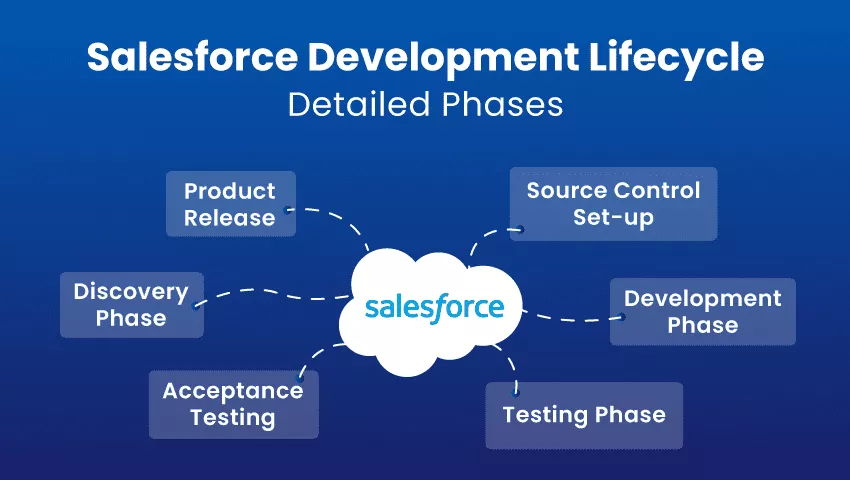
Salesforce Development Lifecycle: Detailed Phases

“With great power comes great responsibility.” We all know this. Or at least anyone who has ever heard of Spider man knows these words.

Salesforce as a tool is kind of the all-powerful one in this context. But anyone who knows Salesforce development also fits the bill.

The Salesforce development lifecycle is multi-layered; not only does it require investment, but rather, a commitment from the entire organization to see the development through. The development team will, of course, commit to their role in it, but it is crucial that the organization, who is the client, does so too.

SFDC development life cycle begins with discovery, understanding why a client requires Salesforce, and their exact needs. There are several complex phases that follow, all culminating in project delivery and staff training. Let’s take a look at all the phases of the Salesforce development lifecycle:

Phases of Salesforce application development lifecycle

Generally, development projects are completed in phases, with every phase having a particular goal to achieve. Salesforce Development Lifecycle goes through 6 such phases.

Let us better understand each phase of the Salesforce Development Lifecycle:

1. Discovery Phase

This is the primary phase of Salesforce development. In this phase, the requirements of the department are assembled, analyzed, and decided upon. Later on, these are shared with development teams. Now, several factors are involved in the discovery phase, like the objectives/goals of projects, critical needs, development intricacies, automation needs, reporting, gaps in the previous implementation, APIs, tools, and development approaches.

2. Source Control Set-up

Source control provides you with a tool to help track changes occurring in files. A release manager would kick off a development project and create repositories and branches. Let’s see what these two components are:

Repository

It is sort of like a vessel for version control. Usually used to store away files, and it can track changes in files in real time. A repository is the master storage of files, from which many branches, which contain new elements in development, come out. You can oversee changes, review the work of other developers, and clear up discord by creating different repositories.

Branches

Branches give the developers an autonomous working environment to work on new features away from other development work. Branches allow for parallel development and provide the developers with control changes when products are released for testing. It is favorable to have a separate Git repository for different projects. You can merge all the data later on with the main application. The responsibility falls to the release manager to assign tasks according to the intellect of the developer.

When you create a version control, you can set up a single source of code, manage conflicts, reduce risks, facilitate deployment risks, clarify reduction, and release at a higher rate.

3. Development Phase

Development operations are executed in sandbox environments. Every developer who works in such an environment has a copy of the main production application and the essential configuration info. Developers use these separate environments to write code, modifications, and testing. They may connect with their sandbox using Force.com and transmit metadata to IDE. After all the required changes are made and tested, they are transferred to the Git repository. If a project requires multiple people working on the same code, check the conflicts before you put the code in the repository.

4. Testing Phase

After the development phase comes the testing phase, teams are gathered to conduct top-to-bottom testing sessions where code is moved from the primary repository to the sandbox. Quality Analysts conduct different testing processes in Salesforce application development projects, like unit testing, performance testing, regression testing, visual testing, integration/API testing, load testing, etc.

Most of all, Salesforce application development partners use agile methodology so that any structural changes can be taken care of at this stage. Although, should serious modifications arise, you have to go back to the drawing board (initial development stage).

5. Acceptance Testing

After the stages mentioned above are completed, we come to the acceptance testing phase. User acceptance tests are conducted and carried out by end-users in combination with the development team. In this phase, a release manager creates sandboxes, which the end user then uses for testing. Once the testing is completed and approved, the product is ready to be released. However, if there are changes suggested at this stage, you can take the entire thing back to the initial development phase.

6. Product Release

After undergoing different testing procedures, the product is tested a final time for performance in a sandbox. Here, all the configurations, functionalities, and app data are tested a last time. Here we have to ensure that the solution passes through the service level agreements before being set up in production.

How will CRMJetty help you with the same?

We have been honing our Salesforce development skills for over 16 years now and have built a strong portfolio of clients who have made it in the industry with us. You can count on our expertise with the software, as well as our understanding of your unique needs.

Contact us today to learn more about everything we offer in terms of Salesforce development and get started on your path to success!

Original Blog: https://www.crmjetty.com/blog/sfdc-development-lifecycle-phases/

Salesforce Implementation Guide: All You Need to Know

Powerful tools are only that if they are used optimally. And almost all powerful tools are, in a way, unwieldy until you master them. But that should not deter you from using them.

When it comes to business insights, and management, that kind of powerful a tool is Salesforce. As they say, it is the number one CRM. For it to become that, it has to be much more layered and complex than it shows. The deeper you dig, the more use you will get out of it.

However, businesses generally don’t have hours to spend learning and configuring a tool by themselves. They need a Salesforce implementation partner who can configure it and conduct thorough training on how to get the most out of it.

Let’s dig deeper into the Salesforce implementation process.

What is Salesforce Implementation? What are the types of Salesforce Implementation?

The process of assessing Salesforce needs for a business and configuring select modules of Salesforce for said business to get them insights is what we call Salesforce implementation.

There are, of course, various ways to do it:

3 Types of Salesforce Implementation

The golden words are Salesforce implementation partner. You need them to do this the right way. They are someone who knows Salesforce in and out, are always updated with it, and have experience in implementing it for companies of various sizes and industries.

Your ideal Salesforce implementation partner is someone who has experience with a company of your size and your industry.

These partners have an entire Salesforce implementation guide and are able to optimize how they go about it in terms of assessing your requirements, setting up and configuring, transitioning, and training. Leave the entire process in their hands, and you will be able to breathe easy as they go about it at their pace.

Here are three types of Salesforce implementation projects:

1. In-house implementation

In-house implementation is not the most desired. Almost anyone who wants to implement it will do it with a third-party implementation partner. Occasionally some small or mid-sized organizations will attempt to do it in-house.

There are fewer pros for it, namely lesser cost and in-house team effort to learn Salesforce.

On the other hand, the cons are plenty. It takes longer, the learning curve is messy and full of hurdles; not to mention, an in-house team will go in with only a problem-centric approach rather than a solution one because they will try to solve the problems they see in their organization. They will not have the foresight to build a solution for further scaling and challenges.

2. Third-party implementation

Third-party implementation partners provide end-to-end services, from consultation to planning, final employee training, and post-implementation maintenance. It is definitely a significant investment, but compared to in-house implementation, it has much lower chances of challenges.

Third-party implementation is more cost-effective and more long terms. The implementation partners are Salesforce experts, so they know exactly the challenges you face now and the ones you may face while scaling.

As opposed to in-house implementation, the pros are significantly more here. You get the third-party implementation partner’s experience, expertise, and vision. Because of this, the entire process is optimized, smooth, and fast. They can also show you benefits you can gain from Salesforce that you didn’t know about.

Perhaps one of the hardest things about on boarding a third-party implementation partner is choosing the right one. Another challenge is that you might be dependent on them for continuous maintenance if your in-house team is not up for it, which can increase the long-term cost.

3. Hybrid implementation approach

A third option is a hybrid approach. For this, your in-house team has to be willing to shoulder their responsibility and learn from the experts. Often the third-party partners carry out the implementation and train the in-house team. Then the in-house team takes over employee training and future maintenance up to a certain level.

The most significant pro of this method is that you organically have in-house experts who can help you maintain your solution.

Need to know more about what it’s like to have a third-party implementation partner? We can be your Salesforce implementation team!

Why Should You Implement Salesforce?

Salesforce helps manage leads, opportunities, contacts, and cases. It helps an organization get insights into customer interactions, track sales patterns, and so on. In simple words, to grow.

Let’s look at the steps for implementing Salesforce successfully.

10 Salesforce Implementation Checklist/Steps

Step #1:

No one knows the challenges an organization faces more than its business stakeholders. It is crucial to know the problem before you go seeking a solution. Connect with the different stakeholders and teams to understand their needs and challenges to understand what kind of solution they require.

Once you gather this information, you will have a better idea of how to go about the implementation. You will know what challenges to solve with Salesforce and be able to set realistic goals.

Step #2:

Document, document, document!

The next step in assessing the requirement is to ask relevant teams to document their current workflow and day-to-day tasks. Once you have that, you will be able to plan how to optimize them.

Step #3:

Timelines are important!

The third step is ensuring no projects overlap, reducing the risk of resource shortage. Planning rollout phrases, testing, and the meeting become easier after you decide on the project timeline. Moreover, you can evaluate your needs/expectations with a high-level budget estimate in mind.

Step #4:

A lot of factors like company size, amount of data to be imported, and customization influence project estimation. To avoid hassles, you can create three layouts of the implementation process: pessimistic, optimistic, and realistic.

Step#5:

If you wish to measure the success of your project, then you need to set up concrete goals. These definitive metrics can help you visualize the completion of goals and adjust strategies accordingly.

Step #6:

Team collaboration must be explicit and regular in order to attain implementation goals. The key to the successful formation and enactment of Salesforce CRM is efficient communication between all parties involved.

Step #7:

You may need to select certain people for the Salesforce implementation process, even with limited resources.

A standard CRM project involves the following stakeholders: senior management, platform users, sales, service, and marketing providers, channel partners, customers, and IT specialists. This does not necessarily mean that you have a massive team; one person is enough to handle major roles.

This primary stakeholder ensures that you are prepared for the implementation project; moreover, they will supervise the process internally and will be the first point of contact. They would be technical support, in charge of the systems you wish to assimilate with or migrate from.

Step #8:

Prepare data for exfil!

You must ensure that the data sets are precise and error-free so that they benefit the new business operations. Additionally, you can set up policies to prevent data duplication.

Step #9:

You need to have a definitive change management plan in place before the implementation’s launch. This plan must continue throughout the project, and after the date, it goes live.

Step #10:

Getting to know how the new look feels is an essential step before moving to it. It helps you regulate expectations with respect to the capabilities of the system.

Want to know more about how implementation can happen? We have all the answers here.

4 Tips for Implementing Salesforce

1. Hire a certified Salesforce admin

When you hire a certified Salesforce admin, it will probably be a full-time job and will carry on after approval. There are nine official roles in Salesforce that are considered the cornerstone of the system, and an admin is one of them. Running the system smoothly, helping to build and implement new elements, and staying on top of the products and functionality are some of their responsibilities.

2. Flexibility

Should you bring in a partner, or when you add to the cache of knowledge, your plan may change while the implementation is taking place. You should be flexible and prepared for the last-minute changes that may crop up; trial and error is the best strategy for alterations in your approach.

It is a good idea to include from every department and at every level so surprises and resistance don’t sneak up on you. Make sure that you listen to them and are ready to adjust your strategy accordingly.

3. Communicate

You must give priority to communication and regularly update everyone in the organization regarding the progress of the implementation. Even if it is too early for many people to be involved, these updates will involve a part of the process. The key advantage of prioritizing communication is that you get regular feedback from the employees and the end-users of the new Salesforce system. This helps you shape an all-inclusive CRM platform for the users and promote better employee engagement.

4. Offer training options and resources

Everyone has different approaches to learning. An important thing you will come across in Salesforce implementation is the more types of training you offer, the better; users can pick the type of training best suited to them and stay on top of updates. These could range from traditional classroom-style courses and official Salesforce training to apps, blogs, e-books, and gamified training. Salesforce is massively popular, which makes it possible for there to be plenty of resources to choose from.

Hired consultants vs. in-house IT team, which one is best?

The cost of using third-party consultants versus in-house IT teams can vary depending on various factors, including:

Third-party consultants: Consultants typically charge higher hourly rates than in-house IT teams. However, they bring expertise and experience from working on multiple projects, which can lead to a more efficient and effective implementation.

In-house IT teams: Hiring an in-house IT team may be more cost-effective in the long run, but it can take time to find and train the right people. Additionally, the cost of salaries, benefits, and training must be considered.

Project scope: The size and complexity of the project will impact the cost of both third-party consultants and in-house IT teams. A large and complex project may require more resources and increase the cost.

Location: The cost of hiring a consultant can vary based on the location of the project. Consultants in larger cities may charge higher rates than those in smaller cities.

Ultimately, the decision of whether to use third-party consultants or in-house IT teams should be based on the specific needs and circumstances of the project. It may be best to use a combination of both, with in-house IT teams taking on routine tasks and third-party consultants handling more complex tasks or providing specialized expertise. Overall, the Salesforce implementation cost may be higher with third-party consultants, but their work will be efficient.

How will CRMJetty help?

CRMJetty has been in the industry for software solutions for over 16 years now and has extensive experience working with various industries. Our Salesforce experts can help you get the most out of the tool at your convenience and help you achieve your business goals. Contact Us

Origial Blog: https://www.crmjetty.com/blog/salesforce-implementation-services-guide/

An All Covering Guide on Dynamics 365 Portal

or exceptional customer experience it is imperative to provide prompt response to your customers.

To achieve that, organizations are providing the option of self-service to their customers.

Statistics reveal that 67% of customers prefer serving themselves than talking with a customer service representative.

Considering this very idea of self-service, we will be discussing how Dynamics 365 portal can help you bring more efficiency to your business operations.

An outline of all the topics this post covers:

What are Dynamics 356 Portals?

I know there’s no point telling you the whole story, but just for the record. Dynamics 365 portals are websites that extend the functionality of your Dynamics 365.

Think of them as a booster dose. It’s only going to be more helpful. Such additional functionality is going to lead to more collaboration, better engagement, and great CX.

You can create a Dynamics 365 portal, and provide it to your customers or business partners or employees for streamlined communication.

As far as the structure and functionality of Dynamics 365 portals is concerned, here are the most crucial elements that a portal should have.

  • A web page that displays all the relevant information that a user can see. To create pages, you can use templates, layouts, and other design components of the Dynamics 365 portal.
  • A portal has entity forms (single-step forms) as well as web forms (multi-step forms) that you can add to web pages.
  • You can also use widgets and pages to also create knowledge articles, frequently asked questions, and such.
  • You can create content snippets. These are a small section of editable content that you can place on any web page or template of the portal.

Original Source: https://www.crmjetty.com/blog/dynamics-365-portal-guide/

How Finance Businesses Can Benefit from a Finance Portal

Note: This post is for any B2B finance brand or a direct customer in the finance industry. This post highlights some of the common challenges that a direct customer might face and how they can be solved using a finance portal.

For many years now, the finance industry has been undergoing a fundamental shift. Digital transformation is changing the way businesses and customers interact with one another.

Everything is shifting online, be it payments or communication. Innovations and trends are emerging in the industry. Businesses are doing their best to keep up with customers’ expectations and deliver seamless experiences.

Understanding your customers’ pain points will help you best cater to their requirements and give your business a competitive edge.

Critical areas, which, if kept unattended, can put off your customers

A. Customer support

You will agree that customer acquisition costs in finance are higher than in other industries. Did you know acquiring a customer can cost five times more than retaining existing customers?

So here, exceptional support to your customers is what helps build trust, foster loyalty, and bring in more business with word-of-mouth.

A common problem

A common area of support where most financial organizations struggle is quick response time. Customers want a solution to their problems in less time. They base their experience on how quickly they get a response.

As per CMO Council, the most important attribute of a good customer experience, according to the customers themselves, is a fast response time.

Given the nature of finance, customer queries tend to be more complex. Because of that, customer support agents have to deal with longer turnaround times and unsatisfied customers.

Solution

B2B finance businesses can leverage a finance portal with built-in support functionalities. With features like knowledge base, live chat, etc., you can provide quick support. For instance, with a knowledge base, customers can access articles to get all the information they need to solve their queries.

Know more about how a finance portal can benefit your finance business. Explore all the features that make a portal successful.

Know more about the finance portal

Original Source: https://www.crmjetty.com/blog/how-finance-businesses-can-benefit-from-finance-portal/

Travel Portal Development: A Round-Trip Journey

If there’s one sector which is resilient, it’s the travel industry. We can be certain that they will be back in full swing. The trick in the current situation is to reposition yourself and think creatively about what you can do to attract, convert, and retain customers. It can be about bringing health and wellness to the forefront with no-touch technologies like the one found at Chengdu Shuangliu Airport in China. They have kiosks that use facial recognition to help travelers check their flight status and find their gate.

Or, you can streamline your marketing and operational processes with travel portal development. It will help you streamline operations, reevaluate customer service, demonstrate empathy, earn customer trust, and improve inventory and products.

All you have to do is reposition yourself, understand customer needs, and develop a customer-centric portal. This article will guide you through the entire process of travel portal development – covering what, why, and how.

  • Introducing the Travel Portal
  • Why Travel Portal over Travel Website or Agents
  • Approach to Travel Portal Development
  • How CRMJetty Can Help You

1. Introducing the Travel Portal

In layman’s terms, a travel portal is an online engine that lets your customers come together and interact for information, bookings, services, and sharing experience. They can book flights, hotels, packages, and other related services, compare prices, seek help, and do a lot more.

Travel portal development is the process of developing that solution for your customers. It includes researching features and technologies, designing prototypes, developing the software, integrating tools, testing the compatibility, and displaying services in users’ preferred way.

Travel agents are adopting this sustainable way. Let us find out why in the below section:

2. Why Travel Portal over Travel Website or Agents

Customer convenience, satisfaction, and retention are the reasons you should go for a travel portal. While your agents can offload some of your customers’ tasks, the options they will be able to provide are limited. Besides, your customers have to visit in-person or call you for their bookings, which they can do anytime with a portal. Plus, they can browse through multiple options and manage their bookings and status themselves anytime with just a few clicks.

Your customers can book through your travel website. However, it is more about the information of your company, packages, and services you offer. A travel portal is customer-centric. It facilitates user experience and demands. The features are built from the customers’ point of view. Take the knowledge base, for example. It provides your customers information about bookings and other information related to it. They can even solve their queries themselves. If I want to know more about the ‘work from home package’, well, I don’t have to contact the customer support. Articles and FAQs related to the topic would be enough.

Original BlogPost: Source

Customer Portal Design: 4 Best Practices to Implement in 2022

Almost every business now knows and uses customer portals to improve their customer service. But that doesn’t guarantee customer satisfaction.

Your portal is the face of your customer service. 50 percent of customers will switch to another brand after one bad experience. So, you must offer a positive experience with an appealing, intuitive, and feature-rich customer portal design.

If you had a physical retail store, you would ensure that customers get the best experience possible. The sections are designed systematically, and the support people are well-versed with all the products in the store.

You would make it possible that they don’t leave without purchasing or with a bad experience. Think about your customer portal the same way. Ensure it serves customers the way it’s supposed to.

Let’s look at the 4 customer portal design best practices that will surely help you in 2022.

1. Build with Purpose

Start by thinking about your customers’ requirements and what service they need – communication, document sharing, profile management, etc. Think about the features your portal should consider in order to help them with self-service. Along with customers, also think about your support team and how the portal will simplify their work. If you can’t, think about the questions that your customers often ask – if it’s about performance, you need to provide them reports on the dashboard. You can provide a knowledge base and ticket management if it’s about ticket generation. For your support team, think about their challenges – repetitive queries – add FAQs and case deflection.

Remember that your portal is effective only when customers and staff use it. If it serves a purpose, both your customers and staff will benefit from it.

Tip: If the purpose is instant solution/help, add features like advanced search and knowledge base to help customers help themselves.

Challenges to tackle during customer portal design

  • Too much data clutter
  • Complicated browsing
  • Customer relationships
  • Optimized portal

2. Focus on UI

First impressions are the most important part of the customer journey. If the store looks appealing, they are likely to stay and browse. Hence, start with the look and feel, i.e., the visuals and graphics, and then proceed towards functional design and how the portal works.

Read More Article: Here

A 2021-2022 Approach to Employee Portal Development

Last year many companies such as Slack, Twitter, Shopify, UpWork, and Facebook embraced the permanent work-from-home culture. Remote work forced by the pandemic has proven that employees can work productively from home as much as they can from the office. But the real challenge was – implementing remote work. Miscommunications, inefficient operational management, misinterpretation, delays in delivery, security concerns, etc. disrupted the entire business flow.

Many tools emerged to handle this. Businesses started using Zoom and Google Meet for meetings, tracking tools to manage employees’ work. The biggest benefit of these tools and remote culture shift was increased accountability. Employees took care of their activities themselves. And now, when the digital transformation has become the holy grail, it’s essential that you provide them with that level of comfort – whether they’re working from home or office.

Let’s figure out how to improve their experience with employee portal development.

1. What is an Employee Portal?

In general, all the companies today are associated with IT solutions. Perhaps you might have come across solutions like ‘employee portal software’, ‘intranet portal’, ‘self-service portal’. You can say that they are pretty much the same. Their message at the core is the same

‘A digital workspace that provides employees with a wealth of information and tools to speed up their work and communicate with others effectively.’

An employee portal serves as a single point-of-access to personalized content, communication services, and operation management. It offers data access, transactions, security, chats, videos, conference calls, and more.

2. What are the Benefits of Employee Portal

Employee portal helps businesses succeed by improving employee experience, productivity, and retaining staff. A 2017 Forbes article shows that happy employees help organizations thrive in all aspects – sales, customer satisfaction, and business expansion.

Read More: https://www.crmjetty.com/blog/2021-2022-approach-employee-portal-development/

Improve Customer Experience with Ecommerce Portal Development

Every time someone talks about customer experience, the first and foremost suggestion that businesses receive is – deliver what customers want. But each customer may have unique requirements. A few may ask for convenience in shopping while others may prefer quality products. There are different ways to enhance your customers’ shopping experience. And yet, the most effective way is to offer self-service. You can achieve that with eCommerce portal development.

This article covers everything about it – definition, features, benefits, tips, and more. So, dig in!

1. What is an Ecommerce Portal

An ecommerce portal, also known as B2B/B2C self-service portal, is an online platform that facilitates buying and selling of products/services with online transactions. It allows businesses to interact with customers and suppliers effectively. eCommerce portal development allows businesses to have one interface shared across the entire business community.

The best examples of eCommerce portals would be Amazon, Flipkart, and other marketplaces that provide customers with a separate space to manage their orders, details, transactions, and more.

Talking about its working, it’s more like an eCommerce website where customers can shop and pay. Businesses can display products, manage orders, customers, suppliers from the backend.

Overall, it streamlines the buying process.

2. Benefits of Ecommerce Portal Development

It helps marketers turn leads into sales. To prove it right, here’s the result of the March 2020 survey. 10 and 11 percent of distributors and manufacturers generated 80-100 percent of their revenue through eCommerce portals.

For more information: https://www.crmjetty.com/blog/improve-customer-experience-ecommerce-portal-development/

Customer Engagement Portal: An Up-to-Date Guide

What’s the difference between an average customer and an engaged customer?

An average customer will buy and leave. An engaged customer will come back and also recommend you to others. So what do you think is worth the effort?

This article is for you if you are into the second option, i.e., customer engagement, and looking for some inspiration to improve customer experience.

Here, we will learn about various strategies and how the customer engagement portal helps you implement those.

What is Customer Engagement and Why is it Important?

Customer engagement is interacting with customers through various channels and supporting them at various stages in their journey. Keeping customers engaged through the buying process helps build customer loyalty and collect valuable information about them.

Customer engagement is more of an emotional connection. It starts with the initial purchase but goes beyond customer support and a seasonal sales campaign. It involves everything customers experience while interacting with your business – speed, convenience, employee friendliness, customer support, etc.

Investing in customer engagement brings in many benefits such as better ROI, happy customers, reduced churn, more sales, and a strong brand presence.

How to Engage Customers

You can use different channels like social media, emails, and push notifications. Offer additional services like shipping and customer support. Here are some ways to engage with your customers effectively:

Create Content Strategy and Share Useful Content

Content has the power to make or break your customer. Hence, create and post content that is valuable to your customers. For that, create a customer-centric marketing strategy. Start by defining a buyer’s persona. Next, use that data to anticipate customers’ needs, interests, behavior, and more. It will help you define the kind of content you should create for customers. It can be video tutorials, webinars, animated videos, how-to guides, blogs, and other educational information.

Create various content formats for multiple channels. Lay down content guidelines, posting frequency, content distribution, and measurement metrics.

Read More : https://www.crmjetty.com/blog/customer-engagement-portal-complete-guide/