Any organization that uses a website should want to have certain user input to know their needs better. The easiest—not to mention consensual—way to do this is via forms. With a form, you can ask for information like contact details, the visit’s purpose, their needs, etc.
Let’s first see how to create this form in the PowerApps portal:
Create a form
Sign in to Power Apps.
On the left navigation pane, expand Data, and then select Tables.
Select a table, such as the Account table, and then select the Forms area.
Select Add form, and then select one of the following
Main form The primary form type for interaction by users with record data. The contents of the new form are filled using the existing main form definition. If multiple main forms exist, the form at the top of the list in the form order for your app is used to fill the new form. Learn more about the main forms.
On completion of changes to the form, select Save to save the form or select Publish to save and make changes visible to app users.
The challenge comes in the form of data collected with this form. While the questions or fields may be simple enough to fill out, not everyone will fill it out as it should be; nor will people always understand the fields, which will, in turn, result in wrong/unhelpful input.
Apart from unhelpful input, there is also the challenge of having this input be actionable. If your form makes the right connections in the backend, then that data can instantly become information. But it requires a lot of steps to get there.
As a user of Dynamics 365, you, of course, know that all the data you get, if the input is proper, will give the information and insight you need. Not to mention, it might very well be instantly actionable as it becomes CRM records.
However, all of this starts with ensuring you build the right form.
Those of us who structure forms often know that making one is no easy task. It requires precession, vision, and a result-oriented approach. So you build a form, but not each field can be user-generated in that. Some parts of it your employees might have to fill in.
Now, of course, if you put this entire form out for your customers to see, they will understand that you’re seeking their input for all fields. Another thing that can happen is that maybe they will abandon your website entirely because the form is too lengthy.
So you need to create a special form for the website, one that is easy to fill out, short, and only demands customer input.
With the PowerApps portal for Dynamics 365, you can do this. Your main form is the one in the CRM. Create an extracted copy of that in the PowerApps portal for the user to fill in the details. Once the form receives input, manually copy all those details in the CRM form, thus creating a richer database.
PowerApps portal can duplicate the entire CRM form and publish that for customer input, or you have to create another form that has only the specific fields that you want users to see.
Alternatively, CRMJetty’s PortalXpand has a drag-and-drop form builder, so you can create a customer-facing form directly from the one configured in the CRM, just for the portal. This bypasses the need to create a separate form and ensures all data is manually entered into the CRM.
Data updates directly in the CRM when any user fills the form. In real-time.
The benefit of this is only one: it cuts down on the time and effort in creating a special form and on the time and effort in maintaining CRM records.
There are many other points of comparison between the PowerApps portal and PortalXpand, a Dynamics 365 Customer Portal.
You can request a demo of the product from right here.
Microsoft Dynamics 365 is widely used because of its robust and effective features. Apart from almost ruling the CRM industry in the enterprise section, they are also ruling the portal industry and with every new release, they raise the standard of their product a little higher. Since every business now has a customer all over the world, it is important to make all communication channels, products, etc. support multiple languages. So, in this article, we are going to show you the steps to enable multi-language support in the default Dynamics portal.
How to enable multi-language support in Dynamics 365 Portal
Let’s start with enabling the support first in a CRM application.
Step 1: Go to Settings → Administration → Languages. Select the language you want to enable and click on “Apply”.
Step 2: Now, enable the language of the portal. Navigate to Portals → Website → Websites.
Step 3: Go to General tab → Supported Languages → click on “+.” Now select the language you want and save the changes.
Have you heard about portals? They have been ruling and evolving for a long time. Businesses opt for it due to its dynamic features like self-service, data security, etc. But the search for the right tool is challenging.
If you, too, are looking for a solution to automate your customer service and enhance the overall experience, then Dynamics 365 portal is for you. In this blog, I have written all the details you need to know about Dynamics 365 portals. Let’s start with the basics:
What is the Dynamics 365 Portal?
Portals are basically websites that provide a tailored experience to your customers, partners, and employees.
Dynamics 365 portal directly syncs all the information from the CRM so that you don’t have to re-enter all the data.
With Dynamics portals, you can enable easy sign-in, self-service, payment gateway, and much more for your customers. You can:
Allow customers to help themselves find solutions to their queries through the self-service sector
Enable smooth communication and collaboration among business partners
It is supporting your customers in all the possible ways on time. For example, when they reach out with a question or problem, answering them instantly.
“Please hold while we transfer you. You are valuable to us.” This is not what they like to hear. No one wants to be put on hold for a long time. Studies show that 15% of customers hang up after waiting for 40 seconds.
It’s essential that you provide them with instant replies, which is challenging as customers prefer different channels for support. They may start their request via phone or call and then move on to other channels. Hence, you should integrate a Dynamics 365 Case management solution that ensures a seamless experience for you and your customers despite the communication channel. It connects everyone in the organization and helps your support team with all the information required to solve a case, including activity history and best actions.
Before we begin with the benefits case management has for your business, let’s examine case management in detail.
What is Dynamics 365 Case Management?
A case management solution lets companies collect all the information related to the cases. It tracks each case (question/request/issue reported by customers and requires resolution) from intake of the incident to remediation process and final resolution.
Dynamics 365 case management solution pulls all the cases in the database, identifies causes, and helps route them to the appropriate agents who can solve the case. It allows agents to categorize and manage cases. Other members such as the support team can analyze KPIs, including response time and resolution time. The service team can maintain a knowledge base to compile common queries.
Case management is important as one single mistake can lead to discrepancies. Long waiting hours, delays in case resolution, miscommunication in case management can escalate the support cost and even impact customer satisfaction, costing you a customer.
Dynamics 365 case management optimizes the business processes with quick access to information.
How Case Management Helps your Business
Case management is a holistic way to manage work and processes that are not repeatable. It enables you to address business challenges and manage unpredictable information-centric processes. Consider these impacts on your business.
Understand Customers Better
When you have all the information related to your clients in one place, you can quickly add case descriptions, view the cases in the list, deadlines, notes along with contact information, communication preferences, etc. All this information helps you focus more on customers and provide a personalized experience. Plus, your support team can collect rich insights about your customers, which can help analyze and offer valuable insights to everyone in the organization.
Automate the Tasks
While dealing with pen and paper, the chances of error are more. Notes can be misplaced, and documentation can be filled incorrectly. Dynamics 365 case management ensures that all the data information is collected appropriately so that everyone knows what steps they need to follow.
It uses automation to remove repetitive tasks from your support team’s tasks and helps them focus on priority tasks. For example, instead of explaining to customers – how to install the product, they can share the user manual or redirect them to how-to guides.
For basic questions, customers can view the FAQs. Instead of asking the support team, they can raise tickets themselves. You can generate forms automatically based on the information and then send them for digital signature.
Expedite Resolutions
One of the advantages of a case management system is that you can resolve the cases from anywhere. A cloud-based system makes all the data available at any time. Besides, it helps assign the cases to the right agent based on skill sets and availability. Customers don’t have to wait to get answers to questions as the team can access and help them even directly from a mobile phone.
This way, businesses can be available round the clock and improve the average handling time.
Other capabilities of Dynamics 365 case management include:
Effective workflow
Reduced costs, risk of errors, and hassles
Easy content search and organization
Fast decision making with personalized dashboard
Instant notifications and updates
Higher real-time insights and visibility
The benefits of case management are limitless.
Now, the question is – how to find a solution that has all the capabilities of case management and is tailored according to your business?
Go for Dynamics 365 Portal!
Yes, a portal that covers all the services that your business needs.
Check out below and learn about the features of the Dynamics 365 portal.
Sometimes, integrating portals can be difficult. We saw a lot of feedback and questions from customers about the process, so we created a step by step guide on How to Install the Default Portal Add-On for Dynamics 365. But in case you’ve decided to opt for a third party portal like our Dynamics 365 WordPress Portal, then this blog is for you.
We are going to discuss how to install and enable Dynamics 365 WordPress portal in your CRM.
A quick overview of the Dynamics 365 WordPress portal:
It is a third party portal solution for your business. It helps you provide quality service to your customers round the clock. It makes your team’s work effortless.
Let’s see steps to install it.
Installation:
To install the ‘Dynamics CRM Customer Portal’ plugin, the following steps have to be followed:
Step 1: Once you have purchased the plugin, you will get a zip file named DynamicsCRM-Customer-Portal-v3.0.zip.
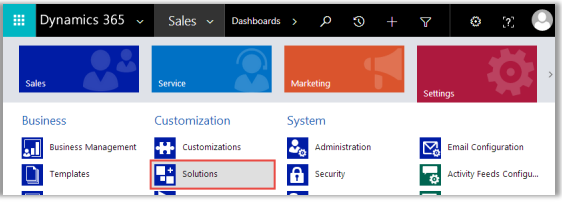
Step 2: Log in to your CRM Account and click on Settings → Solutions
Step 2(a): If you are using a unified interface, click on the Settings icon which is on the right side of the Title bar. Then click on Advanced Settings.
Dynamics 365 has multiple types of portals. Each portal serves its own unique purpose. The one that you need will depend on the use case you have. You can choose the portal that addresses your exact pain points. Here’s a breakdown of the different Dynamics 365 portal examples to help you make the right decision:
Customer Self-Service Portal
Employee Self-Service Portal
Community Portal
Partner Portal
Field Service and Project Service Automation Portal
Major Types of Dynamics 365 Portals
Customer Self-Service Portal
Customer Self-Service Portal helps you guide your customers even when you are not sitting at your desk. A streamlined knowledge base helps them get answers to their queries when they cannot reach the support staff. The basic availability of a webstore being 24/7, support or assistance should also be available 24/7.
Such a self service portal encourages problem solving by providing relevant solutions without the intervention of your staff. This portal includes forums wherein customers can have discussions and there is community building through problem solving. Other interactions like polls, ratings and comments also help the company or organization get essential feedback.
Employee Self-Service Portal
Employee self-service portal can be used as an internal space for employees to share knowledge, manage their tasks, and have certain interactions with the CRM. They can use it to access answers to FAQs, give feedback, and develop a community of their own.
HR for Dynamics which is a self service portal for employees is an efficient platform that simplifies tasks for everyone, especially HR and managers. Employees have the freedom to manage their exchange with the HR department regarding leave applications, activities, travel expenses or other expenses etc, right from within the portal. Apart from that, they can easily change personal information in case of any changes in their contact details or bank details.
For the managers, this gives them the freedom to perform their managerial tasks. They can get their team’s summary front and center, including each members’ leave details, salary, deadlines, certification details etc. This helps them make a more accurate analysis of the team’s performance.
Community Portal
Community portals are primarily like a virtual community, wherein they function like one. A community portal of an organization invites discussions, blogs and articles, and enables polls, ratings and provides a space for comments for feedback.
Such a portal can encourage users to promote the organization as they become unofficial ambassadors and influencers.
Partner Portal
Partner portal extends a hand to your partners to bring them on to your organization in a more meaningful way. They can access various components with this like orders, invoices, payment history, etc., all the things that are relevant to their functions in the organization.
This helps partners get an insight into lead distribution, deal and opportunity tracking, so they use that feedback to improve their operations whenever possible. With account management capability, partners can update any relevant details, have access to their contract details etc.
– Multi-partner collaboration facilitates a number of partners to work together on a single opportunity. This way, all of them can get the sales and experience.
– The platform of partner lifecycle management can be used for recruitment and streamlines your operations of the partner channel.
– The partner portal also maximizes on deal protection and authorization for discounts, and benefits and gives vendors visibility in the customer pipeline. This happens via deal registration.
Field Service and Project Service Automation Portal
Field service portal gives an all-around view of assets, invoices, work orders and agreements. It is available when customers purchase the Field Service, Project Service Automation or an Enterprise plan.
The Project Service Automation portal, on the other hand, gives partners project information like bookable resources, quotes and invoices.
How CRMJetty Can Help?
So, you can see that there are different Dynamics 365 portal examples available to pick from, based on use cases. Picking a portal from the available types of Dynamics 365 portals requires you to analyze your business requirements. And CRMJetty can help you with that.
We provide different types of feature-rich Dynamics 365 portals for different industries like nonprofit, education, insurance, real-estate, finance, etc. In addition to that, we also provide portal development services for different use cases and users like vendors, affiliates, partners, customers, etc.
The process we follow to develop is simple and transparent throughout. First, our developer team gathers all your feature requirements. Next, we check and find out if our base product can cater to your portal requirements with customizations. If not, we develop a complete roadmap for a custom solution for you and keep you posted about the developments. Before final delivery, we test it for limitations and confirm that the portal is exactly like what you wanted.
In the end, we deliver the final custom portal to the customer and provide maintenance and support services as well.
We can help you figure out the portal that meets your requirements and then customize one to match your exact needs.
or exceptional customer experience it is imperative to provide prompt response to your customers.
To achieve that, organizations are providing the option of self-service to their customers.
Statistics reveal that 67% of customers prefer serving themselves than talking with a customer service representative.
Considering this very idea of self-service, we will be discussing how Dynamics 365 portal can help you bring more efficiency to your business operations.
I know there’s no point telling you the whole story, but just for the record. Dynamics 365 portals are websites that extend the functionality of your Dynamics 365.
Think of them as a booster dose. It’s only going to be more helpful. Such additional functionality is going to lead to more collaboration, better engagement, and great CX.
You can create a Dynamics 365 portal, and provide it to your customers or business partners or employees for streamlined communication.
As far as the structure and functionality of Dynamics 365 portals is concerned, here are the most crucial elements that a portal should have.
A web page that displays all the relevant information that a user can see. To create pages, you can use templates, layouts, and other design components of the Dynamics 365 portal.
A portal has entity forms (single-step forms) as well as web forms (multi-step forms) that you can add to web pages.
You can also use widgets and pages to also create knowledge articles, frequently asked questions, and such.
You can create content snippets. These are a small section of editable content that you can place on any web page or template of the portal.
What’s the difference between an average customer and an engaged customer?
An average customer will buy and leave. An engaged customer will come back and also recommend you to others. So what do you think is worth the effort?
This article is for you if you are into the second option, i.e., customer engagement, and looking for some inspiration to improve customer experience.
Here, we will learn about various strategies and how the customer engagement portal helps you implement those.
What is Customer Engagement and Why is it Important?
Customer engagement is interacting with customers through various channels and supporting them at various stages in their journey. Keeping customers engaged through the buying process helps build customer loyalty and collect valuable information about them.
Customer engagement is more of an emotional connection. It starts with the initial purchase but goes beyond customer support and a seasonal sales campaign. It involves everything customers experience while interacting with your business – speed, convenience, employee friendliness, customer support, etc.
Investing in customer engagement brings in many benefits such as better ROI, happy customers, reduced churn, more sales, and a strong brand presence.
How to Engage Customers
You can use different channels like social media, emails, and push notifications. Offer additional services like shipping and customer support. Here are some ways to engage with your customers effectively:
Create Content Strategy and Share Useful Content
Content has the power to make or break your customer. Hence, create and post content that is valuable to your customers. For that, create a customer-centric marketing strategy. Start by defining a buyer’s persona. Next, use that data to anticipate customers’ needs, interests, behavior, and more. It will help you define the kind of content you should create for customers. It can be video tutorials, webinars, animated videos, how-to guides, blogs, and other educational information.
Create various content formats for multiple channels. Lay down content guidelines, posting frequency, content distribution, and measurement metrics.
Every day, thousands of businesses worldwide are boosting productivity, saving costs, and earning better returns by moving from paper-based systems to paperless digital solutions that amplify the daily grind.
Document management systems can easily integrate with your existing solution and improve workflow efficiency. But that’s too ‘90s! Integrating multiple third-party solutions and configuring them to work together creates chaos and might slow down the ERP solution. On top of that, these legacy systems can result in compromised security, compliance risk, unorganized databases, cluttered network drives, etc.
Even amidst all these challenges, managing documents is essential, and going digital is the only solution. Using a customer portal for document management in Dynamics 365 is one of the best options. In this article, I will explain why.
You may think – why not integrate Dynamics 365 rather than a customer portal. I will answer that too in a proper way.
Before that, let’s look at the technical definition of document management, why you need it, and why you should get rid of legacy systems.
What is Document Management?
Document management is a set of practices that defines how businesses manage, store, and track their data. This data can be in various formats like emails, images, documents, etc. However, the principle of document management remains consistent.
A document management system is software that helps businesses manage documents. Here, they can store documents, categorize them, retrieve, share, edit, track, and do a lot more activities. Document management systems help control access and protect sensitive information.
The common components of document management include:
Storage It provides a centralized location for storing documents from where authorized users can easily access them.
Annotations Allows adding notes and comments to the document without a need to edit it.
Version Control Tracks and records the new versions of the documents so that you can view history and restore it if required.
Audit Trails Enables authorized users to view the log of who edited or viewed the documents and when.
Security and Access Control Ensures only limited authorized users can access the documents.
These components play an important role in securing your business’ information. Hence, it’s essential that you choose the right solution for managing documents.
Why You Need a Proper Digital Solution for Document Management
The question you might be having is, “Why should I spend money on a separate tool when I can purchase the cloud storage and store documents there?”
Say you have a law firm, which means you likely handle hundreds and thousands of documents daily.
There’s a murder case that’s similar to the one from 5 years back. To solve this case, you need data from the previous case. You can look for documents on Google Drive. However, it may take up a lot of time if you don’t know the proper names or the location of the documents/folder. Even after having it digitally stored, you can end up losing potential productive hours.
Likewise, if you have a proper document management system, you can create a central repository of your existing content and get rid of the digital clutter. You can easily access the information and focus on your work. Share documents with opposing counsel or clients. Limit access to the documents. Search the documents quickly thanks to indexing and categorizing capabilities.
In simple words, a document management system makes it easier to handle documents, in many ways, automates the workflow. However, you should avoid adopting legacy systems. Here’s why:
Outdated Technology: These old-school solutions are not prepared for change. Using them is like using Excel sheets in the world of Slack and Trello for project management.
Security Concern: Modern solutions are updated continuously to meet the latest threats. However, traditional systems find it difficult to adapt because of their nature and thus leaves room for vulnerabilities.
Compatibility Issues: Legacy systems support documents and file formats up to a point. It means you’re stuck with formats that your partners, customers may not be willing to use.
High Maintenance: These old systems come at a low price, but with time, the expenses increase. The support and updates for outdated technologies are costly as it takes more effort for developers to continue maintenance and updates.
Poor Customer Experience: It’s difficult for you to communicate with your customers who keep moving with the latest technological advancements. Up of that, the 3rd party solution may lack customer-centric features, making it difficult for customers to access, collaborate, or communicate with you.
You shouldn’t go for outdated or third-party integrations. So, what should you do?
Solution: Bring in a customer portal. Well, you can also use the native Dynamics CRM for document storing. But I won’t suggest that to you because it has limitations.
When was the last time you called a customer support agent for a trivial issue with your mobile or laptop? Or when did you call a customer support agent to cancel or track an order you placed on any e-store? I bet it must have been a long time back! Thanks to the revolutionary concept of self-service, there were dramatic changes in traditional customer support. The number of organizations providing the option of self-service is increasing day by day.
Rising to the occasion, Dynamics 365 also launched Dynamics 365 Portal or Power Apps Portals two years ago. Power Apps are external-facing websites that enable access to CRM data for various users outside the organization.
Earlier, a Dynamics 365 portal was separate and came as a licensed add-on to Dynamics 365 apps, or the licenses would include a default portal add-on. After October 1, 2019, a Dynamics 365 portal no longer comes as a separate licensed add-on. Instead, it is licensed based on usage and extends a particular functionality of a Dynamics 365 app.
The caching mechanism of Power App portals is different from that of the add-on-based licensed Dynamics 365 portal. There is also a difference in the provision method between usage-based PowerApp portals and add-on-based Dynamics 365 portal licenses.
In short, PowerApps portals are the next generation of Dynamics 365 portal’s licensed add-ons.
If you are looking for a cost-effective way to integrate one or more capacity-based portals with your Dynamics 365, PortalXpand can help you out. It is a highly customizable and scalable Dynamics 365 portal solution that you can use to manage portals for vendors, partners, customers, and other entities right from a single dashboard.Explore PortalXpand
Types of Dynamics 365 Portals
1. Customer Self-Service Portal
A customer self-service portal, as the name suggests, helps customers serve themselves without any manual support. You can include knowledge articles to help them find answers to their queries. There are also other options like live chat, FAQs, online community forums, how-to guides, videos, user manuals, etc., that you can offer. Besides, you can also enable customers to comment, review, and provide their feedback to help you analyze their satisfaction.
2. Employee self-service Portal
An employee self-service portal can help an organization provide employees with a place to share knowledge, manage tasks, and interact with each other within the CRM. They should be able to use it to view answers to FAQs, submit feedback, and develop their community.
HR for Dynamics is a self-service portal for employees that helps simplify tasks – especially for HR and managers. Using this portal, employees can manage their interaction with the HR department regarding leaves, activities, reimbursements, etc. They can also update their info like bank details or contact details easily from within the portal.
Managers can perform their managerial tasks more efficiently with this portal. They can access the team’s summary, leave details, deadlines of projects, certification details, etc., in real-time. This quick access of information helps in accurate and timely analysis of the team’s performance.
3. Community Portal
A community portal is basically like a virtual community. A community portal of any organization or company invites people to collaborate, discuss, write blogs and articles, poll and review products, etc. This type of portal encourages users to promote the brand as they also feel that they have a say in the brand and are indirect contributors to the brand’s popularity.
4. Partner Portal
A partner portal lends a helping hand to your partners to manage their work better. It provides access to various components like orders, invoices, payment, history, and other organizational entities relevant to them.
Easy access to this information helps partners get insights into leads, deals, opportunities, and more. Accordingly, they figure out a strategy to enhance their operations and eliminate any bottlenecks or issues with proper feedback. Partners can also manage their relevant details like contract or contact details and update them easily. Multiple partners can collaborate on a single opportunity to get good sales and experience with a partner portal.
5. Field Service and Project Service Automation Portal
A field service portal gives a 360-degree view of entities like assets, invoices, work orders, and agreements. When customers purchase the Field Service, Project Service Automation, or an Enterprise plan, it is available. The Project Service Automation portal provides partners with project information like quotes, bookable resources, invoices, etc.
Consider Portal Customization – To Smarten Your Portal
A legacy portal that you used for your organization may need customization to make it relevant. CRMJetty can provide customization for any Dynamics 365 portal type to suit your business requirements.
We typically help our clients customize their portals in one of the following ways:
Technology/Platform Upgrades If you want to upgrade to any technology or platform for your portal, our developer team can get it done for you.
Repair and Maintenance If you use an ancient solution and it gives problems often enough, we offer bug-fixing services to help protect your data from bugs, zero-days, and more.
Technology Migration If you are looking to migrate to new or modern technology, we have got you covered. For instance, you can get help moving your solution with a non-CMS backend to a modern and CMS-backed platform.
Re-development of Your Current Solution If you want changes in your current solution’s architecture to remove development roadblocks, we can provide you with the best possible solution as per your requirements.
Avail of the best customization services now!Contact Us
Integrate PortalXpand – Your Ultimate Solution to Create a Next-Gen Portal
If you want to create a next-gen portal or upgrade your existing portal with the latest features, here are a few functionalities of PortalXpand that can interest you.
Enhanced Security – PortalXpand lets you provide access to different entities in your Dynamics 365 portal to different users based on their roles. You can create different user groups first, define their roles, and then provide them with access to entities based on their roles. It will help you secure your CRM data better.
360-Degree Entity Management – With PortalXpand Dynamics CRM Portal, you can control the entities in both CRM and your portal. It also allows you to use all the default CRM entities and configure additional custom entities to suit your business needs in Dynamics CRM.
Custom Dashboard – You can also customize your dashboard to make it easy-to-navigate with PortalXpand. It lets you set and configure multiple widgets like Recent Activity, Counter Block, etc., for one or more entities you want.
Integrate Knowledge Base – Your Easiest Way to Launch a self-service Portal
One of the key elements you should include in your self-service portal is Knowledge Base. By providing access to a knowledge base in your Dynamics 365 portal, you can stay in constant touch with your customers.
An exhaustive library of documents, white papers, and tools to explain everything about your products and services helps serve your customers more efficiently. It also helps you shift from passive customer service to proactive customer service. Instead of having customers call you every time, you can proactively address most of their concerns and queries with your knowledge base.
Consider SharePoint – A Valuable Add-On for Your Portal
There are different add-ons that you can integrate with your portal to streamline your business operations more. One of the best add-ons you can consider is SharePoint. With our portal solution, you can integrate SharePoint in your Dynamics 365 easily.
With this integration, both you (as the admin) and portal users can manage and store the documents like quotes, proposals, etc., associated with specific records. After installing the SharePoint integration plugin in Dynamics 365, users can create folders, documents, files and delete records.
Build a Dynamics CRM Portal Now – With CRMJetty By Your Side
If you seek to build a Dynamics 365 Portal for your organization, CRMJetty can be your right team for that. We can discuss your business requirements, analyze them, and provide you with a ready-to-integrate portal solution if it’s an exact fit. Our developer team can also gauge the scale of customization our ready-made portal solution would require to fit your business requirements.
Once the developers test the feasibility, they start the required customizations after your consent. We also ensure that you keep getting updates on the progress on a regular basis. Once the final product is ready, our QA team comes into action and tests it for limitations and glitches. Once your product is ready and glitch-free, we hand it over to you. We can also provide you with support for a limited period to help you understand portal features and get familiar with it.
All set to kickstart your portal development journey? Your alpha team is just a click away!Contact Us




 CRMJetty