Affiliate Portal: Benefits, Features, and Tips for 2025

Affiliate marketing has become a cost-effective way for businesses to promote their products and stores. Small and big businesses are benefiting from this revenue based model. It is expected that affiliate marketing spending will cost $8 billion by 2022. It has evolved from online stores and websites to traditional pharmaceuticals.

Affiliate marketing helps businesses build customer trust and gain recognition over new brands. However, running an affiliate program is a big task. You need to recruit affiliates, set up commissions, and make payouts. An affiliate portal can simplify the process. With automation and self-service, it will not only help save time, but also make your program efficient and effective.

This article will explain all about it. Let’s first understand the core challenges of affiliate marketing.

Affiliate Marketing: Purpose and Challenges

Affiliate marketing refers to promoting others’ products and services in return for commission. To run that affiliate program, businesses need to recruit affiliates that will help them in promotion. They then have to set up the commission rates and the payment policies and once affiliates reach the minimum payment level, you need to send them payments.

There are various benefits of affiliate marketing such as wide audience, customer trust, improved SEO, more revenue, etc.

  • Reach Wider AudienceYour affiliates have followers who trust them and look forward to the content they provide. If they have followers from different regions, it benefits you. Your brand will be known to people outside your country. So, even if your product doesn’t get a hype in local markets, with influencer marketing, it can do wonders in the international market.
  • Improve Website SEOIf you know about SEO, you know the importance of backlinks. Backlinks direct users to your websites and help improve your online presence. It affects the ranking metric. Affiliates do it smoothly. They provide organic backlinks to your store, making it easier for you to appear on Google, Bing, and other search engines.
  • Get High Return on InvestmentInitially, you don’t have to invest much in affiliate marketing. A few freebies to your affiliates to try and promote your product and that’s it. If you choose expert affiliates who have better knowledge of industry and a huge following, you’ll make more profits.

Affiliate marketing also saves costs and time while targeting the right audience. It’s a flexible marketing tactic that works in the background and yields results. But as said, implementing it can be complicated. Here are the challenges that brands have to face.

Challenges in Affiliate Marketing

Fraud Challenge

As the affiliates increase, it becomes difficult to track their performance and sales. Sometimes they might have queries and want to reach out for solutions. While managing everything, you may not be able to answer them in a stipulated time frame, leading to conflicts. Since you don’t have a centralized solution, exchange of documents and resources can be challenging. You may have to send separate invoices to each and every affiliate.

Traffic Challenge

Affiliate222

The biggest challenge of affiliate marketing is finding the right affiliates. As your affiliates will not only promote products but also provide valuable information to the customers (their followers). When there are so many affiliate partnership requests across different channels, it becomes difficult to validate them all. Without proper validation, hiring the right person can be challenging. You may end up with affiliates that are not well experienced and have no knowledge about your niche.

Brand Message Connection Challenge

Affiliate333

On some occasions you might have affiliates with huge follower count. But what if they are not able to connect the product to your brand? Maintaining brand image is important as it builds customer trust and loyalty. Most of the time customers associate products with the affiliates. Affiliates with inappropriate behavior and incapable of delivering the right message can cause severe repurressions to the business. Hence, it’s essential that you deliver a proper message and specify the qualities of the affiliates.

Rewards and Commission Challenge

Affiliate444

Marketers are always at a risk of affiliate marketing as the conversion rate is usually between 1 to 5 percent. In that stress, you need to manage all the rewards, discounts, and affiliate commissions, which is time consuming. If you don’t have a proper system to manage payments and rewards, it may cause issues. Delay in payments and commissions can lead your skilled affiliates to leave your affiliate program.

System Challenge

Affiliate555

Another reason why your affiliate marketing strategy fails is that the system you use doesn’t meet your needs. Sometimes you may not even have a proper system in place to manage and maintain security. Illegal ways of earning commissions have risen. There are a lot of fraudsters who may share fake links, plagiarized content to drive traffic to their sites. This may create a negative impression of your brand and affiliate program.

Apart from all these, businesses also have to deal with ROI challenges. But as every problem has a solution, you can tackle affiliate marketing challenges with affiliate portal development. An affiliate portal provides a dynamic solution that helps organizations streamline their engagement with affiliates. Let’s learn more about it in detail.

Reasons to Undergo Affiliate Portal Development

Undergo Affiliate Portal Development

It helps manage affiliates who have a small role in the business but a major role in sales and conversions. Besides, there are no safety concerns with affiliate portals. If you manage your affiliates with CRM or ERP, all the data loads into your business software. For your affiliates to handle their activities and track rewards, you need to explain about your business software and give access to it. This can be a security concern. With a portal, you and your business are safe.

Here are the other benefits you can leverage with affiliate portal development.

Eliminates Fraud

You might have experienced redirecting to malicious accounts. While managing affiliate programs, you and your partners have to keep a track of such links through daily, weekly, and monthly reports. Managing it manually is quite confusing.

Hence, the portal helps track every click. It stores all the data in one place and provides merchants and partners with complete detail of click and redirection. It includes – how many users were redirected, how many reached them, what they purchased, etc.

Eradicates Disputed Payments

Tracking the lead count and paying commission to affiliates sounds easy. But it’s complex and tricky. A single mistake in the calculation can cause disputes between you and your affiliate partners. For example, the leads generated through their coupon code were 10 and your messed up system failed to track one or two leads. You can’t even imagine the chaos it can create.

Take inspiration from eBay on affiliate commission planning. Their affiliate program competes with Amazon, offering commission between 40 to 80 percent.

Well, the portal maintains transparency. It works on automated processes and enables you and your partners to track every click. The data auto syncs with the CRM so that there are no disputes over payments or lead counts. Payment history and lead path also helps keep everyone confusion-free.

Builds Trust

Job frauds are common. You might have heard stories about people getting scammed into paying a specific count for a job at reputed companies. The same is the scenario with affiliate programs. One of the four redirects in the affiliate marketing industry is fake. Affiliates are confused whether the traffic they are redirecting to a specific website/store is genuine or not. Also, if they will get the commissions for their efforts or not. You need to make your affiliates trust you, only then your customers will.

Portal reflects that professional brand image. It stores data, improves efficiency and makes everything visible and traceable in real-time for affiliates to gain their trust. Since, affiliates can manage, track, and view all the data from one specific place, they are likely to trust you. Plus, the system triggers credit activity as soon as the affiliate completes their target, ensuring the affiliates get paid on time with no human intervention.

Removes Barriers to Entries for Small Businesses

Businesses often manage affiliates with CRM or ERP, which is a bad idea because they have to pay thousands of dollars for sign up and licensing. It becomes unbearable when the monthly recurring fee comes up. This is why small businesses don’t opt for affiliate marketing, though it’s a cost effective option to grow their business and reach a wide audience.

They need a solution that can remove this licensing fee barrier and that’s when an affiliate portal comes in. Portal offers one time or monthly recurring licensing fee for the entire solution rather than per user. With no extra cost, you can provide a separate login area to all your affiliates. This removes the entry barrier for small businesses helping them create a collaborative environment in their business.

Purges Inactive Offers or Voucher Codes

The most common problem in managing affiliate programs are the number of broken links or expired voucher codes. Sometimes, you even end up providing the same links to multiple affiliates. This happens because you don’t have a streamlined automated system to manage affiliates and the parent website.

However, you can use the portal to send alerts and notifications to your affiliates informing them about the latest offers and deals. You can notify them to remove the expired links. Affiliate portal can also automatically remove expired links and coupons and disregard the leads associated with it. It auto-generates unique codes and links and assigns it to the affiliates. Moreover, it tracks every activity related to that link and ensures no two affiliates get the same link/code.

Increases ROI with Smart Matches

Affiliates help generate traffic and leads for your business. But to know whether you’re meeting your goals or not, you need to know the affiliates’ performance. A normal system may not provide you with the detailed reports on affiliates performance. As the affiliate portal’s primary purpose is to manage affiliates, it gathers all the data related to them and provides detailed insights about their performance and activities.

The dashboard provides you a complete overview of their performance like the number of leads they have generated, which product got more traffic and where it came from, and so on. This detailed information further helps you create smart matches. For example, a lifestyle blogger was able to redirect more traffic to a specific type of shoes, you can ask them to promote your other shoes. The collected data will also help you generate better recommendations for affiliates and customers, which will improve relationships and drive ROI.

Core Features of Affiliate Management System

The benefits that affiliate portal provides are all thanks to its features. This section looks at some of those features.

Affiliate666
  • Centralized SolutionTo manage affiliates, their onboarding and proposals. Affiliates can send their proposals and you can evaluate those and select the best suited ones for your business promotion. They can manage their profiles, share requests, upload documents, and track their activities from their separate log-in area.
  • Custom Links ManagementAffiliates can manage their links, see their promotional codes, texts, banners in the menu. They can even customize links and map it to create their identity.
  • Reward ManagementCreate tiered based commissions, provide free merchandise and offers to your affiliates on successful target completion. This section helps you retain your affiliates with rewards and offers. Here you can find every detail related to the offers and bonuses you gave.
  • Channel ManagementThis feature improves your collaboration with the affiliates by streamlining all channels. To ease communication, you can further launch news feeds. For example, enable Twitter feeds to keep affiliates informed about the company updates, including offers and updates.
  • Performance TrackingYou and your affiliates can track performance. Get an overview of all the customers that come to your site through an affiliate and make a purchase.
  • InvoicingList orders and revenues your affiliates generate and set up invoices to streamline payment processing. Provide itemized bills with a complete list to give better clarity about where the commissions are coming from and how offers are being associated.

Know More

Tips to Manage Affiliates and Grow Business

Though features will help you increase efficiency, they alone won’t be enough. There are some ways you can use these features to get the best results.

Customize Dashboard View

The first thing your affiliates see when they log into the portal is the dashboard. They rely on it to view information about the commissions earned, leads generated, suppression lists, and compliances. However, not everyone would like to view it in a similar format. So, let them customize the dashboard view. For default view, make sure it consists of referral link, alerts, top offers, bills, news feed, etc.

Provides Affiliates Valuable and Recent Details

An affiliate portal provides a knowledge base where users can access everything but ensure that the content is updated and relevant. Avoid ambiguity, cover step-by-step tutorials, and write in simple language for customers to understand. Make your articles SEO friendly and invest in media elements to improve quality. Don’t forget to edit and proofread.

Keep Security your Priority

Security is crucial for affiliate management as with the growing number of affiliates, the higher will be the required customer links. Hence, ensure that affiliate portal provides better security by auto-generating a custom link for new affiliates. It should limit access to portal users based on their roles and rights. Use two-factor authentication for an extra layer of security.

Make your Portal Multi-Everything

Setting multiple languages and currencies help you expand in new markets and reach a wide audience. You can choose to set the currency and language of the portal depending on your location or region. Or you can provide a feature that auto sets the portal’s language and currency based on the location. This will let you partner with affiliates in different regions and promote your business.

Equip Detailed Insights

Equip your portal with detailed insights to improve performance, optimize campaigns, and boost productivity. Add all the specific reports such as daily summary, campaign summary, affiliate summary, conversion report, click report, etc. Track event performance and provide additional details such as price format, payout, rule targeting, etc. with offer contracts. Most importantly, enable the timezone filter. Allow affiliates to view accurate reporting in their timezone.

Go for Custom Affiliate Portal Development

Every business has unique needs and specific problems. A custom developed solution meets your business requirements. It lets you add the features and plugins that are essential for your business. Most importantly, custom affiliate portal development helps you get access to technical support and maintenance.

How We Can Add Value

CRMJetty can be your best development partner. We can help you develop a custom affiliate portal with features such as online registrations, invoice management, performance management, knowledge base, enhanced security, and more.

We also provide custom update services such as repair, bug-fixing, migration for your existing portal.

Original Blogs: https://www.crmjetty.com/blog/affiliate-portal-benefits-features-tips-2025/

Portal Solution for Non Profit

Nonprofits have big goals but often limited resources to manage their day-to-day tasks. For many, communication and document management can be tricky, especially as they grow. Keeping board members informed, keeping volunteers engaged, and making resources easy to access can make all the difference in achieving their mission effectively.

Imagine a nonprofit focused on supporting underprivileged youth through education and mentorship. This organization, like so many others, found that as it grew, its everyday processes started to fall behind. Emails piled up, documents were scattered across platforms, and volunteer engagement began to slip. They needed a better way to keep everyone connected and organized. Their answer? A portal solution tailored to their needs.

Where Portals Can Help

Portals offer nonprofits a centralized way to bring everything together: communication, resources, and volunteer engagement. Here are the specific challenges this organization faced, and how a portal helped solve them.

Clearer Communication

When important updates were shared through emails, there was always the risk that someone would miss them.

A portal provides a space where board members, staff, and volunteers can see real-time updates and messages all in one place. This nonprofit quickly saw the benefits of having a single platform for communication.

Organized Document Management

For many organizations, finding the right documents quickly is a constant struggle. A study by McKinsey shows that the average employee spends around 1.8 hours a day just looking for information.

A portal can store all essential documents in one secure place, accessible to everyone who needs them, helping nonprofits avoid wasted time and reduce frustration.

Better Engagement with Volunteers

Volunteers are the heart of many nonprofits. But without a good way to communicate and share resources, engagement can suffer.

A portal gave this organization’s volunteers a place to connect, share updates, and plan events together, keeping them engaged and motivated.

Choosing the Right Portal Solution for NonProfits

For nonprofits, selecting the right software solution is essential, especially when working with limited resources. With so many portal options, it’s important to choose one that fits specific needs without overwhelming the organization.

In this case, the nonprofit knew they needed a portal with three main features:

1. Centralized Donor and Volunteer Management

With growth, it became challenging to keep track of all donors and volunteers across various campaigns. The nonprofit needed a solution that could organize and update information in one central system.

This feature enabled them to efficiently manage donor contributions, volunteer schedules, and contact information, helping them stay prepared and responsive to supporter needs as they expanded their efforts.

2. Customizable Campaign Management Tools

Running multiple campaigns required a streamlined approach to organizing events, automating communication, and tracking donations. The nonprofit sought tools that could handle these needs in a single platform.

The ability to track real-time insights into donations and volunteer engagement helped them adapt their strategies effectively and keep supporters informed, ensuring each campaign met its goals smoothly.

3. User-Friendly DIY CMS

Flexibility in updating portal pages was essential, as they wanted to frequently refresh content to keep supporters engaged.

With a DIY Content Management System (CMS), the nonprofit could design and modify pages using drag-and-drop tools, adding widgets, images, and features as needed.

This ease of customization allowed them to create a dynamic and inviting portal aligned with their mission, accessible to both tech-savvy and less tech-savvy users.

After reviewing several options, they decided on the CRMJetty Microsoft 365 nonprofit portal. Our solution met all their requirements and provided additional benefits, such as tailored features for document management and communication. It allowed them to seamlessly integrate with their existing Microsoft tools, making the transition smooth and effective.

Implementation and Initial Challenges

Introducing any new software can come with a learning curve, and this portal was no exception. Here’s how they approached the implementation process and handled some early challenges:

Staff Training

To ensure everyone could use the portal confidently, the nonprofit organized a series of training sessions. They started with hands-on tutorials for board members and staff, followed by walkthroughs tailored to volunteers. This approach made sure no one felt left behind.

Overcoming Resistance to Change

Like many organizations, this nonprofit faced a bit of resistance from people used to their existing systems. To help ease the transition, the team highlighted the portal’s benefits, showing how it could save time and simplify daily tasks. Over time, staff and volunteers grew more comfortable with the new platform.

Troubleshooting and Adjustments

As they began using the portal, the team identified a few areas where small adjustments were needed. By actively listening to staff and volunteers, they quickly made changes that improved the user experience. This helped build confidence and made the portal an increasingly valuable tool.

Transformative Outcomes

Once the portal was up and running, the nonprofit quickly started seeing the positive effects on their operations. The new system brought noticeable improvements, making it easier for them to focus on their mission and reach their goals. Here are some of the biggest benefits they experienced:

Streamlined Communication

With a centralized communication hub, updates, and announcements were now accessible to everyone in real-time.

Board members and staff no longer had to sift through emails to find important information. This improved communication led to faster decision-making and better teamwork.

For nonprofits, quick and clear communication can make a significant impact on projects, allowing them to stay on track and deliver results.

Efficient Document Management

The portal’s document storage feature was a game-changer. All essential files were stored in one place, categorized and searchable. This saved time and cut down on the confusion that came from searching across multiple platforms.

Increased Volunteer Engagement

Volunteers felt more connected to the organization’s mission. The portal provided a space where they could share updates, access resources, and plan activities together.

This improved engagement directly boosted program participation and volunteer satisfaction. Engaged volunteers often stay longer and contribute more, which is invaluable for nonprofits that rely on consistent support.

Improved Board Involvement

The portal gave board members a clear view of ongoing projects, upcoming events, and important documents. This transparency empowered them to participate more actively in the organization’s planning and decision-making. With nonprofit board portal software, the board had secure access to all essential information, helping to increase their involvement and guidance.

An engaged board can be a strong support system, helping guide the nonprofit in its long-term goals. Overall, the portal created a more organized, connected, and motivated team. The nonprofit found that with the right tools, they could better serve their community and make a greater impact.

Conclusion

For nonprofits, every resource counts, and the right technology can make a world of difference. As this example shows, a portal solution can be transformative, helping organizations overcome common challenges in communication, document management, and volunteer engagement. By bringing everything into one central platform, nonprofits can focus more on their mission and less on logistical issues.

A well-chosen portal solution, like the CRMJetty Dynamics Portal for Nonprofits, isn’t just a tool; it becomes the backbone of efficient operations. It empowers teams, strengthens connections with volunteers, and helps keep board members actively involved. For nonprofits of any size, the journey toward a more organized and impactful way of working often starts with investing in the right platform.

If you’re a nonprofit looking to improve your operations, explore how the CRMJetty Dynamics Portal can help you achieve lasting change.

Original Link: https://www.crmjetty.com/blog/nonprofit-portal-solution-dynamics365/

Salesforce Vendor Portal: Revolutionizing B2B Partner Management in 2024

B2B organizations typically rely on vendors and channel partners to keep their operations running smoothly and expanding their outreach. That is why the management of partners and vendors is important, as issues in their management can impact a business.

There are different ways you can ensure that you are managing your vendors, partners, and customers efficiently. One of the ways is using a portal to manage them all. A portal brings all your vendors/suppliers, partners, channels, etc., together in one place.

Salesforce also provides its own social media platform that helps B2B organizations manage vendors, partners, customers, and more. If you are also thinking about managing your vendors/suppliers and partners efficiently, here’s the post for you.

In this post, you’ll first learn about Salesforce’s Community Cloud and then Salesforce Vendor Portal. So, let’s begin.

What is Salesforce Community Cloud?

Salesforce Community Cloud is an online social platform by Salesforce. It enables organizations to connect customers, vendors, partners, and employees with each other. It also lets them share the data and records they need to complete the work. Users can also visit the community to find answers to questions and ask for help from another member.

Key Features of Salesforce Community Cloud:

Collaborative Environment: Encourage teamwork across organizational boundaries

Knowledge Sharing: Central repository for information and best practices

Self-Service Portal: Reduce support workload by enabling users to find answers independently

Customizable Interface: Tailor the platform to match your brand and specific needs

In short, Community Cloud enables you to streamline your critical business processes and expand them internally in your organization and externally to customers, partners, vendors, and more.

Salesforce Vendor Portal

A Salesforce vendor portal helps you accelerate your sales channels by letting you connect with resellers, distributors, vendors, and partners directly.

Here are its features that help you manage your resellers, redistributors, brokers, or vendors seamlessly.

Data Sharing

Salesforce Vendor Portal helps you connect your vendors to product experts and share the relevant CRM information to the vendors in a secure way. They can track sales assets, product information, and even training and certification courses. This helps your internal and external sales teams collaborate in real-time on sales records, monitor customers’ journey, track revenue, and reduce friction.

Dashboard and Reports

Salesforce Vendor Portal helps you track and rank your vendors and partners. You can share custom dashboards and reports with your vendors and partners. You can also ensure that your vendors/partners are aligning their efforts with your goals and objectives.

Easy Tracking of Vendors’ Progress

The Salesforce Vendor Portal helps you share contacts, leads and records with your partners and vendors. You can also centralize pricing, inventory, and more to make vendor management easier. You can also track different vendors’ progress centrally and build strategies to increase sales if required.

Case Study: Global Electronics Manufacturer Transforms Partner Management

A leading global manufacturer of consumer electronics, specializing in smart home devices and wearables, implemented a comprehensive Salesforce Partner Portal to enhance its supply chain management and partner engagement. The solution streamlined order and product management, provided real-time visibility, and centralized document repository with tiered access to features and functionalities.

Key Results:

– 30% reduction in manual effort and errors in order and product management

– 20% increase in Tier-1 partner engagement through a gamified credit point system

– 50% decrease in partner onboarding time with efficient CRM-integrated processes

– 25% estimated savings on future expansion costs due to scalable portal architecture

CRMJetty’s Vendor Portal Solution – Your One-Stop Solution to Vendors’ Needs

There are different third-party Salesforce vendor portal solutions that you can also use to integrate into your organization. They give you the flexibility to give access to relevant CRM information to multiple vendors at a much nominal price.

If you are looking for such a vendor portal solution, CRMJetty is there to help you. Our vendor portal is a next-gen ready-to-integrate portal for those looking for smooth vendor management.

It has various features that can give you the best flexibility and resources to make your vendor management better and productive.

  • Easy Online RegistrationsWith our Salesforce Vendor Portal solution, you can enable your vendors and suppliers to register themselves online easily to become a part of your network.
  • Proposal InvitesOur vendor portal also lets the interested vendors and suppliers submit their proposals and requests online to collaborate with you. You can ensure your vendors’ and suppliers’ confidentiality and give your team more time to focus on more important tasks other than registrations.
  • Comparison of Vendors and SuppliersThere is no need to manually record the performance of vendors and evaluate them on that basis every time while renewing the contracts. You can simply assess the proposals and performance based on the previous history in the portal and take decisions accordingly. You can also rank different proposals and requests based on various criteria, including compliance scores, available inventory, delivery time, etc.
  • Invoicing & PaymentsOur vendor portal offers the option to generate purchase orders and invoices and download them directly from within the portal. This helps you save the hassle of manually sending invoices to different vendors or sending them online via email or messages. Further, it reduces the work of vendors as they can simply place the purchase orders online, view and edit them, and view their history. They no longer need to call, email, or text you to place an order. They can log in to the portal and create and place orders in real-time without any fuss.
  • Secure CRM AccessIf required, you can allow your suppliers and vendors to access specific modules securely. You can give them access to only the information they need from your CRM via individual log-in. This helps you optimize operations by sharing the relevant data with the right people and keeps your security intact.

Final Words

Choosing the right vendor portal solution is a critical decision for B2B organizations looking to streamline their partner management processes. While Salesforce Community Cloud offers a robust solution within its ecosystem, third-party options like CRMJetty provide flexibility and potential cost savings.

CRMJetty offers you a launch-ready vendor portal solution for your organization. You can also request customization of features to fit your business logic. In case you want, we can also build a vendor portal from scratch for your business.

Ready to revolutionize your vendor management? Request a free demo of CRMJetty’s vendor portal and speak with our vendor management expert.

Don’t let inefficient vendor management hold your business back. Explore how a tailored vendor portal solution can drive your B2B success today!

Original Blog: https://www.crmjetty.com/blog/partner-management-salesforce-vendor-portal/

How to Clear the Cache in the Power Apps Portal

When you optimize Power Apps portal, you may need to edit pages, assign roles to users, and make some other required changes. It is necessary to see all the changes you make instantly on the portal. To do that, you should clear the cache on a timely basis.

When you clear the cache, it helps make sure that all the latest updates to the portal metadata and DATAVERSE info are visible on the Power Apps portal.

The Power Apps portal uses caching to enhance the potal’s overall performance. This implies that the portal doesn’t send a direct request back to the Dataverse for individual data updates. This is because if it sent this request, the performance of the Dynamics 365 portal would be very slow. However, there is a disadvantage.

If you use an internal app (like Dynamics 365 or custom model-driven) or update via flow or other integrations to make updates in Dataverse, these changes may not be visible on the Dynamics 365 portal.

How to Clear the Cache in the Power Apps Portal

Know MoreEXPLORE CUSTOMER PORTAL

If you are the admin and are troubleshooting Power Apps cache issues, here are the steps for it.

Steps to Clear Cache while Working with Power Apps Portals

As a portal admin, you can clear the cache on the server-side for the entire portal to reflect changes in the Dynamics 365 portal in real-time.

Step 1. Sign in to the Dynamics 365 portal as an administrator.

Dynamics 365 portal as an administrator

[Portal User With Administrator role inD365]

Log in portal by Admin user

[Log in the portal by Admin user]

Step 2. Navigate to the URL as follows: /_services/about.

URL as follows

Step 3. After this, the portal details page will be open. Click on the Clear Cache button to clear the cache.

Note: There is one thing that you need to consider here. Clearing the portal’s server-side cache or configuration tables’ cache may cause temporary degradation of the performance while data is being loaded from Dataverse.

Conclusion

By clearing cache, you can get to reflect changes on the Dynamics 365 portal in no time. This helps you speed up the processes and increase efficiency.

All product and company names are trademarks™, registered® or copyright© trademarks of their respective holders. Use of them does not imply any affiliation with or endorsement by them.

Original Link: https://www.crmjetty.com/blog/clear-cache-power-apps-portal/

How To Create Custom Entities in Dynamics CRM?

Custom entities are data definitions that do not have a select statement on the data source, but we define return fields and their types. In the case of custom entities, their data model is invoked manually at runtime.

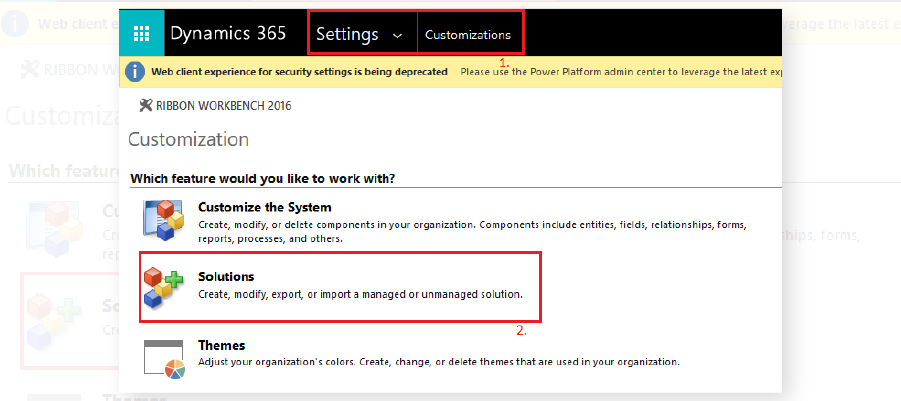
Step 1: Go to Settings > Customizations.

Create Custom Entities-1

Step 2: Now click on Solutions to customize the system.

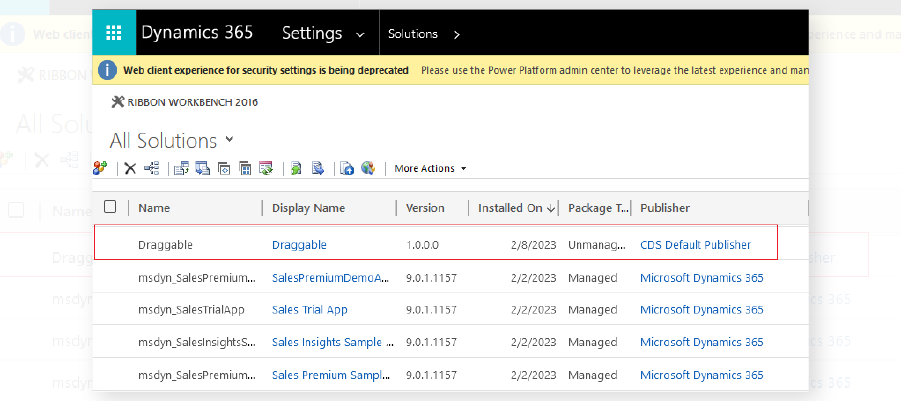
Step 3: Select the solution in which you want to create an Entity.

Create Custom Entities-2

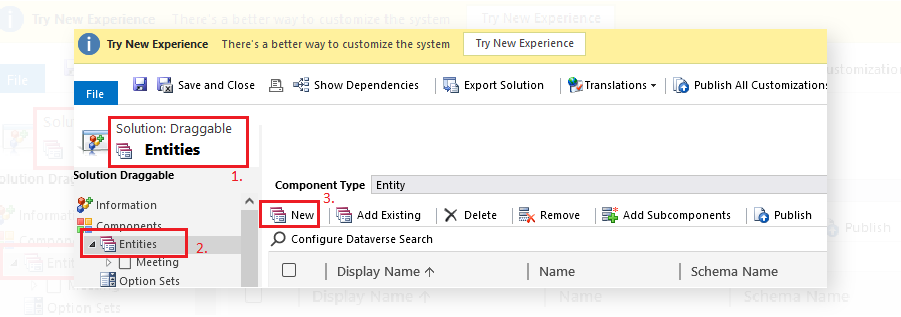
Step 4: Enter the Display Name and Plural Name that will be used for this entity throughout Microsoft Dynamics 365.

Create Custom Entities-3

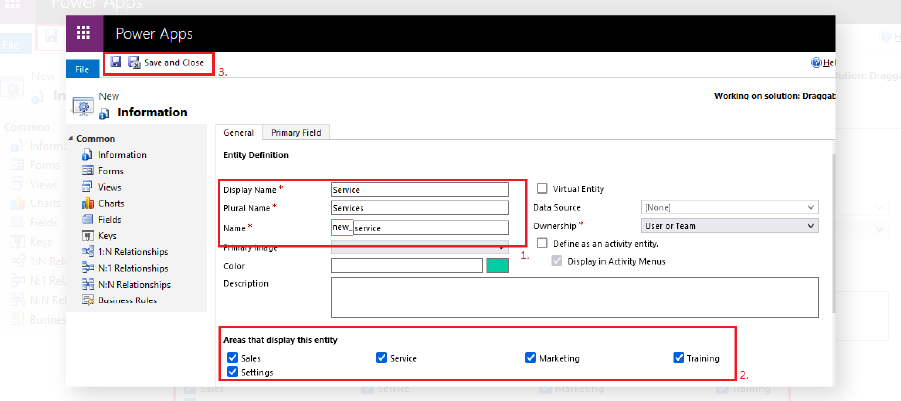
In the name box, change the default name. Once you save that, it cannot be edited again.

Create Custom Entities-4

Step 5: Finally, click on the Save button.

Create Custom Entities-5

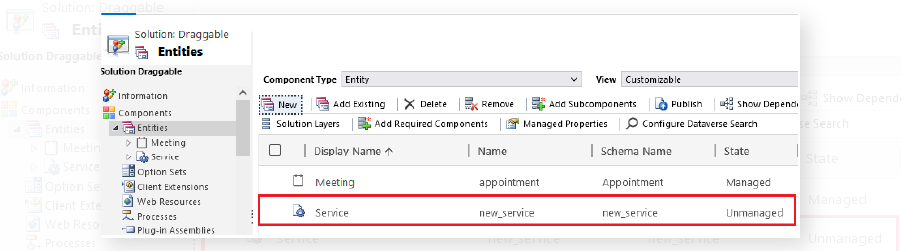
We have successfully created a custom entity called “Service”.

Original Blog Link:https://www.crmjetty.com/blog/create-custom-entities-dynamics/

Salesforce Development Lifecycle: Detailed Phases

“With great power comes great responsibility.” We all know this. Or at least anyone who has ever heard of Spiderman knows these words.

Salesforce as a tool is kind of the all-powerful one in this context. But anyone who knows Salesforce development also fits the bill.

The Salesforce development lifecycle is multi-layered; not only does it require investment, but also a commitment from the entire organization to see the development through. The development team will commit to their role in it, but it is crucial that the organization, who is the client, does so too.

SFDC development lifecycle begins with discovery, understanding why a client requires Salesforce and their exact needs. Several complex phases follow, all culminating in project delivery and staff training. Let’s take a look at all the phases of the Salesforce development lifecycle:

Phases of Salesforce application development lifecycle

Generally, development projects are completed in phases, with every phase having a particular goal to achieve. The Salesforce Development Lifecycle goes through 6 such phases.

Let us better understand each phase of the Salesforce Development Lifecycle:

1. Discovery Phase

This is the primary phase of Salesforce development. In this phase, the requirements of the department are assembled, analyzed, and decided upon. Later on, these are shared with development teams. Several factors are involved in the discovery phase, like the objectives/goals of projects, critical needs, development intricacies, automation needs, reporting, gaps in the previous implementation, APIs, tools, and development approaches.

Source Control Set-up

Source control provides you with a tool to help track changes occurring in files. A release manager would kick off a development project and create repositories and branches. Let’s see what these two components are:

  • RepositoryIt is sort of like a vessel for version control. Usually used to store away files, it can track changes in files in real time. A repository is the master storage of files, from which many branches, which contain new elements in development, come out. You can oversee changes, review the work of other developers, and clear up discord by creating different repositories.
  • BranchesBranches give the developers an autonomous working environment to work on new features away from other development work. Branches allow for parallel development and provide the developers with control changes when products are released for testing. It is favorable to have a separate Git repository for different projects. You can merge all the data later on with the main application. The responsibility falls to the release manager to assign tasks according to the intellect of the developer.

When you create a version control, you can set up a single source of code, manage conflicts, reduce risks, facilitate deployment risks, clarify reduction, and release at a higher rate.

3. Development Phase

Development operations are executed in sandbox environments. Every developer who works in such an environment has a copy of the main production application and the essential configuration info. Developers use these separate environments to write code, modifications, and testing. They may connect with their sandbox using Force.com and transmit metadata to IDE. After all the required changes are made and tested, they are transferred to the Git repository. If a project requires multiple people working on the same code, check the conflicts before you put the code in the repository.

4. Testing Phase

After the development phase comes the testing phase, teams are gathered to conduct top-to-bottom testing sessions where code is moved from the primary repository to the sandbox. Quality Analysts conduct different testing processes in Salesforce application development projects, like unit testing, performance testing, regression testing, visual testing, integration/API testing, load testing, etc.

Most of all, Salesforce application development partners use agile methodology so that any structural changes can be taken care of at this stage. However, should serious modifications arise, you have to go back to the drawing board (initial development stage).

5. Acceptance Testing

After the stages mentioned above are completed, we come to the acceptance testing phase. User acceptance tests are conducted and carried out by end-users in combination with the development team. In this phase, a release manager creates sandboxes, which the end user then uses for testing. Once the testing is completed and approved, the product is ready to be released. However, if there are changes suggested at this stage, you can take the entire thing back to the initial development phase.

6. Product Release

After undergoing different testing procedures, the product is tested a final time for performance in a sandbox. Here, all the configurations, functionalities, and app data are tested a last time. Here we have to ensure that the solution passes through the service level agreements before being set up in production.

How will CRMJetty help you with the same?

We have been honing our Salesforce development skills for over 8 years now and have built a strong portfolio of clients who have made it in the industry with us. You can count on our expertise with the software, as well as our understanding of your unique needs.

You can hire Salesforce developers from us who have over 5 years of experience working for clients from various industries.

Contact us today to learn more about everything we offer in terms of Salesforce development and get started on your path to success!

Original Blog

How Salesforce Portal Can Benefit in Education

In the rapidly evolving educational landscape, institutions are continually seeking innovative solutions to enhance operational efficiency and student engagement. The Salesforce Customer Portal emerges as a transformative tool in this regard, offering a plethora of features tailored to educational needs. This blog post explores how the Salesforce portal can revolutionize various aspects of educational operations, from student enrollment to academic tracking, and how CRMJetty leverages this technology to further enhance these capabilities.

Overview of Salesforce portal in Education

Salesforce portal offers a unified platform for educational institutions to manage interactions with students, faculty, and staff seamlessly. These portals serve as a bridge between the institution’s database and its stakeholders, providing a centralized, user-friendly interface for communication and information sharing.

Streamlining Education Operations with the Salesforce portal

  • Student Enrollment and Admission Processes: Salesforce portal simplifies enrollment and admission, offering online forms, document uploads, and real-time application tracking. This leads to a smoother, more efficient enrollment experience for both students and administrative staff.
  • Personalized Student Profiles: Each student can have a personalized portal profile, which includes their academic records, course enrollments, and extracurricular activities. This personalized approach ensures students have easy access to relevant information and resources.
  • Academic Tracking: The portal allows for effective tracking of student progress, course completions, and academic performance. It enables educators to monitor individual student progress and provide targeted support when necessary.

Enhancing Collaboration

Salesforce portal foster a collaborative environment for students, teachers, and parents:

  • Faculty-Student Interaction: Teachers can use the portal to communicate with students, share educational resources, and provide feedback on assignments and exams.
  • Parental Engagement: Parents have access to their child’s academic progress and school announcements, facilitating greater involvement in their child’s education.

Data-Driven Insights for Educational Growth

  • Analytics and Reporting: Salesforce portal provide robust analytics and reporting tools that help institutions gain insights into student performance, enrollment trends, and operational efficiency.
  • Customized Reporting: Institutions can generate customized reports to analyze various aspects of educational operations and student outcomes, aiding in strategic decision-making.

Security and Compliance Measures

  • Data Security: Salesforce portal prioritize data security with robust encryption and authentication mechanisms to protect sensitive student and institutional data.
  • Compliance with Educational Standards: The portals ensure compliance with educational standards and regulations, such as FERPA, safeguarding student privacy and institutional integrity.

Overview of CRMJetty Salesforce Portal and Its Features

CRMJetty enhances the capabilities of portal with its specialized features:

  • Customizable Interface: CRMJetty offers a highly customizable interface that can be tailored to meet the specific needs of educational institutions.
  • Extended Integration: The portal seamlessly integrates with existing systems within the educational ecosystem, ensuring data consistency and operational efficiency.
  • Enhanced Student Services: Features such as online appointment scheduling and resource booking further enhance the student experience. These can very easily be used for staff registration, student counseling, and so on.

Conclusion

The CRMJetty Salesforce Customer Portal stands as a vital tool for educational institutions. It streamlines operations, fosters collaboration, offers data-driven insights and ensures security and compliance, collectively driving educational growth and student success.

Original Blog: https://www.crmjetty.com/blog/how-salesforce-portal-can-benefit-in-education/

Top Elements for an Effective Customer Support Portal

A customer self-service portal, as the name suggests, is a website or an application that allows customers to help themselves. Businesses leverage customer portals to help their customers find answers to their common queries and questions easily on their own. Customers may also place orders, raise complaint tickets, track their progress, etc. without any need for human support.

It is a win-win situation for both your organization and your customers. Because for you, it takes away the hassle of handling redundant queries and complaints. For customers, it helps solve most of their problems themselves which saves their time and engages them.

Elements and Features to Consider When Building a Customer Portal

When you build a customer portal, there are a few elements and features you can not miss!.

1. Online Community

When you build your own customer portal, having an online community for your customers is important. This way, you allow them to discuss your products, their features, and share their experiences via forums. User-generated content can be a great way to boost your credibility via good reviews and recommendations.

One thing you need to make sure is to moderate the content after regular intervals. Check it for any spams and violation of language guidelines, respond to your customers’ frequent queries, questions, or complaints.

2. Ticket Generation

Your portal should provide your customers with the ability to generate support tickets. When you build a customer portal, it should allow customers to generate a new support ticket, track an existing ticket’s progress, and post relevant comments on a ticket if required.

3. Product Documentation

Online product documentation (primarily user manuals) is a feature you can’t miss out on when you build a customer portal. This is because no customer likes to wade through the long paper manuals that come with products.

As the complexity of a product increases, you can also provide other forms of media like videos on common issues, top-used features, feature-wise use cases, etc. to supplement it.

Well-maintained online product documentation reduces not only your customers’ but also your work.

4. Online Training

The concept of online training has lately been highly popular. Make sure that you provide online training to customers when you build a customer portal. The ways to provide the online training can vary but online training is a must.

You can develop an entire e-learning environment or create small tutorials and how-to videos about implementation steps, troubleshooting issues, etc. However, keep your language and training material generic and easily consumable.

Remember – your purpose is to simplify your customers’ work, not make it complex. So, stay away from excessive technical jargon and technical language while preparing your training material.

5. Search Box

A search box is a crucial feature to include when you build a customer portal. It helps save a customer’s time and redirects them to what they are looking for. One thing to note here is that the customer’s search should return the exact match of their search.

It can be a community post, product manual, a release note, or anything depending on what the customer types. This implies that a search operation shouldn’t always redirect a customer to a knowledge base but to the best relevant match.

6. FAQs

When you build a customer portal, an exhaustive list of frequently asked questions is a must. FAQs let customers click on the link to a particular issue they are facing out of the list available and get the solution.

Keep revising your FAQs timely to keep them updated and relevant. Filter out the questions pertaining to products that are no longer in use or very old versions of a product. You can also find out details like most common search strings and top-used articles to create useful FAQs.

7. Decision Tree

A decision tree is basically a series of indexes to help customers narrow down content options and get what they need fast. For example, you can keep product names in the top tier. The second tier could comprise options like implementation, configuration, etc. for each product. The third tier could consist of more options specific to each product.

8. Chat Bots

AI-based chatbots are getting popular with each passing day. Virtually every site and service portal provides a chat bot option to help customers connect in real-time today. Chatbots have natural language processing capabilities which help them learn with more interactions with customers and enhance their quality of replies.

Looking to build a customer portal with the best features to suit your business logic? With CRMJetty by your side, you can stay assured of getting the best-fit portal for you

How to Build a Customer Portal

1. Review Your Resources

Check and review your resources to be sure that you have the right infrastructure, technology, and team to proceed with. You can calculate working hours you would need to set up your portal properly and bridge the gap between working hours you need and those that your resources can provide. Also look for the framework and technology you will need to start your portal development.

2. Offer What Your Customers Need

When you build a customer portal, engage and interact with your customers to find out what they expect. Doing this will help build a portal that serves the actual purpose and doesn’t turn out to be “a white elephant”.

3. Review Your Processes

Going over the board and including non-valuable or irrelevant content or functionalities can backfire. It can cause customers to drift away and cause wastage of money, time, and effort. Hence, always review the processes and functionalities to keep them in line with the customers’ real demands when you build a customer portal.

You can engage with your target customers at various stages of development to get insights into their preferences and expectations. This will help you build a customer portal that customers will find valuable.

4. Gather and Analyze Pre-Launch Feedback from “Quality” Customers

Every organization has a loyal and quality base of customers. Make use of it for your portal development. Before you publicly roll out your portal, involve some best champion customers and request their feedback and reviews.

Analyze the feedback to improve your product to meet customers’ needs better. It won’t only make your portal more purpose-oriented but also bridge the gap between your offering and customers’ demands.

5. Make It Public

Once you build a portal, it’s time to release it. You can do it in phases or completely by providing the functionalities all at once. Also, prepare yourself and your team to preempt queries and issues that may present during the launch.

6. Market Your Portal

You build a customer portal for your customers. If you don’t inform them that you now have your own customer portal, how would they use it? Simply put, market your customer portal across various channels. Encourage your customers who call or email you to use your portal gently. Send out messages, emails, etc. to spread the word around. Highlight the new portal on your website on top or in a separate section dedicated to it. This only will help you get the traffic on your portal and reduce your support costs – the purpose you built it for in the first place.

7. Encourage Feedback and Reviews

You have given you best and you know that. But do customers know that too? This is where feedback comes into the picture. Let them be a part of your portal improvisation and upgrade by encouraging them to submit feedback.

You can use methods like auto-triggered event surveys after a fixed number of customers uses the portal. You also target specific customers to solicit quality feedback from them. Whatever be your way, you must get insights into what your customers think about your portal.

With the right feedback at your disposal, find out the gaps and scopes of improvement. Work on them and make your portal better and more fitting each day!

Advantages of a Customer Portal

A customer portal offers numerous advantages to both you and your customers. As customers can solve their problems themselves, it makes customer service management easier. Automated self-service via your portal saves you the expenses of hiring and training new support agents to handle customer’s increasing queries as your business grows. A portal also saves your support team’s time and energy on handling minor self-solvable problems. This gives them more time to focus on more complex problems, be proactive, and increase efficiency.

Customers are prone to errors and lethargy after working continuously for long shifts. A customer portal on the other hand can be a great replacement for your 24/7 support agent team. As it neither makes mistakes nor feels the burnout unlike humans. Coming to the cost, a customer self-service portal is the most cost-effective means of support among phone, email, or others.

If you are thinking of how to build a website portal for your organization, we can help you out. Our customer portal solution is a ready-to-integrate portal solution. All you have to do is to integrate it and start off.

Know More

How CRMJetty Can Help?

Self-service is the future of the customer support sector and it’s time you offered that to customers. If you also want to build a next-gen customer portal for your business, CRMJetty can be your partner.

We, at CRMjetty, provide a feature-rich and launch-ready customer portal solution. It is expandable and readily configurable to fit your business logic. It means you can customize your portal the way you want as per your business needs. Even If your requirements differ a lot, don’t fret. We can build a customer portal exclusively for you – from the ground up!

Original Blog: https://www.crmjetty.com/blog/how-build-a-customer-portal/

How Nonprofits Are Transforming Operations with Portal Solutions

Nonprofits have big goals but often limited resources to manage their day-to-day tasks. For many, communication and document management can be tricky, especially as they grow. Keeping board members informed, keeping volunteers engaged, and making resources easy to access can make all the difference in achieving their mission effectively.

Imagine a nonprofit focused on supporting underprivileged youth through education and mentorship. This organization, like so many others, found that as it grew, its everyday processes started to fall behind. Emails piled up, documents were scattered across platforms, and volunteer engagement began to slip. They needed a better way to keep everyone connected and organized. Their answer? A portal solution tailored to their needs.

Where Portals Can Help

Portals offer nonprofits a centralized way to bring everything together: communication, resources, and volunteer engagement. Here are the specific challenges this organization faced, and how a portal helped solve them.

Clearer Communication

When important updates were shared through emails, there was always the risk that someone would miss them.

A portal provides a space where board members, staff, and volunteers can see real-time updates and messages all in one place. This nonprofit quickly saw the benefits of having a single platform for communication.

Organized Document Management

For many organizations, finding the right documents quickly is a constant struggle. A study by McKinsey shows that the average employee spends around 1.8 hours a day just looking for information.

A portal can store all essential documents in one secure place, accessible to everyone who needs them, helping nonprofits avoid wasted time and reduce frustration.

Better Engagement with Volunteers

Volunteers are the heart of many nonprofits. But without a good way to communicate and share resources, engagement can suffer.

A portal gave this organization’s volunteers a place to connect, share updates, and plan events together, keeping them engaged and motivated.

Choosing the Right Portal Solution for NonProfits

For nonprofits, selecting the right software solution is essential, especially when working with limited resources. With so many portal options, it’s important to choose one that fits specific needs without overwhelming the organization.

In this case, the nonprofit knew they needed a portal with three main features:

1. Centralized Donor and Volunteer Management

With growth, it became challenging to keep track of all donors and volunteers across various campaigns. The nonprofit needed a solution that could organize and update information in one central system.

This feature enabled them to efficiently manage donor contributions, volunteer schedules, and contact information, helping them stay prepared and responsive to supporter needs as they expanded their efforts.

2. Customizable Campaign Management Tools

Running multiple campaigns required a streamlined approach to organizing events, automating communication, and tracking donations. The nonprofit sought tools that could handle these needs in a single platform.

The ability to track real-time insights into donations and volunteer engagement helped them adapt their strategies effectively and keep supporters informed, ensuring each campaign met its goals smoothly.

3. User-Friendly DIY CMS

Flexibility in updating portal pages was essential, as they wanted to frequently refresh content to keep supporters engaged.

With a DIY Content Management System (CMS), the nonprofit could design and modify pages using drag-and-drop tools, adding widgets, images, and features as needed.

This ease of customization allowed them to create a dynamic and inviting portal aligned with their mission, accessible to both tech-savvy and less tech-savvy users.

After reviewing several options, they decided on the CRMJetty Microsoft 365 nonprofit portal. Our solution met all their requirements and provided additional benefits, such as tailored features for document management and communication. It allowed them to seamlessly integrate with their existing Microsoft tools, making the transition smooth and effective.

Implementation and Initial Challenges

Introducing any new software can come with a learning curve, and this portal was no exception. Here’s how they approached the implementation process and handled some early challenges:

Staff Training

To ensure everyone could use the portal confidently, the nonprofit organized a series of training sessions. They started with hands-on tutorials for board members and staff, followed by walkthroughs tailored to volunteers. This approach made sure no one felt left behind.

Overcoming Resistance to Change

Like many organizations, this nonprofit faced a bit of resistance from people used to their existing systems. To help ease the transition, the team highlighted the portal’s benefits, showing how it could save time and simplify daily tasks. Over time, staff and volunteers grew more comfortable with the new platform.

Troubleshooting and Adjustments

As they began using the portal, the team identified a few areas where small adjustments were needed. By actively listening to staff and volunteers, they quickly made changes that improved the user experience. This helped build confidence and made the portal an increasingly valuable tool.

Transformative Outcomes

Once the portal was up and running, the nonprofit quickly started seeing the positive effects on their operations. The new system brought noticeable improvements, making it easier for them to focus on their mission and reach their goals. Here are some of the biggest benefits they experienced:

Streamlined Communication

With a centralized communication hub, updates, and announcements were now accessible to everyone in real-time.

Board members and staff no longer had to sift through emails to find important information. This improved communication led to faster decision-making and better teamwork.

For nonprofits, quick and clear communication can make a significant impact on projects, allowing them to stay on track and deliver results.

Efficient Document Management

The portal’s document storage feature was a game-changer. All essential files were stored in one place, categorized and searchable. This saved time and cut down on the confusion that came from searching across multiple platforms.

Increased Volunteer Engagement

Volunteers felt more connected to the organization’s mission. The portal provided a space where they could share updates, access resources, and plan activities together.

This improved engagement directly boosted program participation and volunteer satisfaction. Engaged volunteers often stay longer and contribute more, which is invaluable for nonprofits that rely on consistent support.

Improved Board Involvement

The portal gave board members a clear view of ongoing projects, upcoming events, and important documents. This transparency empowered them to participate more actively in the organization’s planning and decision-making. With nonprofit board portal software, the board had secure access to all essential information, helping to increase their involvement and guidance.

An engaged board can be a strong support system, helping guide the nonprofit in its long-term goals. Overall, the portal created a more organized, connected, and motivated team. The nonprofit found that with the right tools, they could better serve their community and make a greater impact.

Conclusion

For nonprofits, every resource counts, and the right technology can make a world of difference. As this example shows, a portal solution can be transformative, helping organizations overcome common challenges in communication, document management, and volunteer engagement. By bringing everything into one central platform, nonprofits can focus more on their mission and less on logistical issues.

A well-chosen portal solution, like the CRMJetty Dynamics Portal for Nonprofits, isn’t just a tool; it becomes the backbone of efficient operations. It empowers teams, strengthens connections with volunteers, and helps keep board members actively involved. For nonprofits of any size, the journey toward a more organized and impactful way of working often starts with investing in the right platform.

If you’re a nonprofit looking to improve your operations, explore how the CRMJetty Dynamics Portal can help you achieve lasting change.

Original Post
https://www.crmjetty.com/blog/nonprofit-portal-solution-dynamics365/

What is Salesforce Customer Portal?

Businesses are constantly seeking ways to enhance customer engagement and streamline support processes.

Salesforce Customer Portal offers a solution that bridges the gap between companies and their customers.

It is a customizable, self-service platform that allows businesses to create a branded online space where customers can access information, get support, and interact with the company.

It’s an extension of your Salesforce CRM, bringing the power of your customer data and processes directly to your clients’ fingertips.

Key Benefits of Salesforce Customer Portal

  • Enhanced Customer Experience: Provide 24/7 access to information, reducing wait times and improving customer satisfaction.
  • Reduced Support Costs: By enabling self-service, you can decrease the volume of basic inquiries handled by your support team.
  • Increased Customer Engagement: Foster a sense of community and encourage customers to interact with your brand and each other.
  • Improved Data Management: Centralize customer interactions and data within your Salesforce ecosystem.
  • Scalability: Easily grow your customer base without proportionally increasing support costs.
  • Customization: Tailor the portal to match your brand and meet specific business needs.

Get a Free Demo Now

How to Create a Salesforce Customer Portal?

1. Enable Digital Experiences in Salesforce.
a). Go to Setup > Feature Settings > Digital Experiences > Settings
b). Check “Enable Digital Experiences” and click save.


2. Create an Experience Cloud Site (Ref)
a). To create a site, from Setup, enter Digital Experiences in the Quick Find box, select All Sites, and then click New.


b). The creation wizard opens with several templates for you to choose from. To see more information about a template, select it.
c). Read the template description and key features. To use the selected template click on Get Started button.


d). Enter a site name
e). For URL, enter the name of your site. This name is appended to the domain that you created when you enabled digital experiences for this org. For example, if your domain name is crmjetty.my.site.com and you’re creating a customer community, you can enter CustomerPortal to create the unique URL crmjetty.my.site.com/CustomerPortal.


f). Click Create.
The site is created in Preview status. Now you’re ready to build and customize or manage and moderate your site.
g). When you create a site, Salesforce supplies default pages for login, self-registration, change password, forgot password, and your home page. These pages are based on which template you use to create your site. You can customize these default pages at any time in the Login & Registration page of the Administration workspace.
h). Add logo to your portal site


i). Update site information


j). Create/Update pages


k). Add components to your pages. Like object records list, detail, related records list.


3. Add Profiles for access to your site
a). Go to site Administration area.


b). Go to Members tab.
c). In Select Profiles settings, add profiles to Selected Profiles area.


d). Click Save.
4. Activate Site
a). Once you complete building portal site and assign all required user profiles to site, Go to site Administration area.
b). Go to Settings tab.
c). Click Activate in status.


d). After Activation your customer portal site is ready for use.

How to Enable Customer Portal for Contacts

5. How to Enable Customer Portal for Contacts
a). From the contact detail page, Quick Actions, Select Enable Customer User.


b). Verify the general information and locale settings, and enter any missing information. The customer’s Username defaults to the customer’s email.
c). Select a portal user license. The user license that you choose determines the permission sets, user profile type, and role hierarchy options which you can select for the user. See Customer Portal User Licenses.


d). Click on save to save the settings it.
e). From the contact detail page, Quick Actions, Select Log in to Experience as User.


After performing all the steps, this is how the Salesforce Customer Portal will look like.

Explore Our Salesforce Portal

Salesforce Customer Portal Features

1) User interface

In the salesforce customer portal, there are user interface features like search, quick solution identification, creating cases, reports, etc.

2) Salesforce CRM content

Through this Salesforce CRM content feature, your customers can access any product document and you can share relevant content with customers as well. It also has features like sharing, subscription and commenting.

3) Custom objects and tabs

You can create custom objects and tabs in the customer portal and share the same with your customers. These objects and tabs help you implement your business logic throughout the portal.

4) Multiple user profiles & record types

A feature to create multiple user-profiles and record types to help you provide some customized experience to your customers.

5) Account role hierarchy and sharing

You can use three-level role hierarchy and sharing with your customers.

6) Branding and style configuration

Customizations in the home page, header, footer, colors, and fonts enables you to match the portal with your brand, therefore creating a synergy.

Limitations of Salesforce Customer Portal:

While Salesforce Customer Portal (now part of Experience Cloud) offers many benefits, it’s important to be aware of some limitations. These limitations can vary based on your Salesforce edition and license type. Here are some key points to consider:

1. License Types and Feature Access:

Different license types (such as Customer Community, Customer Community Plus, and Partner Community) provide access to different features and numbers of custom objects. It’s important to choose the right license type for your needs.

2. API and Storage Limitations:

Depending on your license type and Salesforce edition, there may be limits on the number of API calls allowed and the amount of file and data storage available.

3. Customization and Branding Restrictions:

While the portal is customizable, there may be some limitations on how much you can modify the user interface or implement certain Salesforce features within the portal.

Conclusion

A Salesforce Customer Portal is a powerful tool for enhancing customer relationships, improving support efficiency, and creating a seamless brand experience. By following the steps outlined in this guide, you can create a customized portal that meets your specific business needs and provides value to your customers.

Remember, the key to a successful customer portal lies in understanding your customers’ needs and continuously refining the portal to meet those needs. With Salesforce’s robust customization options, you can create a portal that not only serves your customers but also helps drive your business forward.

Want a demo get in touch with us kickstart it. Contact Us

Original Link