All You Need to Know about a Customer Self-Service Portal

A customer self-service portal, as the name suggests, is a website or an application that allows customers to help themselves. Businesses leverage customer portals to help their customers find answers to their common queries and questions easily on their own. Customers may also place orders, raise complaint tickets, track their progress, etc. without any need for human support.

It is a win-win situation for both your organization and your customers. Because for you, it takes away the hassle of handling redundant queries and complaints. For customers, it helps solve most of their problems themselves which saves their time and engages them.

Elements and Features to Consider When Building a Customer Portal

When you build a customer portal, there are a few elements and features you can not miss!.

1. Online Community

When you build your own customer portal, having an online community for your customers is important. This way, you allow them to discuss your products, their features, and share their experiences via forums. User-generated content can be a great way to boost your credibility via good reviews and recommendations.

One thing you need to make sure is to moderate the content after regular intervals. Check it for any spams and violation of language guidelines, respond to your customers’ frequent queries, questions, or complaints.

2. Ticket Generation

Your portal should provide your customers with the ability to generate support tickets. When you build a customer portal, it should allow customers to generate a new support ticket, track an existing ticket’s progress, and post relevant comments on a ticket if required.

3. Product Documentation

Online product documentation (primarily user manuals) is a feature you can’t miss out on when you build a customer portal. This is because no customer likes to wade through the long paper manuals that come with products.

As the complexity of a product increases, you can also provide other forms of media like videos on common issues, top-used features, feature-wise use cases, etc. to supplement it.

Well-maintained online product documentation reduces not only your customers’ but also your work.

4. Online Training

The concept of online training has lately been highly popular. Make sure that you provide online training to customers when you build a customer portal. The ways to provide the online training can vary but online training is a must.

You can develop an entire e-learning environment or create small tutorials and how-to videos about implementation steps, troubleshooting issues, etc. However, keep your language and training material generic and easily consumable.

Remember – your purpose is to simplify your customers’ work, not make it complex. So, stay away from excessive technical jargon and technical language while preparing your training material.

5. Search Box

A search box is a crucial feature to include when you build a customer portal. It helps save a customer’s time and redirects them to what they are looking for. One thing to note here is that the customer’s search should return the exact match of their search.

It can be a community post, product manual, a release note, or anything depending on what the customer types. This implies that a search operation shouldn’t always redirect a customer to a knowledge base but to the best relevant match.

6. FAQs

When you build a customer portal, an exhaustive list of frequently asked questions is a must. FAQs let customers click on the link to a particular issue they are facing out of the list available and get the solution.

Keep revising your FAQs timely to keep them updated and relevant. Filter out the questions pertaining to products that are no longer in use or very old versions of a product. You can also find out details like most common search strings and top-used articles to create useful FAQs.

7. Decision Tree

A decision tree is basically a series of indexes to help customers narrow down content options and get what they need fast. For example, you can keep product names in the top tier. The second tier could comprise options like implementation, configuration, etc. for each product. The third tier could consist of more options specific to each product.

8. Chat Bots

AI-based chatbots are getting popular with each passing day. Virtually every site and service portal provides a chat bot option to help customers connect in real-time today. Chatbots have natural language processing capabilities which help them learn with more interactions with customers and enhance their quality of replies.

Looking to build a customer portal with the best features to suit your business logic? With CRMJetty by your side, you can stay assured of getting the best-fit portal for you.

Contact Us

Original Source: https://www.crmjetty.com/blog/how-build-a-customer-portal/

Helping NonProfits With a Digital Solution

Nonprofits are the saviors of the people and nature that we abandon. They are the backbone of the people who need support. But even they need someone to back them up. Someone or something that can help them manage their funds, donations, and volunteers. That’s when we and our Salesforce NonProfit portal come into the picture.

What is Salesforce for Nonprofit?

Salesforce has been in the CRM game for a long time and is one of the most popular and advanced CRMs. They wanted to start an NGO-specific CRM platform, and thus Salesforce for Nonprofit was born.

List the advantages of Salesforce for Nonprofit

For any nonprofit, Salesforce has a great deal of advantages with Salesforce for Nonprofit. Its modules are specifically for NGO operations and therefore help streamline them.

NGOs get a unified view of all their supporters and get rough data on them. This data can easily be translated into valuable information to get a much deeper insight into each supporter, campaign and funds received. With this data, NGOs can better understand the impact and reach of their campaigns and organization in general. Leveraging this insight, they can jump into the nitty-gritty of the following fundraising campaign and tailor it to get the best results.

Let’s walk through the benefits it especially has for volunteers and donors.

Volunteer management:

Any NGO that wants to function smoothly needs volunteers. But volunteer management is quite complex. Volunteers need to know their tasks, the time they have put in, donation details, fund management, and everything in between.

With Salesforce for Nonprofit, admin can onboard volunteers based on their requirements and the volunteer’s skill set. They can assign tasks to volunteers, have them manage their own time and tasks, etc. Volunteers can also view the donations, set up campaigns, and manage them.

Donor benefits:

NGOs often work for specific causes and tie up with organizations in need. This, in turn, means that they also have regular donors. Regular donors also generally donate to specific organizations and causes which might mean something to them or they may feel strongly about. With the Salesforce for Nonprofit platform, NGOs can make it easy for donors to use a channel of their preference and get interaction data to understand supporter engagement.

With easy digital payment integrated into it, donors can securely support the NGO, whether they are one-time donors or regular contributors.

But the Salesforce for Nonprofit alone might not always do the trick. For one, it can get slightly expensive. CRMJetty makes a special portal for Salesforce for Nonprofit, which complements it seamlessly. Take a look at how one of the clients had a very specific requirement that we managed with our portal.

How CRMJetty helps nonprofit organizations to succeed

One of our NGO clients that helps homeless communities with food, shelter, and everything else, needed a platform to help manage funds, donations, and volunteers. They had specific requirements: log entry, volunteer work management, donation tracking, inquiry management, etc. Here’s how we helped them out.

Original Source: https://www.crmjetty.com/blog/helping-nonprofit-with-digitalsolution/

An Actionable Roadmap to Stronger Vendor Relationships

“Companies that fail to invest in vendor relationship management to analyze risks and prevent failures in the first place lose sales, revenue, and market value.”

J.M. Smuckers’ Brand failed to invest in vendor management, effective risk assessment, and proper vendor diligence. The result was a failed product and customers’ trust, which caused them a loss of $400 million in the market value.

Why do you think it happened? Because of the failed vendor management process. We often think collaboration, knowing vendors, and strengthening relationships do not affect the business whatsoever. However, it helps to know more about vendors and ensure they deliver quality products and mitigate risks.

Vendor management is crucial, but all vendors are not the same. They may have different requirements and might follow diverse processes. Hence, traditional vendor relationship management practices won’t be effective. To strengthen vendor relationships, you need to implement a modern and technology-oriented approach.

You need to devise a strategy for managing vendors by considering everything buyers and sellers, products and services, and more.

This article takes you through the aspects you need to consider on the road to better vendor management. It explains the vendor management process, modern approaches, and tools to improve vendor relationships and provide better long-term opportunities.

  • What is Multi-Vendor Management?
  • Why Vendor Management is Essential?
  • Stages of Vendor Management Process
  • Implementing Strategies to Strengthen Vendor Relationships
  • Vendor Relationship Management with Portal – How?
  • Role of CRMJetty

What is Multi-Vendor Management?

Multi-vendor management is exactly what it sounds like, managing multiple vendors – from selecting the right vendors to outsourcing, gauging quality, evaluating performance, and ensuring on-time payments. When done effectively, it improves communication, streamlines processes, enhances collaboration, and strengthens relationships with vendors on an individual level.

Nowadays, it’s done using vendor management tools and technologies such as a vendor management portal, which automates processes and streamlines operations with a centralized interface.

Note: Often, businesses misinterpret vendors and suppliers. They use it interchangeably. But vendors are those who supply goods and services to customers, whereas suppliers supply to businesses. Suppliers are the first link in the supply chain, while vendors are the last in the chain. So, while looking for a vendor management portal, make what you require clear.

Original Source: https://www.crmjetty.com/blog/an-actionable-roadmap-to-stronger-vendor-relationships/

All You Need to Know About High Volume Customer Portal Users

Access management is a crucial part of any business. It provides improved security but mitigates threats.

As your organization grows, you need to provide multiple logins for high-volume users. However, managing high volume users in the Salesforce customer portal is a big challenge.

In this post, we will cover all the aspects of understanding high volume customer portal users and how having a custom Salesforce portal can help you easily take care of high volume users.

What are High Volume Customer Portal Users?

These users, basically, are portal users with limited access. These users will not have complete access, whether accounts, objects, or records. They are important for an organization that has thousands of portal users.

High volume customer portal users include both high volume customer portal and authenticated website license types.

Compared with other portal users, high volume customer portal users do not have roles. This further helps eliminate any kind of performance issues that are associated with role hierarchy calculations.

Characteristics of High Volume Customer Portal Users

Following are some characteristics that determine high volume users:

  • They are contacts enabled to access a customer portal.
  • They are assigned to Authenticated Website license, Customer Community, External Apps, or High Volume Customer Portal.
  • These users can only share records they own with other authenticated Salesforce users in the high volume customer portal users sharing group.
  • They can share records they own in guest user or criteria-based sharing rules.

Further, only if the following conditions are met high volume users can access records. The criteria being:

  • They own a record
  • They have update access to the account they belong to
  • They can access a record’s parent, and the Parent controls the organization-wide sharing setting for that record.
  • The organization-wide sharing setting for the object is Public Read Only or Public Read/Write.
  • They access the account or contact that they’re enabled under via the API (not via the standard account or contact detail page)

Understanding the Limitations of High Volume Users

  • High-volume portal users can not manually share records they own or have access to.
  • Can not transfer cases from non-high-volume portal users to high-volume portal users.
  • They do not own accounts.
  • They can not be included in personal/public groups, account/case/opportunity teams, Salesforce content libraries, etc.
  • They also can’t be assigned territories.

How Custom Salesforce Portal Can Help You

In an ideal scenario, you will need a Service Cloud User License. That way, you can give your contacts unlimited logins to your portal.

Users who have this license can access accounts, cases, documents, and such based on their permission settings.

However, if you do not want to go through the pains of getting licenses, the other option is to have a Custom Salesforce Portal built exactly as per your unique business requirements. It can help you use hierarchy-based and criteria-based sharing rules for high-volume users.

With the help of the portal, you can manage roles and permissions along with page-level permissions for all customers.

Along with this crucial functionality, several other features can help you easily manage your customers.

Our Salesforce Customer Portal is totally flexible, and you can customize it as per your needs. With drag-and-drop functionality, you can design and style easily.

All of these features, with security and ease of use in mind, see how our Salesforce Customer Portal can benefit your business.

Request Consultation

6 Effective Partnership Management Strategies

Only some businesses have realized that partnership is the key to upscaling their business in this competitive landscape. But when it comes to partnership management, it’s essential to know that not all strategies can spur impact or get the desired result that you may be working to achieve. Effective partnership relationship management is crucial for promoting products and building strong relationships.

Many successful brands, including Microsoft, Hubspot, and Salesforce, have achieved tremendous results via channel sales and PRM. Amazon Web Services is one of the leading examples of having strong partnership management skills. Another brand that outshined with channel partnership was Zoom. They reported that channel partners in Japan contributed to 40 percent of their Japanese business. 70 percent of their US Federal Government business was due to channel partners.

So how do you think all this was possible? The answer is strategic partnership management. Businesses have realized that implementing partner management strategies has enabled them to reduce potential communication breakdowns, which ultimately leads to poor performance and affects brand reputation. As a business owner with multiple partners, you may have challenges managing your partners. With this being said, here are six ways you can build better long-term relationships with your partners and propel your business to the next level using a PRM portal.

Steps to Strategize Partnership Management

Successful partnerships are the result of proper nurturing, transparent communication, effective tools, accountability, and the willingness to change if needed. If implemented correctly, it can help partnerships thrive and achieve expected results.

1. Establish Clear Foundation

Discuss common goals. Because in strategic alliances, businesses often assume that being in the same department means everyone is on the same page. That increases stress on partnerships and reduces the odds of success.

Your workflow and processes should meet both your and your partners’ needs. Your negotiations, plans, and strategies should be transparent. Include all the individuals involved in the day-to-day lead operations.

A partnership relationship management portal provides a centralized interface to track and manage the pipeline. It gives your partners and internal staff a unified platform to share ideas and insights and view progress. It helps them identify loopholes. For instance, when registering deals, everyone has visibility of the possibility of the lead at every stage. Besides, partners can easily find all the information they need to approach a client along with numbers like win/loss opportunities, customer requirements, special pricing offers based on manufacturers and developers, etc.

A PRM portal built on CRM lays a strong foundation for relationship management. Partners have access to every data they need – objectives, leads/opportunities, profit/loss, and more.

2. Provide Comprehensive Onboarding and Training

Ensure that partners get all the training and support to promote products and services. There should be a program for new product orientation, marketing strategies, and support. Creating a repository of articles, documents, videos, manuals, and marketing plans is essential to success.

A partnership management portal automates the onboarding process with triggered workflows. Plus, it provides easy access to all the learning materials, including datasheets, manuals, workflows, blogs, etc. It helps personalize training and achieve training milestones by giving partners a chance to self-learn, earn incentives, certifications, and rewards, and experiment at their own pace.

Here’s what kind of process and training you can expect from PRM platforms:

  • Filtering applications based on the defined parameters. Sorting it on their performance and other metrics. This way, businesses only have to go through the eligible candidates.
  • Organizational training explaining basic safety protocols, customer service, company policies, and so on.
  • Product training including features, workflows, technical specifications (if required).
  • General training includes engagement, communication, and collaboration methods.
  • Training to understand market demand, grab business opportunities, develop marketing strategies, competitive pricing, and lead generation.

3. Nurture Relationships

Every business that starts successfully can erode due to communication and collaboration issues. Hence, one of the partnership management strategies is to connect with partners. Understand them, their skills, interests, etc. It helps enhance communication and collaboration.

A community feature makes it possible. It helps everyone on the team – partners and members to connect despite the geographical constraints. They can discuss ideas, interests, challenges, and more with fellow mates. Transparency and data visibility further helps recognize each others’ capabilities, culture, and achievements. It strengthens relationships and helps businesses create more opportunities.

4. Invest in Tools, Technologies, and Processes

Bringing in partners from different regions can be challenging as they may have different styles and expectations. Even their way of working may differ. Providing multiple channels of communication can frustrate them. A partner relationship management portal provides a unified interface where all the partners can communicate together. They can share financial reports, converse with leads, learn about products and services, manage their transactions and internal workflows, etc.

You, as a business owner, can track their activities, define key performance metrics, and evaluate their performance. The best thing is that you don’t have to manage everything manually. A partner portal helps automate the workflows. For instance, partners can track their lead count and other updates. Triggered emails and messages can be sent wherever required in the lead pipeline.

It also allows third-party integrations to ensure that businesses and partners can access all the required tools and techniques in one place.

5. Emphasize Accountability with Data

No process is risk worthy unless you have the numbers to justify it. Hence, businesses should define the key metrics/targets that partners should hit to succeed. What should be the average lead count for partners to earn certain rewards? And so on.

A PRM platform helps businesses track their channel partners’ activity and gathers data to provide valuable insights such as:

  • Total traffic generated from different channels
  • Transcripts of customer interaction and how they respond to a particular action or marketing campaign. What steps were taken to resolve their queries, etc.?
  • Performance overview of partners – communication, leads generated, customers turned, and more.
  • Real-time data of internal processes and strategies yielding results or need revision
  • Capturing ideas and feedback that can help improve marketing and sales initiatives

6. Provide Dynamic Partnership

Along with digitalization, partners also expect flexibility at the negotiation stage and the stages above. A few reasons are local challenges, integration norms, and compliance policies. So, for strategic partnership management, it’s crucial that you provide partners with the flexibility to grow and request changes as per the changing market trends. They can ask for sharing services, expanding business, shifting to different products/services, etc. You should, in fact, encourage them to change as per the changing customer expectations. They should have the freedom to negotiate on financial aspects too.

In short, give them the flexibility to shape themselves to be beneficial for both – them and the business.

Partnership management is a collaborative approach, and only with the right tools and suitable partners, it’s possible to get the most out of partnership management strategies.

Learn how you can help your channel partners with a PRM portal. If you are looking to build a partner portal from scratch, you can always contact CRMJetty to develop a tailored solution for your business. We take pride in having the best industry experts in our team to help you figure out what will best for your business. Get in touch with us today to know more!

After Effects of Integrating Dynamics 365 Marketing with Portal

Customer service and marketing are two important and distinct departments of any business. The two departments are very different from one another. While one focuses on improving the experience, the other focuses on increasing sales.

However, in the era of social media and online reviews, businesses realize that the unification of these two departments is essential to achieve goals faster.

The unification of these two departments solves age-old problems. It keeps the customer service team updated about the promotions that the marketing team advertises. The marketing team is well aware of the customer service problem in the area they are targeting. This is on the human level. Wonder what you can accomplish by integrating a self-service portal with a marketing module? The result will be remarkable.

Hence, in this article, we will discover how businesses can integrate Dynamics 365 Marketing module with their Dynamics 365 portal. What results will it yield? Whether it’s the right choice or not. 

Overview of Dynamics 365 for Marketing

Dynamics 365 Marketing is a marketing automation app within the Dynamics suite that allows businesses to execute various marketing campaigns, create personalized experiences, generate leads, align sales with marketing goals, get a 360-degree business view, and improve ROI using the required tools and features.

Microsoft Dynamics 365 Marketing offers various capabilities such as designing and delivering email marketing campaigns, creating landing pages, automated customer journeys, promoting, managing, and analyzing marketing events, built-in analytical dashboard, smart scoring, etc.

Original Source: Here

Customer Success Portal: What it Means, Why it Matters, and How it Adds Value

As a writer, I like writing about portals and how self-service changes how we approach business. As a customer, I like that we have a self-service option. It’s not that I have any problem asking for help from support reps. Waiting on calls for hours or a reply email is too much for me. I prefer solving problems on my own with the help of knowledge base articles, videos, and more. While it gives me complete control over my activities, it also challenges me to learn and grow by tackling complex problems independently. If that’s not a success for me as a customer, I don’t know what is!

I am not the only one who prefers self-service. According to Statista, 88 percent of customers prefer self-service over talking to customer support representatives. What would you do if customers don’t want support reps as their first line of support? How will you provide effective support?

The answer is a customer success portal. This tool makes it easy for customers like me to find solutions in a way that’s convenient to us. It helps businesses deliver services efficiently and enhance customer experience without increasing business costs. In this article, we will learn what a customer success portal is and how you can turn your customers into loyal ones with it.

  • What is Customer Success Portal?

A digital solution that anticipates customers’ challenges and problems and provides proactive answers and solutions to them. Customer portal provides self-service via a knowledge base to help users with relevant information. It focuses on customer support and thus helps customers with help centers like Zendesk, Freshdesk, and DeskXpand.

Plus, it’s a digital gateway that manages customers’ relationships with businesses and provides new opportunities to connect, share, and grow through communities. Examples include the Hubspot community and Drift community.

Apple Support is one of the examples of the self-service that we are talking about. They provide search tools with personalized workflow options for customers to click on. They have links to provide support via community, knowledge base, and social media underneath workflow options.

Customer success is about providing value to your customers and increasing loyalty and revenue.

Customer Success V/s Customer Support

Customer success and support are intertwined. Together they result in customer satisfaction and are often confused as being the same. They are not.

  • Customer success offers support proactively. Here, businesses stay with customers throughout their journey and improve their overall experience.
  • Customer support works on solving customers’ problems after they reach out for help.

Original Source: Here

Collaboration Portal: For Productivity and Customer Satisfaction in the Digital Era

Remote work has become the new normal in the pandemic. Businesses that lagged in digital connectivity had to come up with remote solutions. They learned how to manage their teams remotely, encourage digital collaboration, and provide customers with their needed tools.

The outcome is that virtual format has now become a norm. 54 percent of Americans say that they want to continue working from home. 66 percent expect to go for a hybrid model. As a result, communication and collaboration have undergone a drastic shift. Digital collaboration has become the norm, and post-pandemic, it’s likely to continue.

Businesses must adopt new digital methods like video chat, file sharing, and chat options to connect with employees and customers. And that’s what we are going to cover in this article.

  • Collaboration portal features
  • Collaboration portal best practices

Before we get into the features, let’s try to understand the role of the collaboration portal in your organization. Whether it’s a small team with a few customers or a big organization, collaboration software bridges the communication gap between employees and customers. As a business, you can increase task completion, knowledge gathering, team-building exercises, and more. A collaboration tool connects customers/employees with the right people and channelizes information sharing to drive the right decisions.

Apart from that, there are various ways portals benefit your organization:

  • Streamlines communication by providing customers and employees with a unified interface: no more redundant emails and calls.
  • Facilitates information storing and data sharing with communities, small groups, and individuals with a few clicks.
  • Enables teammates to work together even remotely. They can share documents, participate in discussions and do a lot more within a single workspace.
  • Increases accountability and allows team members to go back and check the mistakes and prevent them from recurring.
  • Improves relationships with external stakeholders by allowing them to browse the knowledge base, submit questions, and manage everything related to tickets.
  • Eliminates trivial activities such as status updates, to-do lists, meetings requests. You can manage it all from one place.
  • Promotes business expansion and growth. Collaboration inspires teams to participate, share ideas, raise bars, and foster communication for business enhancement.
  • Builds your brand and shows you in a positive light in front of your customers.

To garner these benefits, having the right set of features in your collaboration software is essential. And what are those features?

Let’s see it.

Must-Have Collaboration Portal Features

Unified Communication

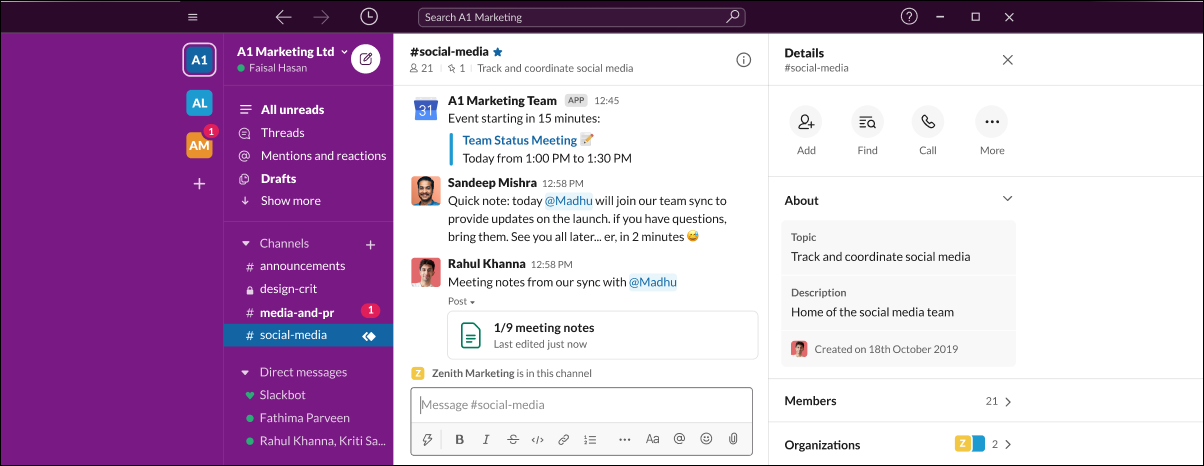
A centralized network with internal communication capabilities eliminates the bottlenecks in human interaction. With a centralized platform, you and your stakeholders can communicate related to a project within one place. Without searching through email threads, you can find relevant information in the chat group. The conversation threads help team members to provide feedback, request approvals, and send documents to each other. Apart from this, you can take advantage of video calls, virtual meetings, streaming – everything from a single platform.

Unified Communication

Slack, a communication tool, is a good inspiration for internal collaboration. It includes features like – search, notifications, screen sharing, customizable chatbots, and third-party integrations. Some solutions also allow attaching files with comments in internal messaging features to improve virtual connectivity.

Here’s what you should include to enhance communication:

  • Real-time chat and messaging
  • Audio and video conferencing
  • Discussion threads
  • File sharing
  • Notifications and Alerts

Tip: Include stickers, GIFs, emojis in the chat platform. Offer all the possible communication channels in a single group. Let your team members choose how they would like to communicate.

Task Management

If the purpose of the collaboration is to expedite projects, then managing tasks would simplify the processes. Your remote team can manage their tasks and work as per their routine. You, on the contrary, can set up a task list for teams, send reminders to you and your team members, and attach files to the list for quick access.Task Management

With task management, you can track your employees’ accomplishments, including project progress. It helps you meet goals and keep everyone on the same page. Trello, for example, allows users to collaborate within a board and create a card for every task that moves across the board with easy drag-and-drop functionality. Users can add others to the task and even attach files to it. Other examples include Asana and Wrike.

Key features to include:

  • Boards to create and manage tasks
  • Task assignment to add people to tasks
  • Task prioritization to set schedule
  • Planning and scheduling to meet deadlines
  • File management to store and attach files
  • Comments and real-time sharing

Tip: Offer easy-to-read calendar views of tasks and deadlines. It will help you and your team members to plan, schedule, and adjust tasks based on their objectives and goals.

Originally Source: https://www.crmjetty.com/blog/collaboration-portal-in-digital-era/

IT Self-Service Portal: All You Need to Know About It

Everyone knows the role of self-service in customer experience. If there are no self-service resources, a few button clicks can result in long calls and waiting times. This can lead to more frustration if the issues are trivial. Also, it may affect internal support. Suppose your organization doesn’t have an IT self-service portal for your internal teams. In that case, the internal requests will be scattered, getting help will be time-consuming, there will be many repetitive tasks and queries, and most importantly, it will hamper productivity and efficiency.

IT self-service portal is a solution that allows customers to solve their problems themselves rather than ask for help. Let’s learn everything about it – what it is, why you need it, the challenges in implementing it, and how to develop an IT self-help portal.

What is an IT Self-Service Portal?

First, IT self-service means empowering users to solve their IT issues using the relevant resources rather than contacting a member. Users will be able to get human support in case self-service fails.

An IT Self Service portal is a solution that comprises all the self-service resources and tools and helps users in finding solutions. It allows users to access the knowledge base and manage their tickets from a single interface.

A self-help portal comprises a knowledge base, ticket management, collaboration tools, and a help center. It ensures your users a seamless experience while helping themselves. For the internal support team, it means offering better and faster services. Hence, offer a dedicated portal for self-service.

Why You Need an IT Self Service Portal

Self-service is a one-stop solution for all your customer support needs. It drives down call volume in call centers and increases the adoption of products and services. A knowledge base is customers’ preferred choice as it has answers to their basic questions like FAQs. It frees the support team to focus on queries that require human support.

Here are the other ways self-service will help you:

  • Empower Customers Today, tech-savvy users require prompt service, speedy resolutions, and fast answers to their problems. They expect this from their internal IT support team as they do as a regular customer. Hence, implement self-service as it will empower customers to find quick answers. They often look online for answers, and a portal will ensure that they find the correct answers. They won’t have to wait hours for IT support to solve a simple network issue.
  • Save Time Do you have to manage a lot of repetitive tasks? Do you handle some tickets again and again? Does it take up a lot of time? If yes, then you need a portal. It will free you and your support team from basic queries. The most common being, resetting the password. With an IT self-service portal, end users can reset their passwords without taking your valuable time. This way, you’ll have fewer queries, more time, and happy customers.

  • Improve Efficiency Tier 1 support requests demand 40% of the time. If there’s a solution that lets the support team view all requests, access resources, and provide solutions from one place, it will speed up their task completion. Similarly, end-users can log incidents, make requests, find answers without contacting IT staff. They will know where to find answers, and the support team will know which task to focus on.

  • Increase Job Satisfaction Support staff members are under a lot of pressure, and answering repetitive questions in a day makes the job dull and unsatisfactory. Unless the queries challenge them and make them use their expertise, it hampers their productivity. With an IT self-service portal, they can focus on trivial matters and get a feeling of accomplishment in solving challenging queries.

  • Provide 24/7 Support You can’t be available 24*7 nor with your support team. However, an IT self-service portal ensures that help will be given to whoever and whenever they ask for it. There’s no time limit to when users can access the knowledge base and find the installation guide.

The goals of the IT self-service portal are improved experience, reduced cost, and better productivity. To achieve that, all you need to do is try on some permutations and combinations and select the suitable ones. In other words, features that will suit your and your customers’ requirements.

Originally Source: https://www.crmjetty.com/blog/all-about-it-self-service-portal/

Web Portal Software – A Guide [2021 Edition]

Since the pandemic has turned every one to work remotely, the need for an online presence has increased. With that, it has become important for businesses to look for web portal software that will allow them to automate tasks, track operations, and significantly increase customer, employee, and partner engagement. But what type of web portal do you need? What will be the development cost? What factors affect the cost?

This article will cover web portal software, including types, development methods, functionalities, advantages, etc. Before that, let’s see what an online web portal is and how it differs from a website. Most people still use the names interchangeably as if it’s the same.

What is an Online Web Portal?

A web portal provides a single point of access to various information. You and users can consider it as a library of personalized and well-organized content consisting of company articles, products information, vendors and suppliers lists, and more.

A web portal software helps in search navigation, personalization, information sharing, notifications, etc. However, to carry out these activities and look at the content, users need access. They need a user account to log in. Once logged in, they can access information provided by you, i.e., a store owner. What makes a web portal convenient is that it collects information from various sources like CRM, CMS and presents it in one place. It reduces users’ efforts. For example, your team doesn’t have to juggle between systems to get customers’ details. Apart from accessing information, it even makes communication between teams easy.

Though the features of a portal look similar to that of a website, their purpose differs, and so do their characteristics. They are not interchangeable. While the website uses web pages that anyone can access, the web portal requires login credentials, and only authorized users can access it. The purpose of a website is to create a digital presence, whereas web portals provide relevant information to authorized users based on their roles.

Common Types of Web Portal Software

Online web portals help with personalization, document management, information tracking, collaboration, business intelligence, etc. As every business is unique, web portals are used in different ways. There are two main types: Horizontal and Vertical. Horizontal portals provide all the relevant information that users might require. Vertical, on the contrary, provides specific information only.

They are then bifurcated into various subtypes based on their target audience and purposes.

Customer Portal

This is for businesses that want to improve their customer support and build loyalty. Customer portals allow customers to place and track orders, generate tickets, activate/deactivate services, get personalized recommendations, manage their transactions, view the status of their query, and find solutions on their own.

Vendor Portal

It’s a solution for businesses having a vast number of third-party suppliers. This type of web portal software is used to communicate and share data with vendors. It makes vendor management easy. Vendors have the freedom to manage their accounts, proposals, orders, etc. Your staff can manage all the vendor-related activities such as sending invites, comparing proposals, viewing suppliers’ information all in one place.

Partner Portal

Industries such as travel, real estate, banking, logistics, or healthcare, often have to deal with multiple partners to get their work done. For instance, real-estate businesses have brokers and others to help them crack a deal. Partner portal helps businesses interact with their partners efficiently by giving them access to data, managing leads, viewing partner performance, speed onboarding, etc.

Affiliate Portal

This type of portal provides an attractive interface to affiliates. It allows them to manage custom links, channels, rewards, invoices, etc., saving your time and building long-lasting relationships.

B2B portal, B2C portal, membership management portal are a few of the other portal examples commonly used. However, the pandemic has forced businesses to implement new strategies, approaches, and digital tools. Thus, there are key portal types that are in demand. Let’s check them out!

Originally source: https://www.crmjetty.com/all-about-web-portal-software/