Effective supplier management is critical for the success of procurement organizations. But as supply chains and suppliers increase steadily, businesses should take proactive measures to mitigate any disruptions within their supply chain. It can be costly in terms of finance and the company’s reputation.
With supplier portal software, businesses can take a strategic approach and manage their suppliers effectively. This article explains all about it. Learn what a supplier management portal is – its advantages, development stages, best practices, and more.
Let’s get started with supplier portal software and its working.
What is Supplier Portal Software?
A supplier portal/vendor portal is an e-procurement solution that lets businesses maintain relationships with their suppliers and vendors. It involves contract management, document sharing, internal collaboration, communication channels, status updates, and more. In simple words, it helps businesses connect with people who supply products that you choose to sell to your customers effectively.
Supplier portal software automates all the procurement tasks and reduces the manual efforts of companies and suppliers. It helps auto raise PO, compare vendors and the products, onboard new members, and carry out activities smoothly.
The supplier management portal is generally used for:
Remote work has become the new normal in the pandemic. Businesses that lagged in digital connectivity had to come up with remote solutions. They learned how to manage their teams remotely, encourage digital collaboration, and provide customers with their needed tools.
The outcome is that virtual format has now become a norm. 54 percent of Americans say that they want to continue working from home. 66 percent expect to go for a hybrid model. As a result, communication and collaboration have undergone a drastic shift. Digital collaboration has become the norm, and post-pandemic, it’s likely to continue.
Businesses must adopt new digital methods like video chat, file sharing, and chat options to connect with employees and customers. And that’s what we are going to cover in this article.
Collaboration portal features
Collaboration portal best practices
Before we get into the features, let’s try to understand the role of the collaboration portal in your organization. Whether it’s a small team with a few customers or a big organization, collaboration software bridges the communication gap between employees and customers. As a business, you can increase task completion, knowledge gathering, team-building exercises, and more. A collaboration tool connects customers/employees with the right people and channelizes information sharing to drive the right decisions.
Apart from that, there are various ways portals benefit your organization:
Streamlines communication by providing customers and employees with a unified interface: no more redundant emails and calls.
Facilitates information storing and data sharing with communities, small groups, and individuals with a few clicks.
Enables teammates to work together even remotely. They can share documents, participate in discussions and do a lot more within a single workspace.
Increases accountability and allows team members to go back and check the mistakes and prevent them from recurring.
Improves relationships with external stakeholders by allowing them to browse the knowledge base, submit questions, and manage everything related to tickets.
Eliminates trivial activities such as status updates, to-do lists, meetings requests. You can manage it all from one place.
Promotes business expansion and growth. Collaboration inspires teams to participate, share ideas, raise bars, and foster communication for business enhancement.
Builds your brand and shows you in a positive light in front of your customers.
To garner these benefits, having the right set of features in your collaboration software is essential. And what are those features?
Let’s see it.
Must-Have Collaboration Portal Features
Unified Communication
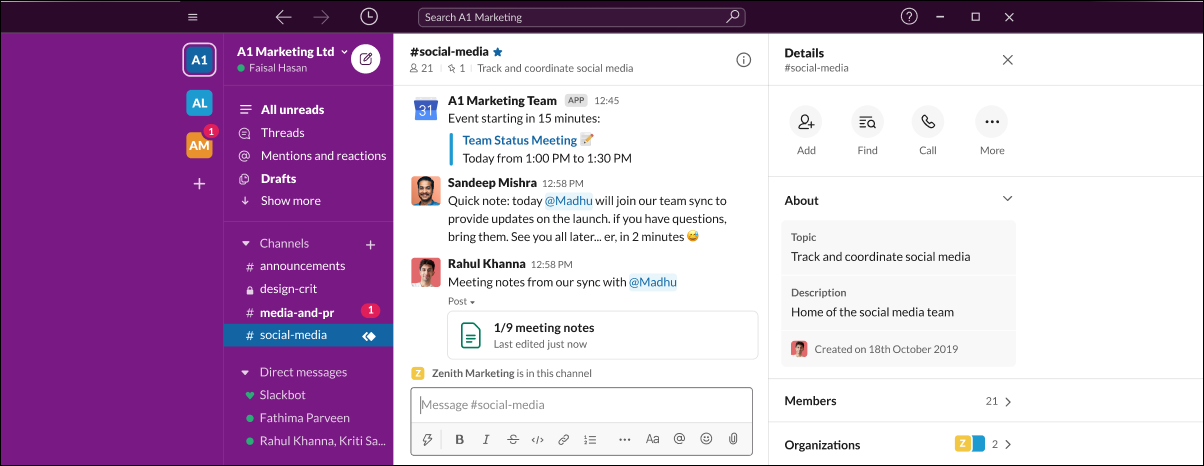
A centralized network with internal communication capabilities eliminates the bottlenecks in human interaction. With a centralized platform, you and your stakeholders can communicate related to a project within one place. Without searching through email threads, you can find relevant information in the chat group. The conversation threads help team members to provide feedback, request approvals, and send documents to each other. Apart from this, you can take advantage of video calls, virtual meetings, streaming – everything from a single platform.
Slack, a communication tool, is a good inspiration for internal collaboration. It includes features like – search, notifications, screen sharing, customizable chatbots, and third-party integrations. Some solutions also allow attaching files with comments in internal messaging features to improve virtual connectivity.
Here’s what you should include to enhance communication:
Real-time chat and messaging
Audio and video conferencing
Discussion threads
File sharing
Notifications and Alerts
Tip: Include stickers, GIFs, emojis in the chat platform. Offer all the possible communication channels in a single group. Let your team members choose how they would like to communicate.
Task Management
If the purpose of the collaboration is to expedite projects, then managing tasks would simplify the processes. Your remote team can manage their tasks and work as per their routine. You, on the contrary, can set up a task list for teams, send reminders to you and your team members, and attach files to the list for quick access.
With task management, you can track your employees’ accomplishments, including project progress. It helps you meet goals and keep everyone on the same page. Trello, for example, allows users to collaborate within a board and create a card for every task that moves across the board with easy drag-and-drop functionality. Users can add others to the task and even attach files to it. Other examples include Asana and Wrike.
Key features to include:
Boards to create and manage tasks
Task assignment to add people to tasks
Task prioritization to set schedule
Planning and scheduling to meet deadlines
File management to store and attach files
Comments and real-time sharing
Tip: Offer easy-to-read calendar views of tasks and deadlines. It will help you and your team members to plan, schedule, and adjust tasks based on their objectives and goals.
Employees, partners, stakeholders, and customers have a crucial role in enterprise success. For their productivity, it’s essential that they can access the right information at the right time, communicate with one another, and streamline business processes.
Thankfully, intranet portals are thriving. They help augment bottom lines and improve service with partners and clients. An intranet portal solution offers numerous benefits to businesses, such as better engagement and customer satisfaction. However, while researching intranet portal development, there are various factors to consider – whether you want to go for an open-source solution or a custom development. An easy communication portal or an intranet portal with an in-depth knowledge base, file, and project management capabilities.
Considering the elements of intranet portal development, we have curated this article. It covers the benefits and the development cost. Here you’ll also learn how to set up an intranet portal and get the most out of it.
What is an Intranet Portal
Intranet portal is a collaborative tool that helps organizations manage data, applications, and other information effectively. They can engage, share ideas, and collectively contribute to company goals. An example of an intranet is a private website that is used exclusively by an airline company to deliver updates to its employees.
While the general purpose of an intranet portal solution is collaboration, you can even integrate different tools and social channels to improve the communication experience—for example, SharePoint intranet from Microsoft Office.
Do you Need to Undergo Intranet Portal Development?
You need a clear picture of your business requirements to decide whether you need an intranet portal or not.
A few questions to ask are:
Does the existing solution offer an impeccable customer experience?
Does it allow third-party integrations?
Are your employees/customers satisfied with the service?
Is there a lack of communication between teams?
Do you need a solution that will simplify the business process?
If you’re unsatisfied with your existing solution, you need an intranet solution. Deploy an apt intranet portal solution to enjoy benefits such as improved collaboration and engagement, better productivity, customer satisfaction, business efficiency, document and knowledge management, etc.
Why you Need an Intranet Portal Solution
Communication, collaboration, and information sharing are the key elements to business success and productivity. An intranet portal solution allows you to organize content for departments, categories, teams, etc. It strengthens the inter-team relation, streamlines the business process, and automates manual tasks.
Everyone knows the role of self-service in customer experience. If there are no self-service resources, a few button clicks can result in long calls and waiting times. This can lead to more frustration if the issues are trivial. Also, it may affect internal support. Suppose your organization doesn’t have an IT self-service portal for your internal teams. In that case, the internal requests will be scattered, getting help will be time-consuming, there will be many repetitive tasks and queries, and most importantly, it will hamper productivity and efficiency.
IT self-service portal is a solution that allows customers to solve their problems themselves rather than ask for help. Let’s learn everything about it – what it is, why you need it, the challenges in implementing it, and how to develop an IT self-help portal.
What is an IT Self-Service Portal?
First, IT self-service means empowering users to solve their IT issues using the relevant resources rather than contacting a member. Users will be able to get human support in case self-service fails.
An IT Self Service portal is a solution that comprises all the self-service resources and tools and helps users in finding solutions. It allows users to access the knowledge base and manage their tickets from a single interface.
A self-help portal comprises a knowledge base, ticket management, collaboration tools, and a help center. It ensures your users a seamless experience while helping themselves. For the internal support team, it means offering better and faster services. Hence, offer a dedicated portal for self-service.
Why You Need an IT Self Service Portal
Self-service is a one-stop solution for all your customer support needs. It drives down call volume in call centers and increases the adoption of products and services. A knowledge base is customers’ preferred choice as it has answers to their basic questions like FAQs. It frees the support team to focus on queries that require human support.
Here are the other ways self-service will help you:
Empower Customers Today, tech-savvy users require prompt service, speedy resolutions, and fast answers to their problems. They expect this from their internal IT support team as they do as a regular customer. Hence, implement self-service as it will empower customers to find quick answers. They often look online for answers, and a portal will ensure that they find the correct answers. They won’t have to wait hours for IT support to solve a simple network issue.
Save Time Do you have to manage a lot of repetitive tasks? Do you handle some tickets again and again? Does it take up a lot of time? If yes, then you need a portal. It will free you and your support team from basic queries. The most common being, resetting the password. With an IT self-service portal, end users can reset their passwords without taking your valuable time. This way, you’ll have fewer queries, more time, and happy customers.
Improve Efficiency Tier 1 support requests demand 40% of the time. If there’s a solution that lets the support team view all requests, access resources, and provide solutions from one place, it will speed up their task completion. Similarly, end-users can log incidents, make requests, find answers without contacting IT staff. They will know where to find answers, and the support team will know which task to focus on.
Increase Job Satisfaction Support staff members are under a lot of pressure, and answering repetitive questions in a day makes the job dull and unsatisfactory. Unless the queries challenge them and make them use their expertise, it hampers their productivity. With an IT self-service portal, they can focus on trivial matters and get a feeling of accomplishment in solving challenging queries.
Provide 24/7 Support You can’t be available 24*7 nor with your support team. However, an IT self-service portal ensures that help will be given to whoever and whenever they ask for it. There’s no time limit to when users can access the knowledge base and find the installation guide.
The goals of the IT self-service portal are improved experience, reduced cost, and better productivity. To achieve that, all you need to do is try on some permutations and combinations and select the suitable ones. In other words, features that will suit your and your customers’ requirements.
Every day, thousands of businesses worldwide are boosting productivity, saving costs, and earning better returns by moving from paper-based systems to paperless digital solutions that amplify the daily grind.
Document management systems can easily integrate with your existing solution and improve workflow efficiency. But that’s too ‘90s! Integrating multiple third-party solutions and configuring them to work together creates chaos and might slow down the ERP solution. On top of that, these legacy systems can result in compromised security, compliance risk, unorganized databases, cluttered network drives, etc.
Even amidst all these challenges, managing documents is essential, and going digital is the only solution. Using a customer portal for document management in Dynamics 365 is one of the best options. In this article, I will explain why.
You may think – why not integrate Dynamics 365 rather than a customer portal. I will answer that too in a proper way.
Before that, let’s look at the technical definition of document management, why you need it, and why you should get rid of legacy systems.
What is Document Management?
Document management is a set of practices that defines how businesses manage, store, and track their data. This data can be in various formats like emails, images, documents, etc. However, the principle of document management remains consistent.
A document management system is software that helps businesses manage documents. Here, they can store documents, categorize them, retrieve, share, edit, track, and do a lot more activities. Document management systems help control access and protect sensitive information.
The common components of document management include:
Storage It provides a centralized location for storing documents from where authorized users can easily access them.
Annotations Allows adding notes and comments to the document without a need to edit it.
Version Control Tracks and records the new versions of the documents so that you can view history and restore it if required.
Audit Trails Enables authorized users to view the log of who edited or viewed the documents and when.
Security and Access Control Ensures only limited authorized users can access the documents.
These components play an important role in securing your business’ information. Hence, it’s essential that you choose the right solution for managing documents.
Why You Need a Proper Digital Solution for Document Management
The question you might be having is, “Why should I spend money on a separate tool when I can purchase the cloud storage and store documents there?”
Say you have a law firm, which means you likely handle hundreds and thousands of documents daily.
There’s a murder case that’s similar to the one from 5 years back. To solve this case, you need data from the previous case. You can look for documents on Google Drive. However, it may take up a lot of time if you don’t know the proper names or the location of the documents/folder. Even after having it digitally stored, you can end up losing potential productive hours.
Likewise, if you have a proper document management system, you can create a central repository of your existing content and get rid of the digital clutter. You can easily access the information and focus on your work. Share documents with opposing counsel or clients. Limit access to the documents. Search the documents quickly thanks to indexing and categorizing capabilities.
In simple words, a document management system makes it easier to handle documents, in many ways, automates the workflow. However, you should avoid adopting legacy systems. Here’s why:
Outdated Technology: These old-school solutions are not prepared for change. Using them is like using Excel sheets in the world of Slack and Trello for project management.
Security Concern: Modern solutions are updated continuously to meet the latest threats. However, traditional systems find it difficult to adapt because of their nature and thus leaves room for vulnerabilities.
Compatibility Issues: Legacy systems support documents and file formats up to a point. It means you’re stuck with formats that your partners, customers may not be willing to use.
High Maintenance: These old systems come at a low price, but with time, the expenses increase. The support and updates for outdated technologies are costly as it takes more effort for developers to continue maintenance and updates.
Poor Customer Experience: It’s difficult for you to communicate with your customers who keep moving with the latest technological advancements. Up of that, the 3rd party solution may lack customer-centric features, making it difficult for customers to access, collaborate, or communicate with you.
You shouldn’t go for outdated or third-party integrations. So, what should you do?
Solution: Bring in a customer portal. Well, you can also use the native Dynamics CRM for document storing. But I won’t suggest that to you because it has limitations.
“Alone we can do so little, but together we can do so much” – Helen Keller.
This is the motto of businesses today. We are likely to see every business using a partner portal to automate their engagement process in this digital era. However, too often, partner portals fail to deliver the core promise because they lack important features. What are they? How do we know partner portal best practices? Both are fair questions, and in this article, I will try to explain those in a structured way.
What is Partner Portal
A software that helps your business partners collaborate and communicate.
Simple, right? Well, a partner portal is complicated, just like your partner ecosystem. You may have partners from different regions, though selling the same products from one vendor. They may differentiate themselves in various aspects such as their selling scale, reach, business planning, marketing, sales, incentives, etc. A partner portal figures this out and serves them in the best way possible. It allows distributors, resellers, installers, service providers, and other stakeholders to obtain direct access to marketing resources, pricing and sales information, technical details, customers’ data, etc.
How Does Partner Portal Help
Let’s take the example of Cadbury. How do you think they reach every corner of the world? By partnership. The distributors and resellers are Cadbury’s partners in a way. However, not every partner would be the same. Small partners might not have the competency to sell certain products, while a large partner may have it. So, instead of differentiating the products manually, the partner portal will figure it out automatically.
Next, instead of calling higher authorities for purchase orders and delivery status, these distributors and resellers can log in to the portal and check it themselves. They can place their order from their login space, view their targets, accomplishments, and more.
Apart from this, you can leverage multiple propositions like lead generation, sales automation, partnership training, business consulting, etc. A partner portal boosts relationships, improves efficiency, and delivers transparency.
A partner portal depends on subsystems like CRM, learning management, inventory, marketing tools, etc. But developing it requires too much work. Making it work together creates a complex experience. What if you took a different road? What about creating a unified experience that makes it easy for partners to log in, look for information, search and find tools easily within a few minutes? In the below section, we shall see how to do that.
Partner Portal Best Practices to Improve Channel Experience
Populate your partner portal with useful and updated information, train your sales team and partners, engage with them, automate the business process, offer necessary resources, and easy accessibility.
We read about it everywhere. But on the implementation level, how to adopt these are unknown. Hence, we suggest you follow these partner portal best practices to get the most out of it.
Since the pandemic has turned every one to work remotely, the need for an online presence has increased. With that, it has become important for businesses to look for web portal software that will allow them to automate tasks, track operations, and significantly increase customer, employee, and partner engagement. But what type of web portal do you need? What will be the development cost? What factors affect the cost?
This article will cover web portal software, including types, development methods, functionalities, advantages, etc. Before that, let’s see what an online web portal is and how it differs from a website. Most people still use the names interchangeably as if it’s the same.
What is an Online Web Portal?
A web portal provides a single point of access to various information. You and users can consider it as a library of personalized and well-organized content consisting of company articles, products information, vendors and suppliers lists, and more.
A web portal software helps in search navigation, personalization, information sharing, notifications, etc. However, to carry out these activities and look at the content, users need access. They need a user account to log in. Once logged in, they can access information provided by you, i.e., a store owner. What makes a web portal convenient is that it collects information from various sources like CRM, CMS and presents it in one place. It reduces users’ efforts. For example, your team doesn’t have to juggle between systems to get customers’ details. Apart from accessing information, it even makes communication between teams easy.
Though the features of a portal look similar to that of a website, their purpose differs, and so do their characteristics. They are not interchangeable. While the website uses web pages that anyone can access, the web portal requires login credentials, and only authorized users can access it. The purpose of a website is to create a digital presence, whereas web portals provide relevant information to authorized users based on their roles.
Common Types of Web Portal Software
Online web portals help with personalization, document management, information tracking, collaboration, business intelligence, etc. As every business is unique, web portals are used in different ways. There are two main types: Horizontal and Vertical. Horizontal portals provide all the relevant information that users might require. Vertical, on the contrary, provides specific information only.
They are then bifurcated into various subtypes based on their target audience and purposes.
Customer Portal
This is for businesses that want to improve their customer support and build loyalty. Customer portals allow customers to place and track orders, generate tickets, activate/deactivate services, get personalized recommendations, manage their transactions, view the status of their query, and find solutions on their own.
Vendor Portal
It’s a solution for businesses having a vast number of third-party suppliers. This type of web portal software is used to communicate and share data with vendors. It makes vendor management easy. Vendors have the freedom to manage their accounts, proposals, orders, etc. Your staff can manage all the vendor-related activities such as sending invites, comparing proposals, viewing suppliers’ information all in one place.
Partner Portal
Industries such as travel, real estate, banking, logistics, or healthcare, often have to deal with multiple partners to get their work done. For instance, real-estate businesses have brokers and others to help them crack a deal. Partner portal helps businesses interact with their partners efficiently by giving them access to data, managing leads, viewing partner performance, speed onboarding, etc.
Affiliate Portal
This type of portal provides an attractive interface to affiliates. It allows them to manage custom links, channels, rewards, invoices, etc., saving your time and building long-lasting relationships.
B2B portal, B2C portal, membership management portal are a few of the other portal examples commonly used. However, the pandemic has forced businesses to implement new strategies, approaches, and digital tools. Thus, there are key portal types that are in demand. Let’s check them out!
The B2C market is expected to reach $4.01 trillion in 2021. You can’t expect to reach this demand if you don’t have a B2C portal to handle your business operations and customers.
In today’s world of instant solutions and fast foods, customers want instant answers. B2C businesses need to adapt to this changing customer demand and behavior. They need to bring in self-service for customers to handle their activities. After all, that’s what 89% of the US customers expect from businesses. With B2C portal development, businesses can increase profits and drive growth. Though B2C portals are not limited to customer support, they can enhance customer experience with streamlined management.
A B2C business sells products or services directly to the customers—for example, an online storefront, a pet sitting business, a gourmet pet food business, etc.
A B2C model eliminates the middleman and connects sellers and buyers directly by allowing businesses to develop their storefronts or sell via different mediums. Amazon, Walmart, and eBay are known to follow the B2C model.
So, if your customer is the end-user, you run a B2C business. It’s a hybrid model if you sell to both customers and businesses.
Challenges in B2C
B2C businesses have a huge potential in niche and local fragmentation. However, looking at the customers’ demand, the convenience of online shopping, and instant support, it’s difficult for you to hold the ground. As a B2C business owner, you need to face many challenges to keep up with the high customer demands.
A few of those include:
Consumer Traffic
If Google doesn’t know your name, your customers don’t. SEO is an essential part of your business. It’s the guide that helps your customers reach you and vice versa. As a B2C business, you need to ensure that your website is optimized to attract traffic. UI and UX are the factors that distinguish you from your competitors. Managing it all is challenging as new trends come up often, and you have to stay updated all the time.
Payment Processing
Along with online shopping, customers prefer digital payment methods. They like it more if there are multiple options like debit and credit cards, bank transfers, e-wallets, cryptocurrencies, pay later, etc. However, most of them are hesitant to submit their payment details to the website due to security concerns. So, B2C businesses have to ensure that they offer multiple payment options with SSL encryption, PCI compliance, and other trust marks to increase customer credibility.
Customer Support
Digitalization has reduced our patience level. Now, everyone wants instant solutions to their problems. As a B2C business owner, it might be difficult to manage all the customers at one time. Say you have to attend 20+ calls and provide solutions to each one of them. Sometimes, you have to put one or two customers on hold, which creates a negative impact. It also affects your support team’s productivity. How can you handle it all!?
Customer Experience
Customer experience depends on how customers feel from the moment they land on your website to the purchase and post-purchase stage. The cost of acquiring a new customer is ten times that of retaining an existing one. But lack of strategies and tools makes it difficult to hold the existing customer for a long time. For example, if customers find it difficult to return the purchased product or are unsatisfied with the service, they will likely abandon you.
Considering the pace at which technology is advancing, providing customers with the support they seek with manual approaches is tricky.
Order Fulfillment
How do you feel when you undergo an entire order purchase process only to find the “out of stock” message at the checkout or after placing an order? It upsets you. You think – “only if they could have mentioned “Out of Stock” at the first stage, I would have ordered it from another store by now.” B2C businesses have to ensure that they fulfill all the customer requirements and if the order is unavailable, it’s mentioned ‘Sold out.’ When it’s back in stock, notifying the customers about the same is crucial. You can’t keep doing that manually, and to and fro between systems is daunting.
Product Search
What’s the use of having an attractive website and dozens of products if customers can’t find what they are looking for? The convenience of online search and smooth navigation is the crucial component of customer satisfaction. However, most B2C businesses fail to provide customers with advanced search and filter options to find the products quickly.
Apart from these common challenges, B2C businesses have to look after all the business operations while managing customers, which can be overwhelming.
Hence, B2C portal development provides customers and businesses with authorized access to relevant data. Both can manage their activities without relying on others for support. Customers, for example, can view their orders, make purchases, and find solutions to their problems using a knowledge base without asking the support team for help. Businesses can streamline their entire operations by giving limited CRM access to everyone included.
Here’s how it helps.
Business Objectives of B2C Portal Development
B2C portal development, generally known as a customer portal, offers a customer-centric approach to increase customer engagement. Here are how B2C portal development fulfills the purpose:
Central Access
A B2C portal brings customers, employees, clients, and other business entities under one roof. Everyone can log in to their space and access the required information based on their roles. The auto-sync between the CRM and the portal makes it easy to carry out administrative activities.
The centralization makes operation management efficient. For example, the support team doesn’t have to go to and fro between CRM and portal to view tickets and customer details. They can view everything directly from the portal. Any changes made in the portal will reflect directly in the CRM.
Personalized Content
B2C portal development provides personalized access to particular users. You can add personalized content for target user groups (e.g., clients, customers, and employees) at specific security levels. Restrict the access to training videos for customers and clients. Suppose a specific support team focuses on the product return process, and you want to equip them with training videos. In that case, you can provide only that particular group with access to training materials.
Active User Interaction
B2C businesses can increase customer engagement by creating community forums. The community forums will allow customers to discuss solutions, troubleshooting steps, share feedback, ideas, and suggestions. The support team can actively participate in the discussions and take into account the customer issues.
In short, B2C portal development helps increase involvement, engagement, and empowerment.
Security Benefit
As an admin, you can fully control the portal access, including who can view what. You can decide which employees to provide authorized access to which data of the business. The secure access to each and every employee and customer based on their roles will help you keep business secure.
Workflow Automation
B2C portals reduce the load on your customer support team. Your staff doesn’t have to handle the redundant queries manually. The B2C portal development will enable your customers to generate their tickets, find solutions to their problems with the knowledge base and community support. The support team, on the contrary, can communicate, share, and update data directly on the portal for everyone to see. This will help them focus on addressing complicated queries instead of repetitive tasks.
Multi-Channel Capabilities
Customers, employees, and others can access the portal through any digital device from anywhere. It ensures they enjoy the immersive experience across all platforms.
These are a few of the fundamental customer self-service elements of B2C portal development. A few tips that you shouldn’t overlook while undergoing development are mentioned below. Keep reading!
For personal insurance, do you tend to call someone or lookup on Google for the answers?
It’s Google, probably!
Because it’s easy and convenient to find answers and solutions rather than asking for help.
We expect round-the-clock service, which is not possible in a traditional approach. Technology has transformed convenience into luxury and is now a necessity. Insurance brokers need to embrace technology to stay competitive in the digital environment. The key is to bring a solution like a Salesforce broker portal that helps brokers know when an existing customer has a policy in another line with them.
Broker portals boost brokers’ efficiency, enable mobility, and enhance customer experience. With the help of Salesforce broker portals, insurers can create personalized offers tailored for individual customers by analyzing their surveys and other open data.
The right solution can help protect backend operations and streamline frontend operations to ensure a 360-degree view of the customers.
But what exactly does a broker portal mean? Let’s find out!
What is a Broker portal? And How does it Work?
A broker portal is a configurable self-service portal that gives insurance agents/brokers the power to acquire more clients by managing client acquisitions and entire business operations from a centralized solution.
It gives agents/brokers access to every department irrespective of the location or device.
Brokers can use the Salesforce broker portal to obtain quotes, client details, renew policies, submit claim data, etc.
The newly acquired portal provides brokers with all the required functionalities in a single solution, reducing the time dedicated to management tasks. The consolidation of all brokers’ services in one place helps insurance companies achieve better technical and operational management.
Benefits of Salesforce Broker Portal
Competitive edge, efficiency in business operations, and customer satisfaction are the key highlights of the Salesforce broker portal.
Other benefits are:
Exceeds Expectations
The Salesforce broker portal provides agents/brokers with tools and features to deliver personalized communication, collaborate internally, streamline service requests, track opportunities, and a lot more.
Work Smarter
Get all the service requests submitted through different platforms in one place. Prioritize inquiries based on urgency and ensure that the right person is managing a case. Help your policyholders with guides, video tutorials, FAQs, etc. Do all of this directly from your portal.
Personalize Interactions
Engage in customer conversations with smart alerts. Allow customers to solve their queries with the help of the community and knowledge base. Let them access their information and generate insurance certificates automatically.
Last but not least, collaborate with colleagues, dig into the community groups to understand customer needs and issues.
Faster Turnaround Time
Salesforce broker portal enables you to offer your customers 24*7 services via SOS video chat or real-time interactions. Provide customers with self-service for quick problem resolution.
Better Insights
Get a clear picture of the business working with company insights like real-time credit information. Improve the underwriting process and accurate pricing. With the Salesforce broker portal, enable your brokers to trade more policies and get desired results efficiently.
Robust Solution
With its features and services, Salesforce allows businesses to connect with their customers, clients, agents, and more in a better way. Using it, businesses can track customer activity, community discussions and manage analytics from anywhere with accuracy. Be it instant access to the information or marketing to the customers, Salesforce makes everything possible.
Hence, you should go for a Salesforce broker portal. And with that being said, here are the installation steps.
How to Install Salesforce Broker Portal?
Follow the steps below to create an agent portal:
From Setup, in the Quick Find box, enter Digital Experiences, and then select All Sites.
Click New.
Select the Insurance Agent Portal template, and click Get Started.
Enter a Name and a URL for the portal, and click Create.
Click Builder.
Customize the portal to suit your business needs, preview the customized portal, and then publish it.
Note: If you want to enable the Financial Services cloud, follow the steps below:
Install a package for Financial Services Cloud and enable StreamAPI.
To access insurance objects and features, users need the FSC Insurance permission set license.
From Setup, in the Quick Find box, enter Users, and then select Users.
Click the user that you want to give permissions to.
Under Permission Set Assignments, click Edit Assignments.
Under Available Permission Sets, select FSC Insurance, and then click Add.
Save your changes.
Your portal users can access insurance objects without requiring any additional permission set license. In your user profile, under General User Permissions, select Access Insurance Objects.
That’s it! You’re all set to use the broker portal.
Excited to know the features inside?
Features of Salesforce Insurance Portal
Insurance portals have various features such as quote submission, policy management, sales and marketing apps, analytics capabilities, security, etc. Here’s more about them:
Policy Management
You can list down policies, conditions, amounts, premiums, etc., and get an overview of policies sold, canceled policies, agents’ ratings, their productivity, and so on.
Premium Plan Management
Customers can pay their premiums by selecting the different payment methods available. They can view their premium details on the dashboard – like paid premiums, premiums that are due, etc.
Knowledge and Consultation
Insurance policies use terms that are difficult to understand. Hence, the portal enables you to add a knowledge base with FAQs, terms explained, articles, guides, and more. This equips your customers and agents with the correct information instantly.
Personalized Quotes
Salesforce broker portal enables agents/brokers to provide customers with personalized quotes based on their requirements and specifications. It enhances agents’ visibility by giving them a clear idea of customer information, claim requests, premium lifecycle, etc.
E-Signatures
It makes it easy to close the deals. Salesforce broker portal allows agents/brokers to close the deals or share insurance policies on the spot by obtaining e-signatures.Explore Broker Portal
Other features include a smart dashboard, comparison module, alerts and notifications, profile management, digital workspace, etc. CRMJetty provides it all.
Read below to know more about us and how we can help you.
CRMJetty – Your Salesforce Broker Portal Partner
CRMJetty is a hub of innovative portal solutions. We have 14+ years of experience in portal development and can help you build a custom solution tailored for your business.
Along with customization, we also offer ready-to-integrate solutions. So, whether you’re looking to integrate a readily available solution or customize your existing one, we have got you covered.
Talking about our Salesforce portal, it’s a secure and scalable solution to expand along with your business expansion.
Following are a few of the features of our Salesforce Insurance Portal
Drag and Drop Builder
Multi-Language Support
Role-Based Access
Real-Time Information
Policy Management
E-Signatures
Financial Calculator
Digital Payments
Mobile Friendliness
How We Will Create a Perfect Insurance Portal for You?
First, our development team will gather all the requirements by discussing the nuances and figuring out the solution – whether your portal will need customization or not. If required, what are they, and will create a roadmap accordingly. Once our team starts the development process, we will update you about the iterations while testing the solution. Once approved by you, we will deliver the final product, which you can use. We will also provide short-term support post-launch for you to get familiar with the features.
With the implementation of technology for healthcare records, patient portals have become incredibly popular in the past few years. Healthcare organizations are looking to find the best patient portal development companies to develop one, irrespective of their size and specialty.
You can think of patient portals as the Swiss Army knives of medical software. They’re unbelievably versatile. Patient portals are usually used to improve the quality of healthcare provided to the patients. It enables better communication between physicians and their patients. It helps build a better patient-physician relationship and gives the patients more control over their treatment.
Patients can have information whenever and wherever they need it. They can check lab results, prescriptions, update insurance information, manage unpaid balances, and more. According to a survey, 90% adoption of patient portal software in healthcare is the major means to keep up with the health metrics.
Healthcare officials also encourage the use of multipurpose healthcare portals to digitize key parts of the medical workflow. Portals are used to handle administrative and clinical functions as well. It enables patients to be more engaged with their care team.
This article will discuss what exactly a patient portal is and how to pick the perfect patient portal development company for your business. We’ll break down everything you need to know before purchasing a patient portal. We’ll also discuss:
Patient Portal: A Brief Overview
Patient portals were developed to improve the way healthcare providers interact. They are used to provide patients with timely access to their healthcare – specifically, access to their healthcare information.
Patient portals are mainly used to retrieve lab results, solve queries, ask questions, update patient profiles, and provide insurance information. Using a patient portal increases patient engagement, promotes loyalty, manages costs, and streamlines workflows. Some patient portals allow patients to schedule appointments and pay bills directly through the software/portal.
Key Advantages of Patient Portals
According to a survey of 232 patients, it was found that 72% of them had access to a patient portal. The fact that patient portals are catching on so quickly shows its unique advantages.
Here are all the more reasons to implement a patient portal:
I. Increased Office Efficiency
Implementing a patient portal for your medical practice can increase your office efficiency as it makes communication between you and your patients easier. This helps you save time. Processes like signing up new clients become easy as patients can fill out information electronically. Your data is saved digitally, and you do not need to maintain records manually. This also reduces errors and inconsistencies in information.
II. Streamlined Workflow
With patient portals, you can streamline the workflows in your office. By moving your communication online, you can prevent your receptionists and nurses from answering the same questions repeatedly. This way, your office staff can focus on more urgent healthcare needs.
III. Tele-medicine
Through a patient portal, you can successfully reduce the number of unnecessary patient visits to your clinic. It enables patients to consult with you through the messaging system. For example, patients do not need to visit the physician simply to change the medication doses. Hence instead of scheduling a physical visit, patients can just consult the physician online by booking their appointments.
IV. Reduces Medical Errors
When your staff takes phone calls, they have to rely on information that patients give them. This may lead to misinterpretations of patient needs and medical issues. But, if you can receive written messages from patients themselves, you can convey accurate information throughout.
Telemedication leads to effective patient medication. Before a physician prescribes any drug, the software can automatically check for drug-to-allergy based on patients’ diagnosis and current medication.
V. Patient-centered Care
With the entry of patient portals, the medical industry’s focus has shifted toward patient-centered care. Organizations offering patients access to their medical records are at an all-time high. Hence, an increasing number of patients are demanding the same.
Portals also offer around-the-clock support. Both parties can conveniently exchange health information, ask questions, and review medical notes. Patients do not have to wait for lab results over the phone or by mail. They can simply access them through the patient dashboard.
Patient Portal Development: Feature Analysis
Patient portal development is not an easy task. Making an informed decision is a must. Take time to understand your peculiar needs and decide what functionalities you want in your portal. Separate the “must-have” capabilities from the “nice-to-haves.” Prioritize according to your needs. Here’s a feature guide to help you out:
1. Patient Registration
Patient onboarding is the most important part of healthcare services. And a benefit of the patient portal is that it eases the registration process. Your portal must enable an easy sign-in registration process. Patient onboarding must be smooth.
You need to design the registration process with the patients’ convenience in mind. When signing in, you can ask them to fill a form to know their medical history, previously prescribed medication, health reports, and underlying conditions. This data can be stored in the patients’ profiles. This way, it is more likely that patient engagement will improve.
Patient portal development requires a multi-tier solution that can manage access based on role and smoothly across the levels. Other than patient management, the healthcare portal requires employee management, supplier management, and partner management. This way, it can help manage staff, treat patients, get medical supplies, and partner with laboratories, all from a single interface. CRMJetty’s patient portal makes it all possible. It comes with robust entity management features. Talk to our experts today and find out more.
Online appointment scheduling is also an important feature in the patient portal development process. It enables patients to book appointments anytime, regardless of their location. With a calendar integrated with your portal, patients can view if the slots and dates they’re looking for are available or not. This feature can be a game-changer to optimize time utilization as it automatically eliminates unnecessary appointments off the schedule.
3. Prescription Management
Your patient portal must have a feature for tele-medication. The ongoing treatment, repeated medical procedures often require patients to access prescription refills. By facilitating this process, professionals can expect an increase in patient engagement online. This way, you reduce the physical footfall at your premises.
4. Patient Help Center
Patient portals can also be used to provide self-service resources to the patients. This can help you shape healthy habits as well. Physicians and admins can include health-related information in the form of FAQs and a knowledge base. This can prove to be a powerful patient engagement solution as well. Patients can receive the content tailored to their conditions and delivered directly to their accounts.
5. Online Payment Management
According to a study, implementing a patient portal has brought some crucial positive changes and raised patient payments by 4% to 8%. Including this feature in your patient portal allows physicians to track down customers for unsettled payments. You can also let them manage the insurance and medical-claim information through the portal. This helps to increase the revenue cycle and saves a lot of time for everyone involved.
6. Healthcare Record Management
Patients view the healthcare record module and have a bird’s eye view of their health data. Patients can access all their reports so they can see the changes in their reports and have a complete map of their data. It can also work as a repository of patient’s blood reports, treatment progress reports, medication, X-ray reports, and other scans and reports needed in their treatment.
7. Notifications
With this feature, patients can get notifications and reminders for regular checkups, necessary tests, report pickup, etc. This will make sure that the patients do not miss their appointments. It also eliminates the hassle of remembering checkup routines.
8. Features for Admin Tasks
Admin features are purely designed to help the administrative staff to ease healthcare management. They can keep track of medical supplies in the hospital and manage them from within the portal. They can manage schedules for doctors and nursing staff.
They can also set schedules for emergencies. Apart from that, they can manage the doctor’s schedules for consultations and checkups. The admins can also update lab reports to the patient’s profile, so doctors and patients always get a current overview of their health data.
How to Select The Right Patient Portal
Once you decide the portal you want to develop, do not jump into picking the first patient portal development company you come across. Analyze these things beforehand:
1. Research Pricing and Set Your Budget
Budget is an important aspect for selecting the right patient portal development company. Your budget often reflects how robust your portal can/will be. You can call in your team of experts for this one. Do not jump for the cheapest solution out there. Analyze and compare various patient portal development services and then make a decision.
Find out how CRMJetty creates a perfect solution for healthcare companies. We are known to provide a robust, feature-rich, and niche-based solution to cater to your particular needs. Check out CRMJetty’s pricing or request a free quote.
Do not stick to a single option. Try free trials for multiple products. One of the most important parts of a patient portal is to provide a simple and effective UI. Patients should feel comfortable logging in and solving their queries with minimal guidance.
3. Go Through Product Testimonials
Once you compare various patient portal development services using free trials, you can narrow down your options. The next thing to do would be to check out product testimonials. Find out if the portal’s functionality is up to mark and specific to your need or not. Find out how their customer support is and how they solve other customer’s problems.
4. Keep Your Patient Priorities on Top of Everything
While selecting your patient portal development features, do not just go for all the popular features. Include features that your customers would want you to include.
For example, if you are someone with less administrative staff and your staff is always busy responding to patient queries, you might want to include admin automation features that would reduce the efforts of both the staff and patients.
Shortlist the features as per your needs. Then find a patient portal development partner who can implement those features exactly as you need.
5. Work with Experts
Working with experts is essential; therefore, we suggest you work with a patient portal development company with years of experience in healthcare development. Work with someone who can identify your current problems and resolve them with the help of portal technology in healthcare.
Patient Portal Development with CRMJetty
With the advent of online platforms, it is clear that using a patient portal can provide multiple benefits for your medical practice. Patient portals have seen a tremendous rise and have provided great results in healthcare due to their vast capabilities. Patient portals significantly contribute to streamlining your healthcare services, generating a bigger revenue for medical establishments.
After accounting for the considerations mentioned above, you must now have an idea of what exactly you need. The only decision left to make is what platform you would pick. When the core functionality of the patient portal is designed and created by experts, patient engagement becomes a major win.
Are you having difficulty finding a partner for patient portal development? Consider taking a look at CRMJetty’s healthcare solutions. We are a patient portal development company that caters to all business needs. We specialize in offering customized patient portal solutions with consideration of the specific needs of healthcare officials. Our healthcare management software can help you level up your healthcare management workflow. It enables you to deliver on, and exceed, patients’ expectations. Connect with our experts to digitize your healthcare services.


.gif)


 CRMJetty