Top 5 Benefits of AI in Customer Service

Good customer experience is one of the driving forces behind having a successful business in this competitive market. According to research done by Salesforce, 80% of decision makers think that having a better customer experience is one of the most important things. Today customers are giving equal importance to good experience as they give to products and services.This has made it challenging for businesses to always be on their toes, go one step ahead and serve their customers better. To ease this entire process of making customer experience better technology has helped a lot. One such thing is new in the field of customer service and that is AI.

More than half the work decreased when portals were introduced in the market. And now going one step further, companies have started introducing AI in portals. This has made lots of tasks of customer agents easy and helped them increase their productivity.

Let’s see ways AI is helping your customer agents serve your customers better:

Case Handling:

When your customer is facing issues they are very likely to look up the solution on the portal and solve it on their own. But, if they can’t then they will generate a ticket or live chat with your employees. Followed by a quick Q&A.

Whereas, with the intervention of AI, you can build a Chabot and instill in live chat. Chabots with the help of machine learning can talk with customers in the first phase, gather all the information or problems they are facing and pass it to your customers.

Now, your employees can solve these issues faster and customers too will not have to wait much for response.

Better employee insights:

Continuously checking and micro-managing your customer agent is not the acceptable thing. They are very likely to get disturbed and might not be able to work efficiently. In such cases, AI can help you. You can now get insights into their performance, their problem solving strategies, how they help customers, time taken to solve each problem, and more.

You can gather all this information and understand which points are making your employees slow. So, in turn you can decide which areas your employees need to have more training or define different ways to solve their issues.

Personalized recommendations:

Understanding your customers’ previous purchases and recommending things to them on the basis of it is an important thing. It is also one of the ways to provide better customer service to your customers.

For example, suppose your user has added some item in the cart then during the checkout you can recommend them certain items from their wishlists which will go with the product they are purchasing. Just like Myntra! They always recommend to you other products as well on the basis of your previous purchase, size, location, and many more. This will help you to know your customers better, their choices, and serve them in the right way.

Predict future trends:

Using AI you can predict future trends of the market on the basis of your customers’ pain points. This will help you to serve your customers in the right way but also set a new trend in the market.

With the help of AI you can predict the future trends of your market. This will help you to understand your customers better, serve them in the right way, and change the marketing strategy according to the future preferences.

This will help you to serve your customers better, know their choice and recommend on its basis, stay ahead of competition.

Prioritization of work:

Prioritizing work is a major concern which leads to lethargic work. It helps to serve your customers in the right way. With the help of AI algorithms you can define which thing is in the priority and further it makes the decision on the basis of it.

Wrapping up:

Artificial intelligence is not new but with time people have started using it in business to serve their customers better. There are multiple platforms that provide this solution but the best solution is a portal with salesforce wordpress integration.

7 Benefits of Using Customer Portal for Freelancers

Being a freelancer is cool but comes with a lot of responsibilities and constant changing requirements to fulfill. Your clients reach out to you any time of the day. This makes you available on calls and emails round the clock. Many times it becomes difficult to have proper personal and professional balance.

To manage all this as a freelancer let’s see the top seven ways a customer portal can help you in your work: 

  • Professional appearance:

The portal plugin works with your WordPress website. With this plugin, their requirements are better managed and so is their communication with you. Your brand appears more put together and streamlined to your clients. 

  • Speeds up communication process:

Now with the help of portals you don’t need to look up old emails every now and then. You can just search any emails in the portal itself. With the customer getting direct and real time access to the work, it eliminates the need for emails and calls for updates. 

  • Working hours:

With the help of WordPress customer portal you can easily show your working hours to customers. This will make it easy for them to know the correct time and medium to contact you. It will also add a perfect personal and professional balance which is much needed as a freelancer.

  • Easy to use:

Providing ease to your customers is the first rule. Some of your customers might know ways to use the tool you are using while some might not. But, with WordPress client portal plugin this becomes easy. You customers can easily get along with this. When the platform you work on is user friendly, customers will automatically associate that ease of work with you and your brand.

  • Customization options:

You can anytime add or remove extra modules in the portal on the basis of the services you provide. Suppose, you are providing one service, let’s say graphic designing, then you start providing photo editing services as well, then, you can add that module in your portal.

  • Manage Contracts:

Paperwork can be a tedious task. But, with WordPress client portal you can easily manage contracts directly from the portal. Your clients and you will have access to it from anywhere at any time. So, now be it local or international clients, get the contracts signed directly from the portal. Increase transparency and serve better!

  • Security:

Security is one of the important aspects for any product. Client portals have a lot of confidential data about your clients so it is important to use the latest security algorithms. So, make sure that you provide a secure customer portal.

Conclusion:

Being a freelancer can be a difficult job as you might need to be a multitasker. This is when a customer portal can come to the rescue. Get the best out of the customer portal and serve them the right way.

Best Practices For Supplier Vendor Management

Suppliers are an important pillar in any organization. Success depends on efficient and effective ways of procurement functions. Today purchasers interact with vendors from across the globe to meet the growing demands from new markets.

Here, let’s discuss supplier management, its advantages, and its best practices:

What is supplier management?

In simple words, we can say; supplier management is useful to keep and build healthy relationships with vendors. This incorporates every transaction, discussion with vendors, contract dealings to report sharing, and meetings to talk about current sales and analytics. It deals with every interaction with your suppliers.

A big part of vendor management is to share data that would profit you and your vendors. Good supplier management software can automate functions.

Let’s see why you should use supplier portal solutions in your business:

  • Build connections:

Vendors provide products that you can guarantee your clients, making this a significant relationship. Additionally, you can even provide them with an option of how their products are performing; it helps them show signs of improvements by taking care of their clients’ needs.

This is beneficial to you and your vendors. Additionally, with good supplier management software, all you need is just a supplier portal solution, which can help enhance the relationship.

  • Productivity:

Considering your vendors’ effect on your business is important that you stay in touch with them. You might need to handle at least one or more vendors. Exchanging emails can sometimes be very exhausting. To make this helpful, you can have a vendor self-service portal. Using it, you can easily exchange information about applications, arrange costs, keep up with quality checks, and get updates of deliveries, simple and quick.

  • Secure your brand’s reputation:

When you do supplier management correctly, you can transform those vendors into partners and help you promote your brand. Simultaneously, they can bring various other vendors to work with you. It will expand your network and successfully grow your business. Vendor portal software can help with this and also helps you with saving data processing costs.

  • Minimize risk:

In this competitive market, it is important that you and your vendors understand each other’s qualities. It needs good communication. If you treat your vendor with much regard, just like your clients, there are fewer chances of having problems. The simple method to do this is to use a supplier management portal so that there is no extent of miscommunication.

Going further, let’s discuss the best practices if supplier management:

  • Selecting suppliers:

Selecting the correct partner is something that everybody knows. It can change your business. The perfect business partner will give you financial adaptability, dedication, and you can rely on them to maintain the quality of the product.

Using the RFI function of supplier management software, the procurement team can request the required data from vendors and easily select and onboard vendors.

  • Two-way connection:

It is a good practice to communicate effectively with your suppliers. It can be anything from brainstorming thoughts to grow your business or any random thing. This thing helps you to have a long term relationship with them. A good vendor management portal with a vendor login portal helps you to streamline the two-way communication between you and your vendors.

  • Vendor Management Portal:

Effective communication is uncertain in most situations. But, with meetings or emails, they become very effortless. Here, the vendor management portal can prove to be very useful. It handles the complex and also the least difficult tasks. It associates the correct products with the correct vendors. This helps to easily connect the correct vendor for the correct item.

Conclusion:

Following these three vendor management best practices will help you to build long-lasting relationships with your vendors. This, in turn, will help you to enhance your business and serve your customers better.

Significance of Customer Portal Solutions in a Digitally Transformed Industry

Customer Support has been one of the most crucial and indispensable aspects of business management throughout business history. And companies around the globe want to figure out the best way to do it. However, it is important to note that customer support isn’t what it once used to be. These days, customers would rather read online solutions/articles and troubleshoot their problems than by writing elaborated emails about it or waiting to speak to a support agent. 

With this increased dependence on self-service over traditional communication methods, it has become quite necessary for companies to implement customer portal solutions where all the information can be collated for the end-users. This article aims to give you insight into these customer portal solutions and guide you if the question, “Which customer portal solution should I use?” is troubling you.

Rise of the Customer Portal Solution!

A customer portal creates an engaging platform that lets the customers interact with your brand, provides them a dedicated space to track and manage their support requests, and connects them to other relevant customer support resources. In a way, a customer portal reduces technical and communication barriers between your customers and your company in both B2C and B2B industries. Perhaps, the most significant benefit for businesses implementing B2B customer portals is securing customers from anywhere in the world. 

Reasons to Adopt a Client Portal Solution.

From giving customers the platform to resolve problems by themselves to creating a thriving community of dedicated users, a customer portal presents abundant opportunities for companies to upgrade their support processes. You can access all the capabilities without any developer assistance by using a dedicated CRM Client Portal software. Let’s look at how customer portals make life easier and why they are crucial for your customers.

  • Meets Customer expectations: Perhaps the biggest reason to have a customer portal is your customers expect it. It becomes much easier for the end-users to find what they are looking for with a well-organized and well-structured customer portal. They get access to relevant information at their fingertips, such as solution articles, FAQs, feature announcements, and more. As a result, your support staff can focus on resolving more complex queries instead of handling minor, repetitive issues. 
  • Lowers Your Support Costs and builds a community of engaged users: The customer self-service portals save you significant expenses on support costs. Statistically, customers are more likely to find answers to their questions on their own. These portals also help build a large community of users connected by your products, which means that your support team will spend less time answering customer questions because your other customers will be doing it for you, which saves your company a lot of time and resources.
  • Fast Service: Anytime, Anywhere!: Nowadays, “Fast is the new satisfactory.” Customers want immediate solutions across all devices and around the clock. And they don’t want to get passed around to multiple customer service reps because it means having to invest more time. Customer self-service portals can deliver quick, 24-hour support. Your customers will not have to wait to get answers to their questions. 
  • Significantly Increases Customer eXperience: We can all agree that a good CX leads to increased engagement, increased brand loyalty, and increased customer retention. All the customer portal solutions’ collective benefits cumulate to better the overall customer experience (CX). 

Which industries are best served with B2B Customer Portal?

For businesses that serve hundreds of customers across geographies, a B2B customer portal can be implemented. A B2B customer portal does not come cheap, nor is it outrageously expensive! However, It is judicious to do a cost vs. benefit analysis to determine its viability. Mostly, it is affordable for Mid-size businesses. 

Some businesses best served with the B2B customer portal are suppliers of the hospital and medical supplies, automotive suppliers, building construction materials, beauty & cosmetics suppliers to beauty salons, industrial electronics and electrical suppliers, Office suppliers, and many more.

Wrapping it up

The client portal solutions have a tremendous impact on how well a business can support its customers. It encourages self-service, provides contextual information, and makes it extremely convenient for your customers to get in touch with you. If you’re not using a customer portal solution yet, this is the right time to get on board! 

Summary: This article explains the significance and benefits of customer portal solutions in today’s marketplace and will support your business. Read more and find out.

Top 12 Reasons to Use Microsoft Dynamics 365

Choosing the perfect operation software like CRM and ERP for your organization is vital as it complements and meets the goals. Microsoft Dynamics is the best platform for a 360-degree vision of insights and processes of business operations.

The impactful tools of Dynamics 365 assist your sales and marketing teams and help you stand ahead of the competition. Additionally, you can integrate it into your CRM and portals and use the combined power of the Dynamics CRM portal. It provides excellent functionality, performance, and security. It helps you scale and change your solution according to your organization.

Let’s discuss the top twelve reasons on why you should choose Microsoft Dynamics 365 for your company:

  • Data Centralization:

Data centralization happens by integrating other applications, cloud services, and external data sources. It includes accounting databases, email marketing, websites, surveys, etc.

Using this, you can find your strengths and weaknesses. This helps you measure performance using data visualizations. Apart from this, it keeps the organization informed with essential metrics and helps you make better decisions.

  • Customer relationships:

Consistency in customer experience can help businesses keep their client base. Integrated sales, marketing, and customer service platforms help connect every source of customer information across all channels. Additionally, you can even integrate this information with webchat and self-service portals.

  • Integrations:

Dynamics 365 integrates with Office 365 and other Microsoft platforms, which has more efficiency and productivity. It integrates with useful and familiar applications like Outlook, Excel, and Word. You can also integrate Dynamics 365 with other CRMs like SAP and Salesforce. Apart from this, you can use various portals like Dynamics CRM customer portal, a self-service portal, etc. to bridge the gap between CRM and websites.

  • Data Security:

Microsoft is known for securing its customers’ data. All its products, along with Dynamics 365, meet the EU criteria, including GDPR. When we go through MS Dynamics 365 compliance, it shows that all your customers’ data is safe in the Microsoft cloud.

  • Timely updates:

Microsoft has a strong team of researchers who try their best practices for Dynamics 365. This helps them stay ahead in the rat race and make sure their customers’ lives are easy.

  • Process Automation:

With Microsoft Dynamics 365, you can create a rule for processes that can customize it based on your business needs. This will help you to put an end to repetitive manual tasks. It notifies you to approve the process of seamless by following some guided procedures. It helps you in reaching successful outcomes and also provides great data quality.

  • Accessibility:

Using Microsoft Dynamics 365, you can synchronize it across iOS, Windows, and Android devices. This enables productivity and helps you and your team members to stay on the same page.

  • Usability:

Microsoft prefers to add a touch of its Windows everywhere. The same thing is with Microsoft Dynamics 365. You feel like using your Windows computer only. This familiarizes you with the interface and increases your and your employees’ productivity. 

  • Accessibility roles:

System administrators can provide accessibility roles to certain users. This ensures the right information is delivered to the right person regardless of using Outlook or a web interface.

  • Targets marketing campaigns:

Currently, customers must know about the offers and new services a business provides. Microsoft CRM offers a marketing automation module which simplifies the following tasks:

  • Building customer
  • Lead lists
  • Developing marketing campaigns
  • Target specific customers
  • Tracking results of these campaigns
  • Creating follow-up marketing campaigns
  • Keeping employees updated:

Microsoft Dynamics CRM design helps your staff be more productive both in the office and out of the office. They can filter needed information like meeting updates, sales details, or customer information from anywhere at any time.

  • Improves efficiency:

Microsoft Dynamics CRM workflow engine enables businesses to automate business processes in many ways. It provides an ease to your employees from tedious work by automating repetitive, time-consuming tasks.

It notifies your staff about customer issues and sends important messages to customers and partners. This helps to solve customer problems and provide better service.

Conclusion:

Many CRM and portal options are available in the market, but Dynamics CRM and Dynamics CRM portal add on still lead the market. With every update, they try to make it better to bring ease to businesses, their customers, and employees.

Get your Customer Service Right with Web Portals

Serving your customers is one of the main aims of any business. Fulfilling their demands, offering them hassle-free solutions, extraordinary customer service, and keeping them happy is the key to run a successful business.

If your customers like your service then they are very likely to come back but if they don’t, there are chances you might lose them. 

Let me share with you my personal experience with Pepperfry:

Their marketing strategy is omnichannel which I definitely was not aware about. I had ordered 2 bean bags and 2 pouffe (had no idea it was a pouffe cover) and had paid a good amount of money for those.

After a month when one bean bag and two pouffes came they were not at all good quality and I was not getting value for the money I bought them for. Upon contacting customer service to return the products, they refused by saying that my reasons were not good enough for them. 

This is definitely not something you should ever tell your customers. You are very likely to lose them. Even if you cannot take the product back it’s better to end the conversation on a better note rather than implying that their issues aren’t valid when you were the one that made the mistake. Especially when you were the one that made the mistake.

It does not end here. After a few days my other bean bag came and this time instead of one, I got two bean bags. When I told them I don’t want another one they said, “ Ma’am just keep it if the company is giving it for free.”

The free bean bag is lying somewhere in my store room for the time being. The solution to customer problems is not free stuff. It is solving them. 

Now a question comes, how can you serve your customers better and provide them with good quality products?

Web Portal!

A Web Portal bridges the gap between you and your customers. 

Let’s see how: 

  • Increase customer retention:

Web portal solutions will help you with creating support tickets, live chat, and schedule appointments with customers. It will streamline operations for your support staff and in turn help, you retain more than 33% of customers. In short, your support team can work productively, provide better customer service, and fulfill customer needs.

  • Security:

Security of your customers’ data is the most important part and most businesses work hard to make sure it stays secure. Most of the web portals developed today use the latest security standards. Additionally, while purchasing web portals you can make sure that it follows the latest market standards to keep the data secure and your customers safe.

  • Payment gateways, Invoices, and Accounting:

You cannot imagine web portals without payment gateways. Web portals help you by providing payment gateways which makes it easy for your customers to pay directly from the portal itself. Additionally, in some of the vendor portals they can generate invoices, accounts and pay their required amount.

You can use web portals in more than one way. But, rather than purchasing ready made web portals it’s better to opt for custom portal development.

Why?

  • Custom features:

Custom portal development helps you with adding features according to your business plan. You can sit with your web portal development company and together on the basis of your business model and customers’ needs ask them to create features. Not only this, but you can also carry out customer surveys and ask them for any specific features they would like to have in web portals.

  • Better branding:

With the help of a custom web portal you can make sure that UI/UX, logo, theme of your website, look, and feel is consistent. These things will help your user to get better with portals and also help you to keep up with your reputation. So, make sure to have consistency throughout your web portal and website.

  • Easily integrate with custom CRM:

There might be chances that your company is using a custom CRM. In such scenarios having a developed web portal is not a good solution. It becomes very difficult to integrate that with your custom CRM. Thus you can solve this issue with the help of a custom built web portal. The company which provides you with web portal development services can help you with integrating your custom web portal with your custom CRM.

Wrapping it up:

Connect with our experts and let us help you walk through the entire process of developing a custom web portal for your company. Don’t let your customers have a bad experience and let us help you serve your customers in a better way. I am sure you don’t like displeased customers tweeting! 

Drive your Customer Satisfaction 360 using Self Service Portal

After our first webinar’s success, we are back with the second webinar while entering this post-pandemic phase.

As our team was brainstorming ideas for a second webinar, it became abundantly clear what everyone was struggling with. We decided to address the pain points of challenges businesses are facing as the pandemic evolves, and cities lift shelter in place orders.

Currently, one of the major issues businesses face is catering to their customers effectively. Enterprises are trying various strategies to fulfill their customers’ needs, communicating with them, and helping them understand the roadblocks in the service. There is also a constant hunger to innovate and make everyone’s life easy.

We want to talk about this can be helped, so our second webinar will do just that. It is aptly titled: Drive your Customer Satisfaction 360 using Self Service Portal.

What you’ll learn:

– Significant issues with customer queries
– Importance of streamlining conversations
– Need for a help desk
– Increase employee productivity
– Ways self-service portals help

With an exclusive Q/A session!

Register Now

A sneak peek into who the speakers are to pique your curiosity:

Our product manager Jay Jagani and business consultant Arnima Jain will walk you through how you can use a self-service portal and how it will help you address your customers’ needs.

When?

Date: 28th October 2020
Time: 7:30 PM IST | 10 AM EDT

Register Now

Step by Step Guide to Enable Multi Language Support in Dynamics Portal

Microsoft Dynamics 365 is widely used because of its robust and effective features. Apart from almost ruling the CRM industry in the enterprise section, they are also ruling the portal industry and with every new release, they raise the standard of their product a little higher. Since every business now has a customer all over the world, it is important to make all communication channels, products, etc. support multiple languages. So, in this article, we are going to show you the steps to enable multi-language support in the default Dynamics portal.

Step by Step Guide to Enable Multi Language Support in Dynamics Portal

How to enable multi-language support in Dynamics 365 Portal

Let’s start with enabling the support first in a CRM application.

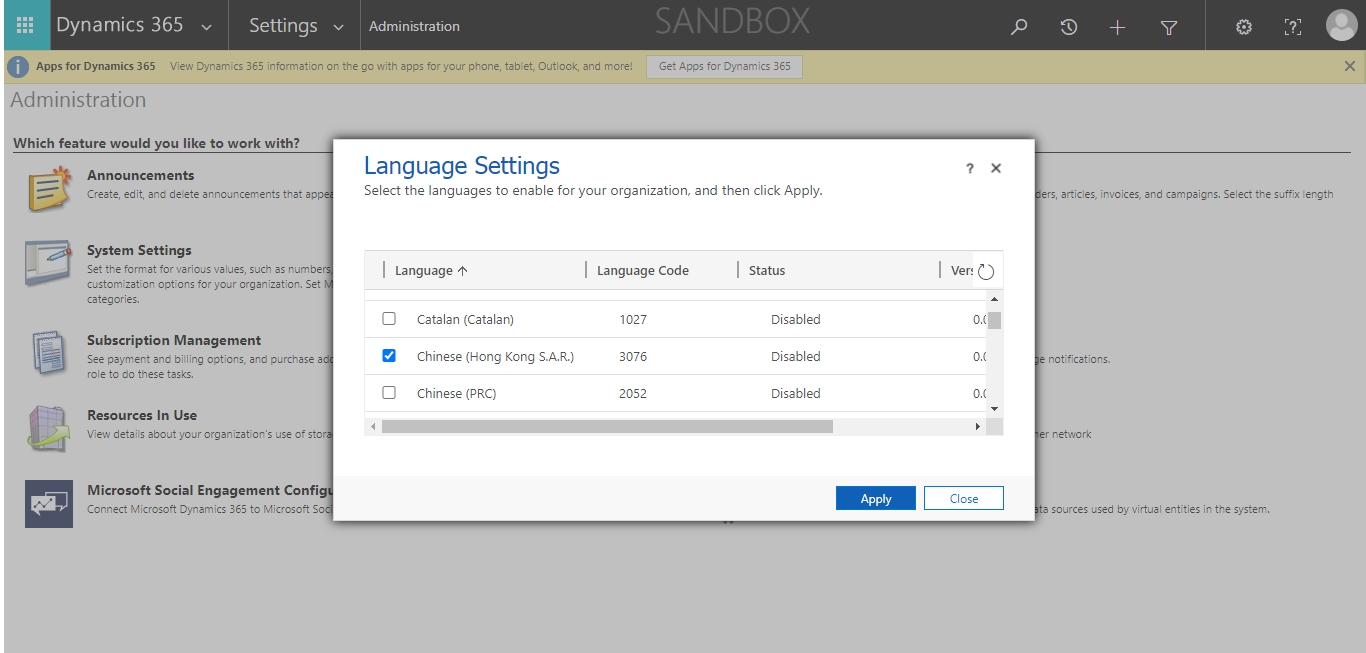
Step 1: Go to Settings → Administration → Languages. Select the language you want to enable and click on “Apply”.

Language Settings

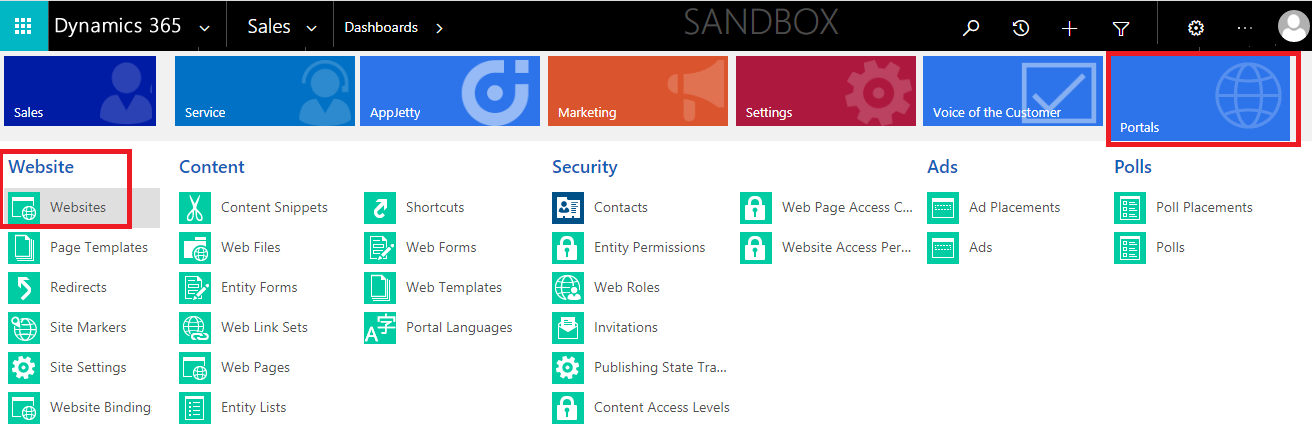
Step 2: Now, enable the language of the portal. Navigate to Portals → Website → Websites.

Portals → Website → Websites

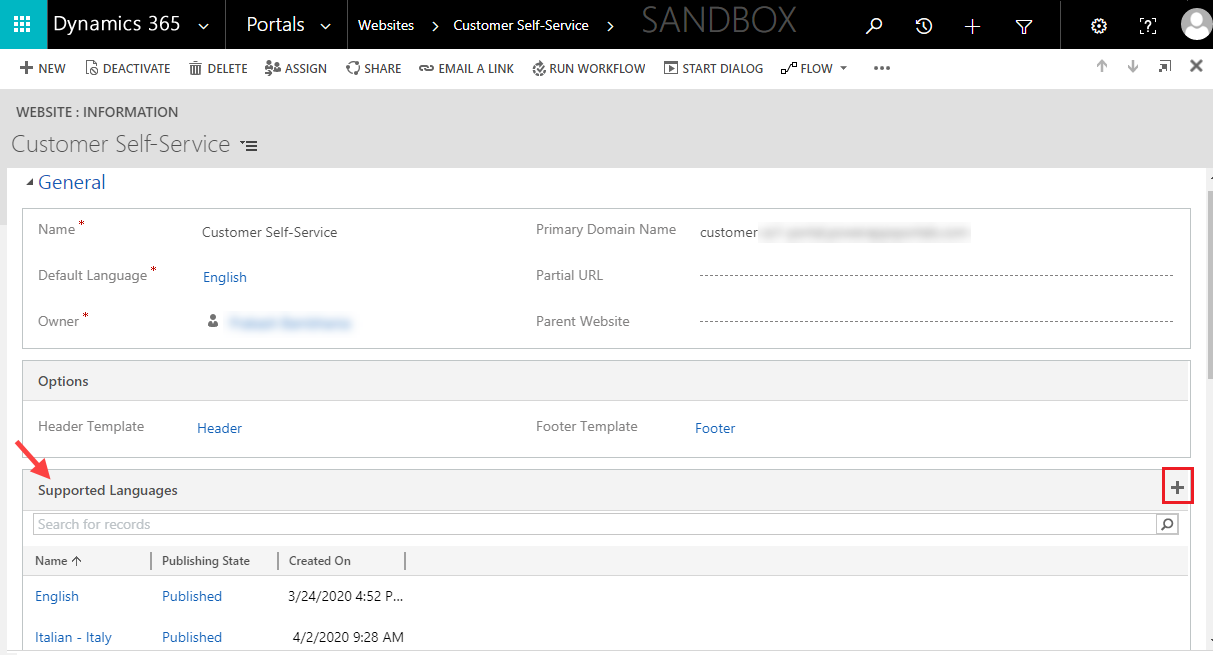
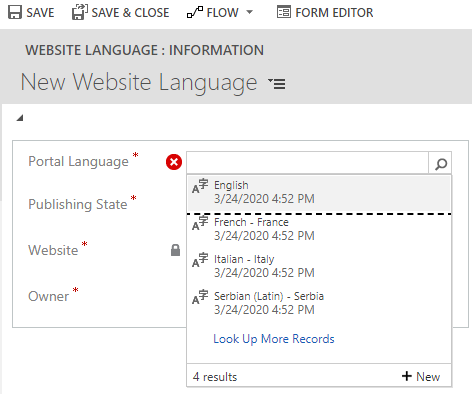
Step 3: Go to General tab → Supported Languages → click on “+.” Now select the language you want and save the changes.

Supported Languages

Note: There are 43 languages supported by the Dynamics 365 portal. To see the list, go to Portals → Content → Portal Languages. Choose the language of your choice and make sure that its publishing status is “Published”.

Supported Languages

Once you add the language(s), the website will be replicated in those languages.

Now let’s update the content of the pages. Remember, each web page has a parent page.

Step 1: Go to Portals → Web Pages.

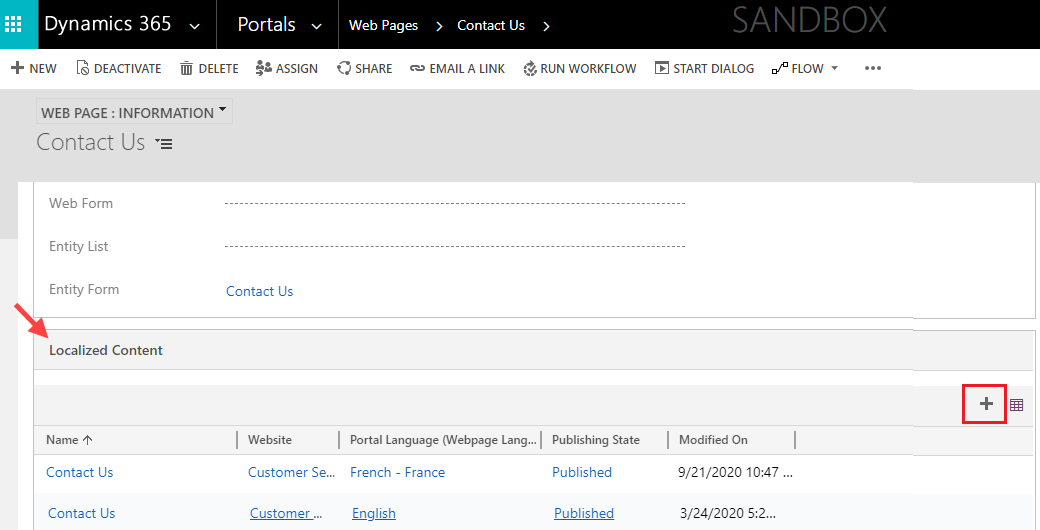
Step 2: Now create a localized webpage for each language you have activated. To do that, go to the localized content section → click on the ‘+’ button on the right side. You might need to modify some content manually.

Localized Content

Congratulations! Your website now supports multiple languages. Your customers will be able to see the drop-down option on the website from where they can change the language.

Now, the default Dynamics portal comes with a lot of limitations or can be expensive for some organizations as well. Hence, we are also going to demonstrate how to manage multiple languages in a third-party portal as well.
One such is CRMJetty’s Dynamics 365 WordPress portal. It has similar functionalities and more.

To set up multi-language support in our WordPress portal, follow these steps.

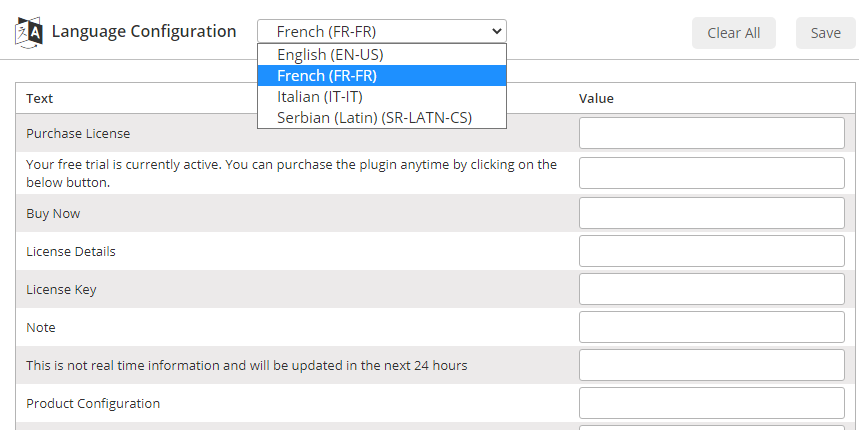
Step 1: Go to the CRMJetty → Configure Language page and click on the configure language option.

Conf.Laguage

Step 2: Choose the language and then add the messages against the specified content. It will reflect on the website when your customers change the language.

Note: You can also set default language from the CRM view by navigating to CRMJetty → General Settings.

You can also set GDPR consent text in the respective languages which will be reflected on the website as well.

About Us

CRMJetty is a hub of innovative customer relationship solutions. Our tools ensure that you can render enhanced interactions at each stage of your customer lifecycle. So, if you are searching for the right portal solution for your company, then you can choose from our wide range of solutions for Salesforce, Dynamics, and more. We have served in this industry for over a decade and have built many portals like customer portal, self-service portal, non-profit portal, etc. Get in touch with us and we’ll help you kick start your journey towards communicating better.

Planning to Hire a Salesforce Nonprofit Consultant? Here’s What you Need to Know

Why would you need a strategy to hire a consultant, right?

Like go on an XYZ review website and hire the best one? Simple? No?

Of course, not.

Hiring a consultant, especially a consultant for Salesforce NPSP can be tricky. Finding is easy, choosing is hard. Well, choosing the right one is.

So, you definitely need some heads up as to how to hire a salesforce nonprofit consultant.

In this article, we are going to talk about 8 things that might seem obvious but are definitely difficult to execute as well as remember while actually conducting the process of hiring a salesforce nonprofit consultant.

Let’s start.

Create a budget

Salesforce consultants come at a heavy price. Before hiring you have to ask a few questions to yourself. How much does your company need one and how much of the budget can you spend on it to get optimal ROI. Things that this budget will need to cover: Salesforce NPSP deployment costs, third party software for integration as well as consultation charges.

You cannot go into such an expense lightly. Think it through and plan it out.

What will your Salesforce consultant do for your organization?

Now that we have a clear idea about the budget, let’s talk vision and impact.

You are an NGO and you definitely have your ethics and morals with which you operate. So, you need to be upfront about that while talking to potential consultants.

Tell them about your vision, your operations, and what you are trying to accomplish with your NGO. And more importantly, ask questions. About their operations, ethics, morals, and how they work in general. Try and understand what kind of skillset and people will they be bringing to this deal

What can they do for your organization that a random consultant or a consultancy firm can’t?

Try and analyze their uniqueness, understand their technology stack, their expertise in the said task, their execution excellence.

Check the portfolios of the Salesforce consultants

With any kind of hiring comes a background check. Whether you hire freelancers or a Salesforce consulting company, look into their portfolios. How many companies have they worked with? What was the scale of these projects? This is especially important since you are a non profit. If your consultant is used to working only with for-profit companies, their work might not align with yours.

So, find a consultant that has experience and expertise working with nonprofits.

Create a shortlist with pros and cons

By this step, you would have already made a mental list of the consultants with the most impressive work and people.

So, why not make it official?

Simply create a Google Sheet and add the names of the consultants or consultancy firms that stood out to you, add their work, their contact details, work experience, pros, cons, skills, recommendations, etc.

This will give you an overview of the potential consultants you are rapping.

Moreover, you can also create a grading system for the same so as to keep all the stakeholders on the same page which makes the future communication smoother.

Pro Tip: Add a remarks column to add your views about them from when you’ll get in touch with them. You can also add a column mentioning the time and date of meeting with a particular consultant.

Fix a consultation timeline

The thing about consultation is that it’s not a forever kind of partnership. You don’t want them to overstay their welcome and make you an invoice you didn’t plan for. However, this does not mean you won’t need them after the initial level. So, fix a timeline for the project. And plan for contingencies. Once that is done, let them work their magic. Over the years, as you scale, you will need them again, or you might even need regular guidelines. Establish your preferences and plan for the long term with them. This way, neither of you will be caught off guard.

What process will they follow to on-board your organization?

Best of the consultants always have a process in-tact to onboard their customers, no matter their size. They are very particular about the team they have for you, the tools they use to manage their projects, the platforms they use to communicate with clients, and the coding and QA practices they follow for the best outcome.

Their proposal will be a reflection of their onboarding process and how they themselves work internally. You don’t want a cluttered team that’s still trying to figure out how to work the works.

So, keep an eye out for the details they provide about technology stack, platforms, tools, team, skillset, etc. and ask them if they’ll be flexible in terms of collaboration platform. And if not, how are they going to educate you about their current set of tools?

This will give you a pretty good idea of the kind of experience you are going to have working with them during the timeline you agreed on for consultation work.

Find your match

While yes you have to find a consultant that can get the job done, that’s not all. You also need them to play well with your team. Only then will the process be frictionless and can be taken forward easily. That’s a big checklist to follow:

✔️Portfolio
✔️Non profit expertise
✔️Team chemistry

If any of these three are missing, it will not work out for you.

Integrate their work into your long term goal and with your in house team

Your work relationships need to help you get better at your work, sure. But they also need to help you stay there once their job is done. Just like that, your salesforce consultants should also integrate with your team and train them to a certain extent. They should be able to help you strategize for a longer term, keeping in mind your bigger goals and get your in house development team to be self-reliant regarding updates and changes from Salesforce.

All these points will help you find the perfect tech partner you need as your Salesforce Nonprofit consultant.

Two more things that you might like to consider:

✔️ See if they are philanthropic themselves. Their contribution to the community and society will tell you a lot about them.
✔️ Salesforce Nonprofit Consultant certification. Salesforce is very particular that way. So, make sure the consultant you are choosing has that certification and is also up to the date with all the updates so as to provide you with the proper consultation you require to bring change in the community.

About us:

CRMJetty is a hub of innovative customer relationship solutions. Our tools ensure that you can render enhanced interactions at each stage of your customer lifecycle. So, if you are searching for the right technology partner to help you deploy your Salesforce NPSP, then you are in the right space. We have served in this industry for a decade and have helped many NGOs deploy NPSP along with a good portal solution. Get in touch with us and we’ll help you kick start your journey towards making this world a better place.

Top 6 Benefits of Salesforce WordPress Integration

WordPress is used by every third website across the world as a Content Management System. And Salesforce is one of the leading customer relationship management (CRM) platforms. Combined, these two can drastically improve your operations.

With Salesforce’s tools, you can store and organize your company’s leads and customer data. However, this data could be even more valuable when integrated with your WordPress website. Below are the six useful ways to synchronize your Salesforce and WordPress data. 

  • Easy User Management

To maintain a cohesive user data across your backend tools, it is necessary to sync them in real-time and the same goes for WordPress as well as Salesforce CRM. You can develop core WordPress functions, like site registration to create new leads in your Salesforce database. You can even sync fields between two applications so that your company departments can have access to the same data set.

With the help of Salesforce WordPress integration, you can keep your users’ account status sync. You can tag your leads as customers in Salesforce and then they automatically get updated with customer tags. In turn, you can provide “customer only” access to your website. Automated prospect to customer updates reduces your sales teams’ workload.

  • Form Submissions to Leads

Planning  to convert your WordPress form submissions into leads any time soon? Then you will need to integrate your website with CRM which in this case is Salesforce. WordPress hooks and filters allow you to send form data to Salesforce and track your forms performance in CRM. Once you know the forms which convert better will help in your crafting a more effective inbound marketing funnel.

  • Track logged in user data:

Understanding and identifying the most valuable corners of your website becomes necessary if you want to provide better service than your competitors. To achieve that, you can track your logged in users and their actions and history by building a custom Salesforce Object. If you are hosting your WordPress site, then remember that tracking users at micro level requires a good deal of computing resources. Based on how and what your web hosting provider charges, it can turn into an expensive proposition. A better and cost-effective way would be to track customer activity through using different third party tools like opting for a Salesforce WordPress portal that offers this desirable integration.

  • Build a Product Catalog

There are multiple ways to import your product database in your Salesforce CRM. But, there are few ways to keep the data synced with an external eCommerce store. For this, there are some solutions that work with different Salesforce setups. These solutions will require you to make customizations to your eCommerce workflow.

A custom integration solution will include a product catalog. It can even include a full eCommerce solution which records all stock quantities, and other sales data in your Salesforce database. This will save the previously purchased data in Salesforce. This in turn will help you to target customers for new products, promotions, or marketing campaigns.

  • Track on Campaign IDs

Integrating WordPress with Salesforce lets you associate users who register on your WordPress site with a sales campaign. You can add anyone who submits a specific form to a given Salesforce campaign ID. You can even target particular website activities you want to track.

E.g.: using WordPress action, you can track the number of blog posts a user views in each product or service category. If they hit the specific metric, you can associate them with the campaign ID which corresponds to that category. With the number of custom actions, you can create and track various actions of your visitors. This will help you achieve specific marketing or sales goals and execute them properly.

Having a Salesforce self service portal or Salesforce partner portal and integrating it with WordPress brings the best out of both the worlds. It makes the task of your team easy and helps you streamline your business operations.