Salesforce as a CRM is exceptional, everyone knows that. But in order to truly harness the power of the CRM, you need to have a portal that can give a window for customers to interact with your business.
And within that, a business needs to be able to configure custom objects within the portal to really get the most out of it.
For the Salesforce Experience Cloud, the Customer Community license, Customer Community Plus Licence, Partner Community Licence, and Channel Account Licence all allow for 10 custom objects per license.
Let’s look at how to configure Custom Objects for the Salesforce customer portal.
Try It Yourself:
1. In your Salesforce org, click and select Setup to open Setup.
2. Click the Object Manager tab. If you don’t see it, enter Object Manager in the Quick Find box.
3. On the Object Manager page, click Create | Custom Object.
4. For Label, enter whatever you want to call your custom object. Notice that the Object Name and Record Name fields auto-fill.
5. For Plural Label, enter the plural form of your custom object name.
6. Check the box for Launch New Custom Tab Wizard after saving this custom object.
7. Leave the rest of the values as default and click Save.
8. On the New Custom Object Tab page, click the Tab Style field and select a style you like. The style sets the icon to display in the UI for the object.
9. Click Next, Next, and Save.
Now that we have seen how to enable them, let’s look at how Custom Objects can be helpful.
Any standard software targeted at various industries comes with standard features—or objects, in this case. So, for example, the portal will have the facility to show products, but within products, you might not be able to show a video. However, your industry depends on product videos within product pages. The only option you have is to create a custom object for the same.
In this way, Salesforce allows you to create 10 custom objects per license for all you have to add to the portal that can tailor it to your customers’ or industry’s needs.
About CRMJetty:
However, suppose your needs are not being met with the limited number of Custom Objects. In that case, we have a product for you that has no such limitations—PortalXpand, a Salesforce Customer Portal. It allows unlimited Custom Objects and no restrictions on role-based rights for viewing, editing, and deleting.
What do you do to make your business stand apart from the crowd?
I am assuming the answer is: evolving the business constantly with the latest technologies and new strategies, right?
So, then you might have heard about the portal for sure! It is popular for being a one-stop solution for all business needs like automating manual work, providing security features, helping everyone to stay on the same page, etc.
Yes, having a web portal for your business is a solution for all your business miseries!
What should be the cost of a web portal for your business?
What are the benefits of a web portal?
And many more.
For that, we have this article!
It answers all the questions you might have about the web portal.
So, without any further delay, let’s get started from the basics:
What is a Portal?
When I was figuring out what a web portal is, I often misunderstood it with websites, but they are not the same!
You might think that a web portal’s features look similar to those of a website, but let me tell you, their purposes are different. Plus, they are not interchangeable.
A website provides access to users to various information from a single point of access. It includes well-organized content comprising company information, articles, vendors, supplier lists, etc. The website uses web pages that anyone can access. Its purpose is to create a digital presence.
The web portal gathers all the information from various sources (CRM, CMS, etc.) into a centralized system for all the users including employees, partners, customers, and admin. This means that you and your team will not have to juggle multiple systems to fetch user data.
It enables easy document sharing and with collaborative tools enhances the communication between teams and with customers.
The web portal requires login credentials, allowing only authorized users to access it. It provides relevant information to users based on their roles. With many security and streamlining features, a web portal gets the plus points in comparison to a website.
Website provides generic information relevant for all the users. However, the portal enables users to access only the required information.
I will justify my opinion in this article by explaining different details of how a web portal is a one-stop solution for enhancing customers’, partners, and employees’ experience.
Use of Web Portal
Now that you know a web portal is, you might want to know their features and benefits for your business. Here are a few that will end your search for a better business streamlining tool.
Enhanced Collaboration
Numerous times in a day, an employee has to send a document or other data to another employee.
Sharing third-party social spaces make interacting with the team easier, but are they efficient? No, they are not. It takes a chunk of time and effort. To save the extra effort and time, you need a web portal that enables easy information flow. With centralized data, users can get all the data at one place with options to share on multiple channels. And with secure sharing, users can share the documents without worry.
Simplified Operations
A web portal reduces your work by automating some tasks. People can fill their data in the system, and the portal will update accordingly.
For example, insurance agents will not be required to update customers’ documents or details every time; customers can do it by themselves. The support team will not have to waste time updating customers about their ticket status or delivery updates. They just require you to log in to the portal. The portal will fetch the data from the CRM automatically.
This way, your team’s productivity will increase, and they can invest their time and effort in something more fruitful.
Better Security
Data theft is hard to escape; however, our web portal has a solution. You can share limited data with specific members or a team with role-based access features.
With page-view access, you can give access to a few pages of your data and keep other data confidential.
With features like two-factor authentication and multiple-factor authentication, you can provide more security to users and gain their trust.
The demand for Salesforce is as high as ever, and this has increased the Salesforce developer demand. Salesforce remains the number one CRM choice for companies across the globe, and this means that compared to other CRMs, the Salesforce market share is also higher.
The Salesforce developer demand is high, but not every requirement is the same, and nor are all developer roles. What you need for your company defines the type of developer you hire and how you hire them.
This article is a guide on what to look for when hiring a Salesforce developer and how to hire the right one for your company.
Who is a Salesforce developer?
A Salesforce developer is an entity that develops steady and dynamic applications. They use Salesforce platforms to swiftly and efficiently develop and deploy these applications to the cloud without worrying about hardware. Salesforce developers can use the platform, or GIT, to effectively build and deploy code to run the application. They use different programming languages compatible with their platforms, like Ruby and PHP.
The responsibility of guiding and developing Salesforce’s instance rests with the Salesforce developer and building Salesforce applications on different Paas platforms. These developers must have excellent coding expertise and can construct club-based applications with the help of force.com platform.
Roles and Responsibilities of a Salesforce Developer
Salesforce technicians/developers/specialists differ based on the skills they offer, so there could be multiple roles a Salesforce specialist could take up. These roles will help establish the work for which a particular developer will be qualified and responsible.
It’s always best to know what you are looking for before you start the hiring process. There are six main Salesforce roles:
Administrator – they are responsible for running the CRM.
Developer – they are responsible for customizing the CRM according to the requirements of the company and business specifications.
App Builder – they are responsible for building various applications.
Architects – they are responsible for creating technical solutions for ecosystem development.
Consultant – they are responsible for administering and consulting on matters related to Sales Cloud, Community Cloud, and Service Cloud, and sometimes dealing with employee training.
Specialists – these are Salesforce Marketing Specialists, Pardot specialists, and CPQ specialists.
The major Salesforce certificates that are connected to the developer role:
Salesforce Certified Platform Developer I
Salesforce Certified Platform Developer II
Salesforce Certified Platform App Builder
Salesforce Certified B2C Commerce Developer
Salesforce Certified Marketing Cloud Developer
Salesforce Certified JavaScript Developer I
What are the skills of a Salesforce Developer?
Hiring candidates for technical positions can be a real task if you have no previous experience with it, especially if your first rodeo is hiring a Salesforce developer. Go through the following section to know what to look for when hiring a Salesforce developer.
1. Object-Oriented Programming (OOP) concepts
Just like Java, Salesforce is an object-oriented language-based programming language. This is an approach to developing programs using various classes and objects. OOP lets the developers to work with an effortless development environment and ease of maintenance with concepts like Objects, Classes, Encapsulation, Polymorphism, Abstraction, and Inheritance. Thus, when you shortlist candidates for Salesforce development-related roles, keep an eye out for those with a clear understanding of object-oriented programming.
2. Knowledge of JavaScript
To be considered a strong Salesforce developer, it is imperative that one has detailed knowledge of languages like JavaScript, which is a scripting language developed using the ECMAScript standards. A Salesforce developer with a strong base in JavaScript can make all the difference in the quality of project execution. Used to distinguish and tweak the capabilities of Visualforce pages, one can use JavaScript to set up pass parameters to showcase pop-ups and confirmation messages, manage validation messages, etc. Hence, the importance of learning JavaScript for Salesforce development cannot be stressed enough.
3. Knowledge of C#
As Salesforce is, first and foremost, an object-oriented programming language, developers are required to be proficient in C#. Its coding structure closely resembles JavaScript, and it is currently one of the most popular OOP languages in use. A mastery of C# is the most basic requirement of being a Salesforce developer. Hence, when one is hiring Salesforce developers, look for people who have experience working with C# and related technologies.
4. Knowledge of data modeling
Data modeling is the method of storing data in an architecturally structured manner. Salesforce offers multiple options to customize preset models to add to the existing functionalities and modify them. There are tips that developers can take up to develop Salesforce data models, which facilitates necessary processes.
5. Ability to work with Lightning frameworks
An essential and dynamic feature of Salesforce is the Lightning Component Framework. It is a very well-known framework that is often used in building web applications that have cross-platform compatibility. It is generally used to create single-page apps, intuitive UIs, and for Lightning Platform applications. The lightning platform uses Apex for the backend and JavaScript framework for the front end.
6. Strong understanding of SOQL
Salesforce Object Query Language is a tool for recalling sets of data from large databases, which is rapidly becoming popular. It sort of works like the SELECT statement used in SQL, but it is designed particularly to be used in the Salesforce platform. With the help of SOQL, developers can build effective query strings for multiple environments.
Advantages of Remote Salesforce Developers
Hiring a remote Salesforce development team can be considerably less expensive, depending on geographical costs. For instance, if you hire Salesforce specialists from the United States it will be way costlier than hiring from Eastern Europe. Moreover, you don’t have to provide them with office space.
It works out great with regard to time. Salesforce developers who work remotely follow a defined technical specification and deliver the outcomes on time. On top of this, when you work with remote development companies, you only pay once the project is complete.
You work with an experienced group of people. Your remote Salesforce team is made up of people who know the platform inside and out. These individuals specialise in a variety of Salesforce services and will be able to provide you with advice on particular Salesforce modifications and issues.
Disadvantages of Remote Salesforce Developers
If you hire a remote Salesforce development team, you cannot personally supervise the process and ensure that everything runs as it should.
When you work with a remote Salesforce development team, there is room for misunderstandings because of differences in culture, geography, and most commonly, language. Meetings can be scheduled to avoid most such situations, and proper equipment can be utilised.
Conclusion
In conclusion, you need to assess your needs and match them with your investment. Once that is done, you can figure out what kind of Salesforce developers will work best for you to meet your goals and hire them.
CRMJetty has over 16 years of experience with Salesforce development services. We can become your technology partner in a way that you can leave the entire Salesforce development project to us and focus on your business growth.
Reach out to us to talk about your requirement, and we will take it from there.
Any organization that uses a website should want to have certain user input to know their needs better. The easiest—not to mention consensual—way to do this is via forms. With a form, you can ask for information like contact details, the visit’s purpose, their needs, etc.
Let’s first see how to create this form in the PowerApps portal:
Create a form
Sign in to Power Apps.
On the left navigation pane, expand Data, and then select Tables.
Select a table, such as the Account table, and then select the Forms area.
Select Add form, and then select one of the following
Main form The primary form type for interaction by users with record data. The contents of the new form are filled using the existing main form definition. If multiple main forms exist, the form at the top of the list in the form order for your app is used to fill the new form. Learn more about the main forms.
On completion of changes to the form, select Save to save the form or select Publish to save and make changes visible to app users.
The challenge comes in the form of data collected with this form. While the questions or fields may be simple enough to fill out, not everyone will fill it out as it should be; nor will people always understand the fields, which will, in turn, result in wrong/unhelpful input.
Apart from unhelpful input, there is also the challenge of having this input be actionable. If your form makes the right connections in the backend, then that data can instantly become information. But it requires a lot of steps to get there.
As a user of Dynamics 365, you, of course, know that all the data you get, if the input is proper, will give the information and insight you need. Not to mention, it might very well be instantly actionable as it becomes CRM records.
However, all of this starts with ensuring you build the right form.
Those of us who structure forms often know that making one is no easy task. It requires precession, vision, and a result-oriented approach. So you build a form, but not each field can be user-generated in that. Some parts of it your employees might have to fill in.
Now, of course, if you put this entire form out for your customers to see, they will understand that you’re seeking their input for all fields. Another thing that can happen is that maybe they will abandon your website entirely because the form is too lengthy.
So you need to create a special form for the website, one that is easy to fill out, short, and only demands customer input.
With the PowerApps portal for Dynamics 365, you can do this. Your main form is the one in the CRM. Create an extracted copy of that in the PowerApps portal for the user to fill in the details. Once the form receives input, manually copy all those details in the CRM form, thus creating a richer database.
PowerApps portal can duplicate the entire CRM form and publish that for customer input, or you have to create another form that has only the specific fields that you want users to see.
Alternatively, CRMJetty’s PortalXpand has a drag-and-drop form builder, so you can create a customer-facing form directly from the one configured in the CRM, just for the portal. This bypasses the need to create a separate form and ensures all data is manually entered into the CRM.
Data updates directly in the CRM when any user fills the form. In real-time.
The benefit of this is only one: it cuts down on the time and effort in creating a special form and on the time and effort in maintaining CRM records.
There are many other points of comparison between the PowerApps portal and PortalXpand, a Dynamics 365 Customer Portal.
You can request a demo of the product from right here.
“With great power comes great responsibility.” We all know this. Or at least anyone who has ever heard of Spider man knows these words.
Salesforce as a tool is kind of the all-powerful one in this context. But anyone who knows Salesforce development also fits the bill.
The Salesforce development lifecycle is multi-layered; not only does it require investment, but rather, a commitment from the entire organization to see the development through. The development team will, of course, commit to their role in it, but it is crucial that the organization, who is the client, does so too.
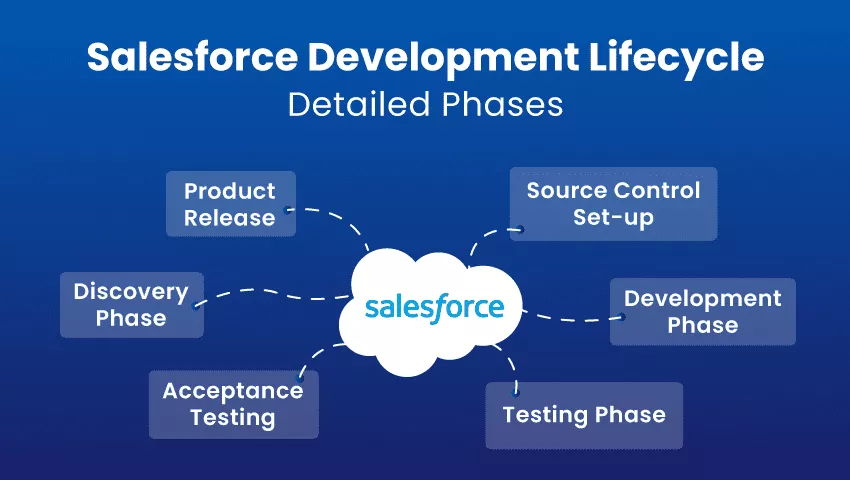
SFDC development life cycle begins with discovery, understanding why a client requires Salesforce, and their exact needs. There are several complex phases that follow, all culminating in project delivery and staff training. Let’s take a look at all the phases of the Salesforce development lifecycle:
Phases of Salesforce application development lifecycle
Generally, development projects are completed in phases, with every phase having a particular goal to achieve. Salesforce Development Lifecycle goes through 6 such phases.
Let us better understand each phase of the Salesforce Development Lifecycle:
1. Discovery Phase
This is the primary phase of Salesforce development. In this phase, the requirements of the department are assembled, analyzed, and decided upon. Later on, these are shared with development teams. Now, several factors are involved in the discovery phase, like the objectives/goals of projects, critical needs, development intricacies, automation needs, reporting, gaps in the previous implementation, APIs, tools, and development approaches.
2. Source Control Set-up
Source control provides you with a tool to help track changes occurring in files. A release manager would kick off a development project and create repositories and branches. Let’s see what these two components are:
Repository
It is sort of like a vessel for version control. Usually used to store away files, and it can track changes in files in real time. A repository is the master storage of files, from which many branches, which contain new elements in development, come out. You can oversee changes, review the work of other developers, and clear up discord by creating different repositories.
Branches
Branches give the developers an autonomous working environment to work on new features away from other development work. Branches allow for parallel development and provide the developers with control changes when products are released for testing. It is favorable to have a separate Git repository for different projects. You can merge all the data later on with the main application. The responsibility falls to the release manager to assign tasks according to the intellect of the developer.
When you create a version control, you can set up a single source of code, manage conflicts, reduce risks, facilitate deployment risks, clarify reduction, and release at a higher rate.
3. Development Phase
Development operations are executed in sandbox environments. Every developer who works in such an environment has a copy of the main production application and the essential configuration info. Developers use these separate environments to write code, modifications, and testing. They may connect with their sandbox using Force.com and transmit metadata to IDE. After all the required changes are made and tested, they are transferred to the Git repository. If a project requires multiple people working on the same code, check the conflicts before you put the code in the repository.
4. Testing Phase
After the development phase comes the testing phase, teams are gathered to conduct top-to-bottom testing sessions where code is moved from the primary repository to the sandbox. Quality Analysts conduct different testing processes in Salesforce application development projects, like unit testing, performance testing, regression testing, visual testing, integration/API testing, load testing, etc.
Most of all, Salesforce application development partners use agile methodology so that any structural changes can be taken care of at this stage. Although, should serious modifications arise, you have to go back to the drawing board (initial development stage).
5. Acceptance Testing
After the stages mentioned above are completed, we come to the acceptance testing phase. User acceptance tests are conducted and carried out by end-users in combination with the development team. In this phase, a release manager creates sandboxes, which the end user then uses for testing. Once the testing is completed and approved, the product is ready to be released. However, if there are changes suggested at this stage, you can take the entire thing back to the initial development phase.
6. Product Release
After undergoing different testing procedures, the product is tested a final time for performance in a sandbox. Here, all the configurations, functionalities, and app data are tested a last time. Here we have to ensure that the solution passes through the service level agreements before being set up in production.
How will CRMJetty help you with the same?
We have been honing our Salesforce development skills for over 16 years now and have built a strong portfolio of clients who have made it in the industry with us. You can count on our expertise with the software, as well as our understanding of your unique needs.
Contact us today to learn more about everything we offer in terms of Salesforce development and get started on your path to success!
Powerful tools are only that if they are used optimally. And almost all powerful tools are, in a way, unwieldy until you master them. But that should not deter you from using them.
When it comes to business insights, and management, that kind of powerful a tool is Salesforce. As they say, it is the number one CRM. For it to become that, it has to be much more layered and complex than it shows. The deeper you dig, the more use you will get out of it.
However, businesses generally don’t have hours to spend learning and configuring a tool by themselves. They need a Salesforce implementation partner who can configure it and conduct thorough training on how to get the most out of it.
Let’s dig deeper into the Salesforce implementation process.
What is Salesforce Implementation? What are the types of Salesforce Implementation?
The process of assessing Salesforce needs for a business and configuring select modules of Salesforce for said business to get them insights is what we call Salesforce implementation.
There are, of course, various ways to do it:
3 Types of Salesforce Implementation
The golden words areSalesforce implementation partner. You need them to do this the right way. They are someone who knows Salesforce in and out, are always updated with it, and have experience in implementing it for companies of various sizes and industries.
Your ideal Salesforce implementation partner is someone who has experience with a company of your size and your industry.
These partners have an entire Salesforce implementation guide and are able to optimize how they go about it in terms of assessing your requirements, setting up and configuring, transitioning, and training. Leave the entire process in their hands, and you will be able to breathe easy as they go about it at their pace.
Here are three types of Salesforce implementation projects:
1. In-house implementation
In-house implementation is not the most desired. Almost anyone who wants to implement it will do it with a third-party implementation partner. Occasionally some small or mid-sized organizations will attempt to do it in-house.
There are fewer pros for it, namely lesser cost and in-house team effort to learn Salesforce.
On the other hand, the cons are plenty. It takes longer, the learning curve is messy and full of hurdles; not to mention, an in-house team will go in with only a problem-centric approach rather than a solution one because they will try to solve the problems they see in their organization. They will not have the foresight to build a solution for further scaling and challenges.
2. Third-party implementation
Third-party implementation partners provide end-to-end services, from consultation to planning, final employee training, and post-implementation maintenance. It is definitely a significant investment, but compared to in-house implementation, it has much lower chances of challenges.
Third-party implementation is more cost-effective and more long terms. The implementation partners are Salesforce experts, so they know exactly the challenges you face now and the ones you may face while scaling.
As opposed to in-house implementation, the pros are significantly more here. You get the third-party implementation partner’s experience, expertise, and vision. Because of this, the entire process is optimized, smooth, and fast. They can also show you benefits you can gain from Salesforce that you didn’t know about.
Perhaps one of the hardest things about on boarding a third-party implementation partner is choosing the right one. Another challenge is that you might be dependent on them for continuous maintenance if your in-house team is not up for it, which can increase the long-term cost.
3. Hybrid implementation approach
A third option is a hybrid approach. For this, your in-house team has to be willing to shoulder their responsibility and learn from the experts. Often the third-party partners carry out the implementation and train the in-house team. Then the in-house team takes over employee training and future maintenance up to a certain level.
The most significant pro of this method is that you organically have in-house experts who can help you maintain your solution.
Need to know more about what it’s like to have a third-party implementation partner? We can be your Salesforce implementation team!
Why Should You Implement Salesforce?
Salesforce helps manage leads, opportunities, contacts, and cases. It helps an organization get insights into customer interactions, track sales patterns, and so on. In simple words, to grow.
Let’s look at the steps for implementing Salesforce successfully.
10 Salesforce Implementation Checklist/Steps
Step #1:
No one knows the challenges an organization faces more than its business stakeholders. It is crucial to know the problem before you go seeking a solution. Connect with the different stakeholders and teams to understand their needs and challenges to understand what kind of solution they require.
Once you gather this information, you will have a better idea of how to go about the implementation. You will know what challenges to solve with Salesforce and be able to set realistic goals.
Step #2:
Document, document, document!
The next step in assessing the requirement is to ask relevant teams to document their current workflow and day-to-day tasks. Once you have that, you will be able to plan how to optimize them.
Step #3:
Timelines are important!
The third step is ensuring no projects overlap, reducing the risk of resource shortage. Planning rollout phrases, testing, and the meeting become easier after you decide on the project timeline. Moreover, you can evaluate your needs/expectations with a high-level budget estimate in mind.
Step #4:
A lot of factors like company size, amount of data to be imported, and customization influence project estimation. To avoid hassles, you can create three layouts of the implementation process: pessimistic, optimistic, and realistic.
Step#5:
If you wish to measure the success of your project, then you need to set up concrete goals. These definitive metrics can help you visualize the completion of goals and adjust strategies accordingly.
Step #6:
Team collaboration must be explicit and regular in order to attain implementation goals. The key to the successful formation and enactment of Salesforce CRM is efficient communication between all parties involved.
Step #7:
You may need to select certain people for the Salesforce implementation process, even with limited resources.
A standard CRM project involves the following stakeholders: senior management, platform users, sales, service, and marketing providers, channel partners, customers, and IT specialists. This does not necessarily mean that you have a massive team; one person is enough to handle major roles.
This primary stakeholder ensures that you are prepared for the implementation project; moreover, they will supervise the process internally and will be the first point of contact. They would be technical support, in charge of the systems you wish to assimilate with or migrate from.
Step #8:
Prepare data for exfil!
You must ensure that the data sets are precise and error-free so that they benefit the new business operations. Additionally, you can set up policies to prevent data duplication.
Step #9:
You need to have a definitive change management plan in place before the implementation’s launch. This plan must continue throughout the project, and after the date, it goes live.
Step #10:
Getting to know how the new look feels is an essential step before moving to it. It helps you regulate expectations with respect to the capabilities of the system.
Want to know more about how implementation can happen? We have all the answers here.
4 Tips for Implementing Salesforce
1. Hire a certified Salesforce admin
When you hire a certified Salesforce admin, it will probably be a full-time job and will carry on after approval. There are nine official roles in Salesforce that are considered the cornerstone of the system, and an admin is one of them. Running the system smoothly, helping to build and implement new elements, and staying on top of the products and functionality are some of their responsibilities.
2. Flexibility
Should you bring in a partner, or when you add to the cache of knowledge, your plan may change while the implementation is taking place. You should be flexible and prepared for the last-minute changes that may crop up; trial and error is the best strategy for alterations in your approach.
It is a good idea to include from every department and at every level so surprises and resistance don’t sneak up on you. Make sure that you listen to them and are ready to adjust your strategy accordingly.
3. Communicate
You must give priority to communication and regularly update everyone in the organization regarding the progress of the implementation. Even if it is too early for many people to be involved, these updates will involve a part of the process. The key advantage of prioritizing communication is that you get regular feedback from the employees and the end-users of the new Salesforce system. This helps you shape an all-inclusive CRM platform for the users and promote better employee engagement.
4. Offer training options and resources
Everyone has different approaches to learning. An important thing you will come across in Salesforce implementation is the more types of training you offer, the better; users can pick the type of training best suited to them and stay on top of updates. These could range from traditional classroom-style courses and official Salesforce training to apps, blogs, e-books, and gamified training. Salesforce is massively popular, which makes it possible for there to be plenty of resources to choose from.
Hired consultants vs. in-house IT team, which one is best?
The cost of using third-party consultants versus in-house IT teams can vary depending on various factors, including:
Third-party consultants: Consultants typically charge higher hourly rates than in-house IT teams. However, they bring expertise and experience from working on multiple projects, which can lead to a more efficient and effective implementation.
In-house IT teams: Hiring an in-house IT team may be more cost-effective in the long run, but it can take time to find and train the right people. Additionally, the cost of salaries, benefits, and training must be considered.
Project scope: The size and complexity of the project will impact the cost of both third-party consultants and in-house IT teams. A large and complex project may require more resources and increase the cost.
Location: The cost of hiring a consultant can vary based on the location of the project. Consultants in larger cities may charge higher rates than those in smaller cities.
Ultimately, the decision of whether to use third-party consultants or in-house IT teams should be based on the specific needs and circumstances of the project. It may be best to use a combination of both, with in-house IT teams taking on routine tasks and third-party consultants handling more complex tasks or providing specialized expertise. Overall, the Salesforce implementation cost may be higher with third-party consultants, but their work will be efficient.
How will CRMJetty help?
CRMJetty has been in the industry for software solutions for over 16 years now and has extensive experience working with various industries. Our Salesforce experts can help you get the most out of the tool at your convenience and help you achieve your business goals. Contact Us
Dynamics 365 is a promising tool. But often, a CRM alone is not enough to have smooth workflows. This is where portal solutions come into the picture.
Extend the capabilities of Dynamics 365 and lend a helping hand to your partners and customers to engage better and help optimize processes with PortalXpand.
With PortalXpand, you get a feature-rich platform to interact with and exchange information with your partners and customers.
Things you can do:
Configure the portal with drag-and-drop functionality
Always keep necessary stakeholders updated with the right resources
Optimize processes
Customize the portal to meet requirements
In this webinar, our experienced portal experts, Jinal Patel (Product Manager) and Ravi Barot (Business Development Manager), will walk you through the insights they have gained on how Dynamics 365 portal is a powerful tool for business optimization. They will show you how businesses using Dynamics 365 get to learn from their interactions with customers and partners.
After the webinar, there will be a live Q&A session so we invite you with any and all questions you have regarding Dynamics, the potential of the portal, and so on.
Key takeaways from the webinar
Insight into what a portal solution can do for you
Current business challenges and how to find a way around them
With extensive expertise in the customer engagement domain and products, Jinal Patel is the Product Manager of CRMJetty. She has been working with Dynamics 365 for innovative business solutions for 5+ years. She believes in having a strong combination of technology and management. Staying relevant and adapting to change are her success mantras.
Ravi Barot – Business Development Manager
Ravi is the Head of Sales for CRMJetty, the first point of contact for his clients, and an expert in CRM technologies, Self Service Portals & Customer Service industry. His experience has helped a lot of businesses optimize their sales process, customer retention ratio, and partner engagement with the help of CRM and portal solution technology.
Microsoft Dynamics has gotten insanely popular, which is made pretty evident by the high demand for Microsoft Dynamics 365 Developers. Companies of all shapes and sizes go all out to hire remote developers that work with Dynamics 365. This helps to upgrade their business processes, and automation is an advantage. We can say, without a shadow of a doubt, that Microsoft Dynamics 365 products add value for customers.
There are some prerequisites one must keep in mind before hiring a Microsoft Dynamics CRM developer. Let’s go through the whole process, beginning with an introduction to Microsoft Dynamics 365, to why one needs it for their business, and ending with a step-by-step guide to hire a Microsoft-certified developer.
Let’s begin:
Introduction to Microsoft Dynamics 365
Dynamics 365 is a collection of resourceful business apps that allows involvement with customers, which builds relationships and enhances operations; these connections help grow your business. This helps to empower your workforce and attracts the best talent when hiring. This is an all-inclusive solution for your business that brings together all the various processes like sales, on-field operations, and customer services in one place. The expert, using Microsoft Dynamics, manages all these processes via various modules that include CRM and ERP.
Why Does One Need a Microsoft-certified Developer for Their Business?
No matter what the size of the business is – large, small, medium, or otherwise – they all need some essential features, all of which are included in Microsoft Dynamics 365. Good customer experience can be achieved by having features that are customizable, adaptable, and that are integrated into the workflow effortlessly, and this is what every company wants. Let’s talk about the key advantages of hiring a Microsoft Dynamics 365 developer:
They have a detailed knowledge of planning, integrating, implementing, and updating CRM services, along with actual comprehensive experience in doing so.
MS developers offer flexible business skills and processes for every need.
Should it be needed at any stage of CRM development, they provide exceptional technical support. This includes consultation and resolutions of any customer query 24/7.
Successful CRM development is enabled by using the latest technologies and tools in which they are proficient.
MS developers are knowledgeable in predictive analytics with real-time insights, including Power Business Intelligence and Azure.
They possess the technical know-how needed for various modules like MS Dynamics CRM, GP, NAV, etc.
They can help the whole organization by integrating specific tasks into a centralized CRM solution.
Salesforce is a well-established and widely used CRM among businesses of every size; from enterprises to solopreneurs for years now. It was first founded in 1999, and since then, it has evolved into various plans and platforms within itself, as well as apps and tiers to accommodate changing dynamics of doing business and managing customers. To provide an overview, there’s Salesforce Experience Cloud, Salesforce Sales Cloud, Salesforce Service Cloud, and so on. Each and every one of their products come with a different set of features solving myriad problems occurring in different business processes, which is why It can be hard to figure out exactly which solution is right for your business.
Apart from choosing the right Salesforce solution, you will need to integrate it, implement it, train to use it, etc., which can be daunting even for experienced businesses and organizations. Hence, when dealing with technical products such as Salesforce solutions, it is always a better idea to hire Salesforce consultant.
Now, you might be wondering what or who are these Salesforce consultants.
They are Salesforce experts who understand your business requirements and, while keeping the dynamics of your industry in mind, guide you to explore various possible integration of Salesforce in different business processes.
But largely, the question still remains, why should you hire Salesforce consultant to make the most of Salesforce to achieve your business goals? So let’s answer this question:
Why should you hire Salesforce consultant?
A certified Salesforce consultant has seen it all. They have helped many businesses successfully implement various Salesforce solutions, so they know all the strategies and nuances one needs to keep in mind. For instance, with the help of different Salesforce solutions, they can help you optimize your sales processes, streamline your targets, and manage your customer base better. Hire Salesforce consultants so they can help you grow steadily.
Now, if you are hiring a Salesforce consultant, how should you go about it? What are things you need to ensure before hiring? Here’s a checklist curated by our in-house Salesforce team.
Customer Relationship Management (CRM) is synonymous to the brand Salesforce. It’s the first name that pops up whenever there is any chatter about CRM. They have set the standard for the whole industry to follow. As of 2019, they will complete their two decades into the business. Two whole decades!
Similarly, when you talk about Content Management System (CMS), people are bound to think of WordPress, a company that is five years junior to Salesforce but has a similar reputation in the market. Almost anyone who has ever wanted to set up a quick blog has used WordPress. Needless to say, it is equally popular as Salesforce, for what it provides to the users.
Now imagine the possibilities with the combined power of Salesforce and WordPress.
On Salesforce, you are managing your internal & customer data and on WordPress, you are managing your website content. But how do you create a synergy between the two software? Moreover, more importantly, how can you add the customers in this synergy and create an enhanced experience for them?
All these questions have one answer. A Salesforce Customer Portal.
Of course, we won’t just say these words and let you do all the research. We have listed down 4 ways a Salesforce Customer Portal will help you meet your business goals.
1. Activity & Record Tracking
A customer portal’s main purpose is to keep your customers in the loop with all the related activities that your organization is carrying out. They will be able to access & keep records of all the activities such as purchase records, contracts, calls, etc. This will reduce the efforts of your support team, which eventually will result in lower customer acquisition costs.




 CRMJetty